OEM e7008 install Questions

thanks JA....figured it was a stock option.

after playing with the system, i am having some issues:

2) black screen when shifting in reverse. i wired up an aftermarket camera, bec108 from eclipse. it says the "check surroundings for safety" bit at the bottom, but the screen is black. checked the wiring for kinks and found nothing. i did some searching here but couldn't find anything conclusive...

thanks for any help in advance

Hmmm, I can't help with the voice recognition, however I have a question for ya. How did you hook up the camera? IF you ran a wire from the pin (HU) to the camera (cam+), you do realize it's just 5v (OEM cameras run at just 5V)?? The BEC series eclipse are run at 12V.................. I can't remember where I saw that. Seems as though the camera is fine, could be it's just not getting enough juice.

Hope this helps
 
so you're saying that the output for the pin at that location is 5v and not getting enough power to the camera, right? how do i boost it? tap it into a power source?

i still have the oem camera...might wire that up from the headunit to see if it works.

the bluetooth mic still stumps me...everything else works great!
 
so you're saying that the output for the pin at that location is 5v and not getting enough power to the camera, right? how do i boost it? tap it into a power source?

i still have the oem camera...might wire that up from the headunit to see if it works.

the bluetooth mic still stumps me...everything else works great!

Yes, I would wire the camera up to the backup lights (12V) and ditch the pin from the HU. Try that. Post pics, LOL

Regarding the mic: Can the person you are on the phone with hear you? If so, I'd say the mic is fine, could be issues with the NAV itself, although I have heard it can be buggy. Both of my cars (and parents) have voice activation commands, but I never use them.

Hope it works out!
 
ok i'll rewire the camera to 12v reverse.

regarding the voice: there is no voice pickup at all. called another phone and all i heard was fuzz. no muffled sounds or anything. i tried all the diagnostics menus, boosted the volumes, can't think of anything else. everything looks to be wired up properly. totally stumped.
 
ok i'll rewire the camera to 12v reverse.

regarding the voice: there is no voice pickup at all. called another phone and all i heard was fuzz. no muffled sounds or anything. i tried all the diagnostics menus, boosted the volumes, can't think of anything else. everything looks to be wired up properly. totally stumped.

Hmmm, did you use "shielded" wire for the mic? If not, could be your issue.
 
My t4r is non jbl. I found and purchased a wiring and amp kit on eBay that allowed me to switch my entire audio to jbl, thus, enabling me to install the e7008 unit. I know people will dog on me for installing a 7 year old navigation unit into an as old car, but I'm one who likes the stock look.

It should be noted that all other features work properly. Turn by turn works well, clear voice, sound is good, even through non surround sound setup. I am not sure about it being shielded or not, but the wiring looks professionally done. It is Toyota oem parts so that would make sense.

I'll post some pics of the harnesses later, but by the looks of several guides I've sean on here, everything looks like it's wired properly. I'm sure I'm missing something minor in the settings.
 
pictures

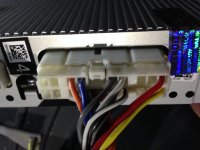
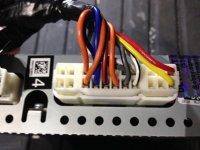
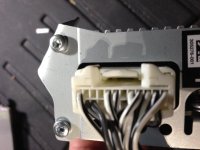
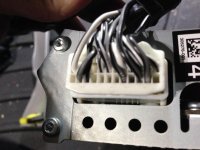
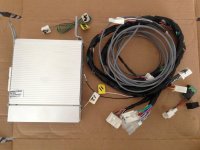
below are some pictures of the kit i purchased. as far as i can tell, the connections match what is seen in this thread. i verified the mic pins were inserted into the long connector. the only thing i'm fuzzy about is attaching a wire or two from the headunit to the amp...not sure which connectors they're talking about in the above thread.

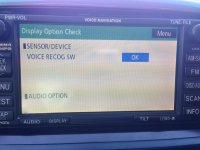
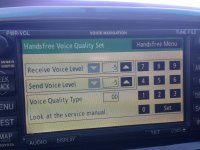
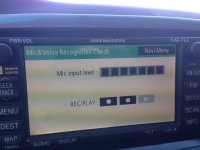
i also included some screenshots of the diagnostic menu. everything looks good there...but i may be missing something.
[MENTION=50507]CookieRoe[/MENTION], i also ran a 12v reverse signal into pin 24 of the long connector for added juice for the backup camera. no dice. i still have the black screen with the "check surroundings..." on the bottom...but there are white horizontal lines that seem to scroll through the screen. so an image is trying to get through.

i am no pro in wiring, but have learned a ton from this forum on how and what to do. however, i'll need a sharper mind to solve my problems, as my lack of electrical stuff in cars is limited to my current vehicle.
 

Attachments

  • IMG_0136.jpg
    IMG_0136.jpg
    128.4 KB · Views: 607
  • IMG_0137.jpg
    IMG_0137.jpg
    131.5 KB · Views: 609
  • IMG_0138.jpg
    IMG_0138.jpg
    133.8 KB · Views: 581
  • IMG_0139.jpg
    IMG_0139.jpg
    133.1 KB · Views: 568
  • IMG_0177.jpg
    IMG_0177.jpg
    148.6 KB · Views: 568
  • IMG_0178.jpg
    IMG_0178.jpg
    142 KB · Views: 582
  • IMG_0179.jpg
    IMG_0179.jpg
    151.9 KB · Views: 619
Umm wait, what?

i also ran a 12v reverse signal into pin 24 of the long connector for added juice for the backup camera. no dice. i still have the black screen with the "check surroundings..." on the bottom...but there are white horizontal lines that seem to scroll through the screen. so an image is trying to get through.............

You ran a 12V to pin 24? No no...... That's bad (if I'm understanding you correctly....... you physically connected a 12V wire to Pin24 of the NAV unit).

Forget about pin 24 as it only puts out 5V. In fact, disconnect the wire from Pin 24. If you have an aftermarket camera, it more than likely needs 12V. So, you need to connect the camera's Camera + (camera power, not Video signal) to the reverse lights (which are 12V). So, when your reverse lights are lit, 12V goes to the camera, thus, turning it on. When they go off, so does the camera.

Please be careful that you DON'T feed a 12V INTO the NAV's Pin24 slot (R26 connector). You can potentially fry it.

Idea: You MIGHT have the video+ and camera+ wires mixed up? Be sure your grounds are ok.

I'm no expert in wiring either, but you learn as you go............. :hungry:
 
re-reading my post after your answer and i definitely wrote the wrong thing. i did not insert the reverse 12v pin into the back of the headunit...i did actually remove the wire from the 24pin harness completely, and then tapped into the reverse signal. so my post was correct except for my wording.

i will double check everything tomorrow when i open it back up. i do have a cheapy $10 camera i might wire up...i'm beginning to think more and more that it is the camera that is the issue. i know there arent any kinks in the wires...

the lack of voice for bluetooth is still bugging me. i check my wiring the other day and it is definitely shielded. i think i'm missing something going from the amp to headunit...the original poster talked about it but i'm not sure what wires he meant. the link in my previous post shows that others had trouble wiring the mic up...i really dont know what the problem is. i don't need it for the navigation turn by turn but i do need it for bluetooth.

can someone with bluetooth go into their diagnostic menu and check something? under one of the menus there is the option to check the mic volume: shows play, stop and rec. if you record and playback, i believe you hear a test of your voice. can someone verify? i get nothing at all...thanks
 
Question:

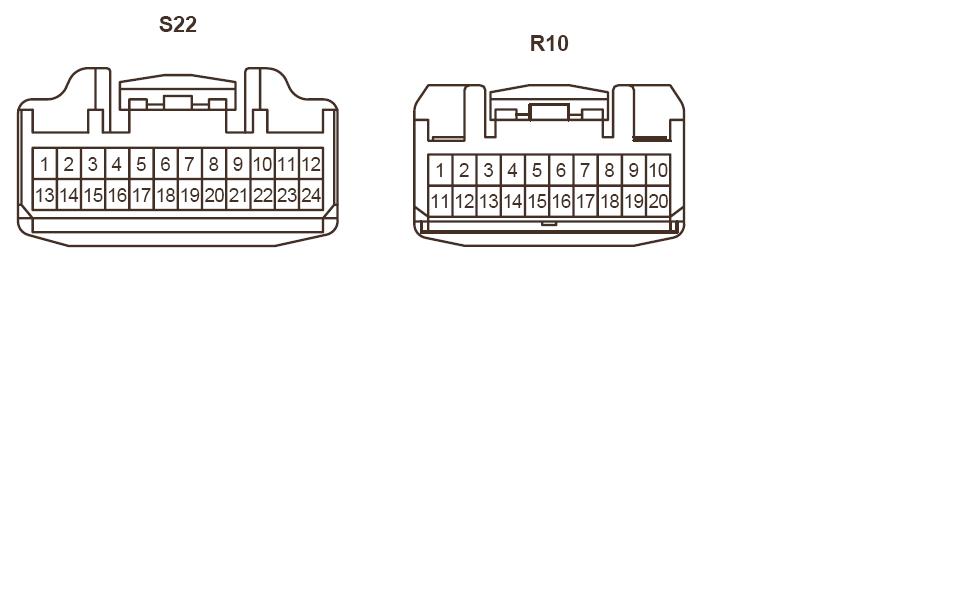
On the very first post of this thread, in the diagram, it shows connector R10 and pins 11,12 and 13 are nav voice going to the amp. What does it mean when it says "shield" for pin 13? I know what a shielded wire is, but where does pin 13 plug into ?

Sorry for the lame question but trying to diagnose the lack of nav voice and trying even the smallest things I may have missed. Thanks
 
Question:

On the very first post of this thread, in the diagram, it shows connector R10 and pins 11,12 and 13 are nav voice going to the amp. What does it mean when it says "shield" for pin 13? I know what a shielded wire is, but where does pin 13 plug into ?

Sorry for the lame question but trying to diagnose the lack of nav voice and trying even the smallest things I may have missed. Thanks

Look at this thread (post):
http://www.toyota-4runner.org/engin...me-help-navigation-install-19.html#post133362

8030d1135478596-heres-some-help-navigation-install-amp-wiring.jpg


R10 (back of OEM NAV unit) and S22 (back of AMP)
8031d1135478643-heres-some-help-navigation-install-connectors1.jpg


So.. From Connector:

R10 Pin 11 - S22 Pin 23
R10 Pin 12 - S22 Pin 22
R10 Pin 13 ---SHIELD.


My take is that your connect the first 2 wires, then with a shield'ed wire you connect to Pin13 (on R10) and RUN the wire back to the amp and connect to NOTHING. I read this in a Tundra forum but I can't find the post.

Hope this helps.

I'll be embarking on this very soon as I'm getting extremely frustrated on not having these features hooked up yet.
 
i have some pics of the amp and harness wiring from one of my previous posts. check those out.

based on those pics, the amp looks to be getting the correct connections. however, i did input two wires into the r10 connector, pins 11 and 12, but nothing into 13. i inserted an oem pin/wire part thingy into pin 13 and left it, but nothing.

if pin 13 is wired to nothing, why do you have to run it aaaaaaaaalllllll the way to the amp? what good does that do?

and i believe i figured out the backup camera. i rewired it the other day to include a cheapy $10 camera from china. i altered a composite video cord and plugged the wires into the r26 connector, tapped into reverse 12v for power, and plugged the yellow connector to the camera. same black screen with horizontal lines when putting into reverse. i've concluded that it MUST be the wires that are inserted into the connectors. i'm gonna look for some replacements.

in the meantime, still worried about the wiring for the bluetooth....like you, desperately want it to work. should have just got the oem nav when i purchased my vehicle brand new in 07...
 
i have some pics of the amp and harness wiring from one of my previous posts. check those out.

based on those pics, the amp looks to be getting the correct connections. however, i did input two wires into the r10 connector, pins 11 and 12, but nothing into 13. i inserted an oem pin/wire part thingy into pin 13 and left it, but nothing.

if pin 13 is wired to nothing, why do you have to run it aaaaaaaaalllllll the way to the amp? what good does that do?

and i believe i figured out the backup camera. i rewired it the other day to include a cheapy $10 camera from china. i altered a composite video cord and plugged the wires into the r26 connector, tapped into reverse 12v for power, and plugged the yellow connector to the camera. same black screen with horizontal lines when putting into reverse. i've concluded that it MUST be the wires that are inserted into the connectors. i'm gonna look for some replacements.

in the meantime, still worried about the wiring for the bluetooth....like you, desperately want it to work. should have just got the oem nav when i purchased my vehicle brand new in 07...

Pin 13 is a shield wire. It doesn't plug into anything, but is wrapped around the other two wires (11 and 12). I'm not an electrician so I don't know why, but I'm assuming it's to help with static or interference. If you look at the diagram, you'll see the boxes from the wire in pin 13 overlap the other two.
 
I'll check to see if this kit has the wire for pin 13; it had oem pins for 11 and 12 that came from the amp and wired to the nav...maybe I just missed the pin 13 (but I doubt it).

But the mic goes directly to r26 connector and not the amp, so pin 13 would only effect voice output, which I don't have a problem with...
 
Hmmmmm

to keep this thread current with useful information, one MUST have the wire from Pin13 shield the other two. (to prevent Noise/interference) This product seems to deliver what one needs:

Cat-3 3-Pair Direct Burial Cable - VETCO.NET

I could be wrong? Anyway, looks cheap. I'm going to order, what? (from HU to amp in the rear)......... so, 10-15 feet good?
 
Nice find

So since I already have the below connected:
R10 Pin 11 - S22 Pin 23
R10 Pin 12 - S22 Pin 22

And all I need is this:
R10 Pin 13 ---SHIELD.

And it must be the same shielded wire around pin 11 and 12 to work, can I just tap into those wires on each end (nav harness and amp harness), insert into pin 13 and be done with it?
 

Attachments

  • IMG_9895.jpg
    IMG_9895.jpg
    134.4 KB · Views: 812
Nice find

And it must be the same shielded wire around pin 11 and 12 to work, can I just tap into those wires on each end (nav harness and amp harness), insert into pin 13 and be done with it?

Yeah, that's the theory. The wire from Pin13 you don't connect to anything. Just let it sit there (tape it up at the end near the amp). When I bought my E7009 back in 2010, I purchased regular shield'd speaker wire (2 wire), not realizing I needed 3 wires. This product should do the trick!

And YES, I never connected the camera/voiceNav/Microphone to the HU. Last year I installed a Gentex mirror with Homelink/RearCamera on my Civic and my wife loves it. However, she's been putting the pressure on me to install the camera on the 4Runner. I need to finish this install.

Let me know when you have it connected and running!! :thumb:

I'll post pics.
 
Ok so I'm gonna buy some shielded wire from that link you sent, and tap into the two wires already in the s22 on the amp, remove the two pins in have on 11 and 12, reinsert the new one, and see if that works. I was reading some older posts from j0mama a few years back and it was talking about getting nav voice to amp just requires these wires.

I'll post pics and update when completed. Hope to do this next weekend, obviously the sooner the better.
 
[MENTION=50507]CookieRoe[/MENTION]

in looking at that link again, i was wondering something...does each wire need to be shielded, or do they have to be shielded as a whole? cause it looks like there is one shield going around all the wires...i assumed each wire needed to be shielded...
 
[MENTION=50507]CookieRoe[/MENTION]

in looking at that link again, i was wondering something...does each wire need to be shielded, or do they have to be shielded as a whole? cause it looks like there is one shield going around all the wires...i assumed each wire needed to be shielded...

The schematic shows the shield'ed wire "wrapping around" the other two, so yes.

EDIT: Ever get your camera sorted out?
 

Members online

Forum statistics

Threads
278,307
Messages
3,554,056
Members
248,016
Latest member
Advally Service

Trending content

Back
Top