Pioneer 9" DMH-WT7600NEX Floating Display Installed: First Impressions w/OEM Audio+

For those using Crutchfield....did anyone use their harness service and did it include wiring all the Maestro?

Also....how did you wire the parking brake?...or does this unit still have the bypass feature in the software (touch screen to turn off)?

i did not use crutchfields wiring....this unit does have the bypass in software
 
Installed last weekend and have been driving with it for a week. Very happy so far. Have noticed a tiny bit of sluggishness in the default UI but I use CarPlay all the time and outside of a minor issue that happened once (very easy to fix by unplugging the phone and plugging back in) it is awesome.

Amazing display, love having CarPlay in the truck. Solid look and solid construction. Will check back in in a few weeks and post some pics.
 
Does the screen dim well for night time driving? I know that was some of the complaints with the Alpine.

It does dim, but not well enough. This is something I would like to see improved as I want things to get dark. I can turn off the display but eh, this is lacking.
 
This is Pioneer's competitor to the Halo 9.

Pioneer Link

Unboxing video


If you're interested in vids or something specific (like Gaia), just message me on IG @thegraverunner and I'll see what I can do. Don't message me here as I won't see it.

This won't be an install thread as there are many like it and it's very straight forward if you've done this before. Maestro's supplied harness and wiring diagram makes it pretty easy. Although I will note: when you are installing it, there are two plugs that are keyed and only go one way that plug into the OEM+ speaker and sub harness instead of the stock harness (they will hang loosely and are unused).

Last week I got my hands on the just released Pioneer 9" DMH-WT7600NEX as well as a Maestro RR to retain steering wheel controls.

I installed this on 2019 TRD ORP, with OEM Audio+ Reference 500 and fully soundproofed doors and floorboard with Noico 80mil.

I bought it off Crutchfield due to the generous return policy (60 day). It arrived on a Monday and I had it installed by the following Wednesday.

Since there was no pre-assembled "kit", I pieced together everything separately.


Total cost for the above items came out to USD $1337.66. Labor was free as I did it myself.

I used this Halo9 install video for the interior: link

I bought additional items like an antenna usb adapter but ultimately did not use them. I never listen to FM or Sirius radio and the usb adapter didn't plug into my usb port on the bottom.

If you are an OEM+ user like me, depending on when you bought it, you may have to flash the amp/signal processor under the seat - I've yet to do this as they are sending me a dongle that I am yet to receive. While I've adjusted the EQ and speaker settings to my taste, I still want to have this done.

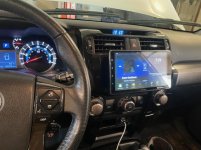
Pictures of it installed:
IMG_2522.JPG


OBD Readout
IMG_2521.JPG


Pros
  • 720P, looks very sharp compared to the stock unit.
  • style and thin bezel, compare this to images to of the Halo9 and it blows it away in my opinion
  • Size ;). 9" fills the gap very nicely, however there is certainly room for the 10" model
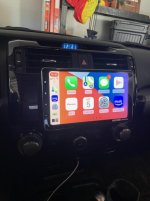
  • Carplay is nice and works as it should (I have Gaia installed but have yet to actually use it on a trip)
  • EQ adjustability, stock left a lot to be desired and this fills the gap
  • Came with a screen protector already installed
  • Multiple adjustment points to get the angle you want
  • Wireless Carplay is nice, but I still prefer to plug in my phone
  • Gauges are interchangeable and display loads of diagnostic information (can't find trans temp however)
  • It's fast and responsive, startup time is comparable to stock, buttons do what I tell it
  • Not flimsy and doesn't feel cheap, feels like quality


Cons
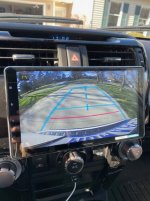
  • Stock low-res rear view camera is immediately made apparent, this is not a knock on the receiver, but because it's so sharp (relatively speaking), the rear view camera looks pretty bad. I'll look into upgrading this when I replace my rear bumper
  • The larger screen means you can't be heavy handed when inserting your key, I jumped in the car quickly and my key hit the screen (lightly, no scratch left), but something to be aware of.
  • The USB adapter to retain the stock USB port does not appear to work on my model 4runner and appears to work for early model 5th gen's, someone can please correct me if I'm wrong and direct me to the correct part # and I will correct this. For now I just ran the USB and 3.5m jack in the original USB port's place (I took it out and it's two wires hanging out there)
  • At night, you can turn off the screen and still play music, however the touch sensitive buttons on the left side are still illuminated, it's a pleasing glow, but I would like the ability to turn all the illumination off
  • Pioneer CarAVAssist iOS app does not appear to work properly and does not want to sync with my receiver, this is minor and I don't use the factory interface as I use Carplay, but still, I'd like this option to be there. This will be used in the future to update the firmware of my receiver, so I'd like to get this to work sooner rather than later. I'll look into this further as I suspect it's user error. However after working in the UI/UX software design field over 8 years, this should be easier.
  • Not a knock on the receiver, but I am skeptical of the Metra kit's attachment point, especially when off road and things bouncing around. Next time I'm back there I'll try to remember to get a shot of it

I've only had it a week and probably have clocked a grand total of 4-5 hours of drive time with (if that), so I'll be sure to update this thread with additional photos and long term impressions, especially with extended trips as things heat up in summer and as I venture off-road with it.

Anyways, hope this was helpful for anyone looking into this.

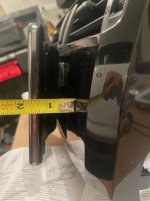
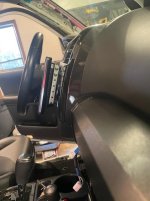
Do you have any side angle pictures? Wondering how much it sticks out and if it is flush where you can’t see the pocket etc.

Thanks
 
Do you have any side angle pictures? Wondering how much it sticks out and if it is flush where you can’t see the pocket etc.

Thanks

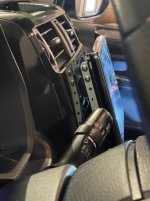
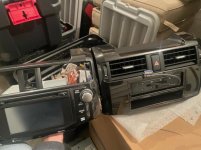
Just finished installing this on my wife's 4Runner so I figured I would grab you a couple side shots etc. Not to hijack this thread as its not an install thread but wanted to give some comments as I went into this "blind" - took me about 4 hours over 2 days. Note a couple of the side shots do not show the black back cover installed - you can not see the silver mounting rails and screws with the cover on (photo #3)

*I think the OPs photos make this head unit look a little more "tucked" to the dash then it actually is, I don't think it looks bad installed and prefer this to the T8/T9 or Alpine options from a visual standpoint but it is still and always will be "tablet on the dash"

*There are a lot of parts to move over from the OEM headunit to the Metra dash kit - the vents, vent adjusters and emergency flashers - this likely comes to no surprise to anyone who did an ounce of research but like I said above - I thought it looked good, was tired of the OEM radio locking up and it was something the wife wanted for Christmas so I went to Crutchfield , ordered the kit and winged the install (the directions are terrible imho)

*This does block just a bit of the vents even in the lowest setting, I think the 10" would look far to big but to each there own

*There is a RATS NEST of wires now, I assume this is standard with aftermarket Headunits but as this was my first install I was shocked how many wires, dongles, adapters it takes to do this - its not what I would call "clean" but I think it is what it is in this world.

*You have to flash the Idatalink Meastro RR - was easy but did not realize I would have to do that going into this

*The metra dash kit black matches very well with factory paint, no would would notice imho

*I did not reuse the OEM mounts even though I did grind off the alignment "knobs" - the Metra/Pioneer mounts seem solid enough but I kept the OEM incase I change my mind

*I tucked the GPS receiver behind the unit, not sure if you are supposed to do this but the signal strength said "ok" after install and it appears to work - does not matter much to me as we will be using Apple Car Play 99% of the time

*Overall the install was not to bad but its very intimidating the amount of wires/adpters/connections - I did not find the IdataLink or Crutchfield instructions all that clear as far was what gets used and what does not so is was a bit trial and error

*Wired and Wireless Carplay seems to work fine - I will be installing a wireless charger under the lower cubby in the dash so we can just place phones there and charge/Wireless Carplay

*As the OP mentioned the OEM backup camera appears pretty grainy on the screen (cameras fault not the Unit) - I think it looks worse in person then the photo I attached shows.

*I have not had a chance to play with settings so it might be changeable but only have 4 icons across on the screen makes them "large and in your face" imho
 

Attachments

  • IMG_6127.jpg
    IMG_6127.jpg
    40 KB · Views: 3,027
  • IMG_6104.jpg
    IMG_6104.jpg
    45.9 KB · Views: 2,697
  • IMG_6115.jpg
    IMG_6115.jpg
    33 KB · Views: 2,676
  • IMG_6129.jpg
    IMG_6129.jpg
    36.4 KB · Views: 2,655
  • IMG_6141.jpg
    IMG_6141.jpg
    50 KB · Views: 3,141
  • IMG_6143.jpg
    IMG_6143.jpg
    48.9 KB · Views: 3,201
  • IMG_6144.jpg
    IMG_6144.jpg
    32.6 KB · Views: 3,321
Last edited:
Just finished installing this on my wife's 4Runner so I figured I would grab you a couple side shots etc. Not to hijack this thread as its not an install thread but wanted to give some comments as I went into this "blind" - took me about 4 hours over 2 days. Note a couple of the side shots do not show the black back cover installed - you can not see the silver mounting rails and screws with the cover on (photo #3)

*I think the OPs photos make this head unit look a little more "tucked" to the dash then it actually is, I don't think it looks bad installed and prefer this to the T8/T9 or Alpine options from a visual standpoint but it is still and always will be "tablet on the dash"

*There are a lot of parts to move over from the OEM headunit to the Metra dash kit - the vents, vent adjusters and emergency flashers - this likely comes to no surprise to anyone who did an ounce of research but like I said above - I thought it looked good, was tired of the OEM radio locking up and it was something the wife wanted for Christmas so I went to Crutchfield , ordered the kit and winged the install (the directions are terrible imho)

*This does block just a bit of the vents even in the lowest setting, I think the 10" would look far to big but to each there own

*There is a RATS NEST of wires now, I assume this is standard with aftermarket Headunits but as this was my first install I was shocked how many wires, dongles, adapters it takes to do this - its not what I would call "clean" but I think it is what it is in this world.

*You have to flash the Idatalink Meastro RR - was easy but did not realize I would have to do that going into this

*The metra dash kit black matches very well with factory paint, no would would notice imho

*I did not reuse the OEM mounts even though I did grind off the alignment "knobs" - the Metra/Pioneer mounts seem solid enough but I kept the OEM incase I change my mind

*I tucked the GPS receiver behind the unit, not sure if you are supposed to do this but the signal strength said "ok" after install and it appears to work - does not matter much to me as we will be using Apple Car Play 99% of the time

*Overall the install was not to bad but its very intimidating the amount of wires/adpters/connections - I did not find the IdataLink or Crutchfield instructions all that clear as far was what gets used and what does not so is was a bit trial and error

*Wired and Wireless Carplay seems to work fine - I will be installing a wireless charger under the lower cubby in the dash so we can just place phones there and charge/Wireless Carplay

*As the OP mentioned the OEM backup camera appears pretty grainy on the screen (cameras fault not the Unit) - I think it looks worse in person then the photo I attached shows.

*I have not had a chance to play with settings so it might be changeable but only have 4 icons across on the screen makes them "large and in your face" imho


Appreciate this! Helps a lot with the decision!
 
Wonder if you can get it to go lower and not block vents if you put the pocket on top and head unit at the bottom?

Would the heater against the screen not be good over time?
 
lol my Alpine Halo sits WAY closer to the dash than that. I have no visible screws, just sayin

OMG no way? Thats so awesome! - How about you give us some measurements and photos so others can follow in your footsteps or maybe read the post fully where it says the screws are shown because the cover is not on.....

This place really has gone to shit and sad to see you have gone along with it
 
Wonder if you can get it to go lower and not block vents if you put the pocket on top and head unit at the bottom?

Would the heater against the screen not be good over time?

I don't think it can go any lower as I am on the lowest mount setting. I don't think its blocking enough of the vents to cause issue with the screen - but I guess only time will tell. Luckily its winter so hopefully if an issue would arise It will happen within the warranty/return period.

Its certainly not the perfect option but while many seem to not have issues I was not willing to gamble on the T8/T9 Clones as the main reason we did this was the bugginess of the factory units and neither of us liked the blank space left by double Din units on either side so a floating head unit It was......So far liking it more and more as I have had a chance to play with the brightness and color settings along with some of the other functions (gauges, setting Quicklinks etc)
 
I don't think it can go any lower as I am on the lowest mount setting. I don't think its blocking enough of the vents to cause issue with the screen - but I guess only time will tell. Luckily its winter so hopefully if an issue would arise It will happen within the warranty/return period.

Its certainly not the perfect option but while many seem to not have issues I was not willing to gamble on the T8/T9 Clones as the main reason we did this was the bugginess of the factory units and neither of us liked the blank space left by double Din units on either side so a floating head unit It was......So far liking it more and more as I have had a chance to play with the brightness and color settings along with some of the other functions (gauges, setting Quicklinks etc)


Agreed! T9 is a waste of $$ according to many YouTube reviewers. I’ve always liked the sound quality of pioneer over the alpine IMO. The only problem I would have is the screen will slightly block my lcd heater control unit. I have the limited version.
 
Spent a bit of time reviewing this thread and have a few questions. After reviewing the various options out there this seems to be my top choice to replace the Etune Radio in my 2015 Trail.

1. SiriusXM Radio Presets: Does it skip b/w presets with the SiriusXM tuner or just go from like channel 20 to channel 21.

2. Screen dimming at night: I saw one post that said it didn’t dim properly at night. Another that it did and that the lights on the left side were still on but not overly bright. Just thought I’d ask on that one since I’ve had a radio that did not dim properly.

3. Navigation- Confirm there is no stock navigation with the radio? It looks like it’s just Carplay or Android Auto.

Thanks!
 
Used the print outs off of Crutchfield to compare the the 8600 vs the 7600 vs my installed 8400 (7”) from the driver’s seat. While the 10” is nice, I’m leaning more towards the 9” to keep from blocking the vents and HVAC knobs.

a494e5e09a4eb88d60bdafc1f62fd4e6.jpg

bc5126b0dfc524dff1b87764b87c8676.jpg

c75708b9a7fd11cf54a396a1390ff10a.jpg


Sent from my iPad using Tapatalk
 
Just installed the Kenwood equivalent of this last Sunday with this dash kit. 2 days later it was stolen and all they had to do was pull because it is secured with just the tabs to the dash. I will be replacing it and its probably a good idea to figure a way to reuse the oem brackets and maybe use security bolts.

Does anyone know if the Scosche kit bolts to the factory locations?
 
Had no idea Pioneer had this unit out.. I guess I should have done more research. Currently having a bit of buyers remorse as I just installed the Halo9 last week and my biggest gripe is the 480P screen. I don't notice as much washout on maps as others have mentioned.. but the opportunity to have a higher resolution screen would be a blessing. Seriously considering ripping out the Halo9 and sending back to Crutchfield and installing this Pioneer. Decisions decisions...
 
Here's a pic of the OEM brackets used in conjunction with the plastic Metra ones. You may need to drill out or grind down some alignment nibs so they sit flush. I decided to use both together because I wanted to keep the ability to reinstall/remove as a single assembly like OEM. I have a standard double DIN and don't have any direct experience with the newer floating style head units, but it looks to me like the best course of action may be to install the chassis first reusing the OEM brackets and skipping the metra ones all together, install the trim piece over the chassis, then mount the floating display last.

Any reason not to just skip the metra brackets?
 
Haven't logged on in awhile. I recently installed the ICS bracket, so while the bezel was off, I trashed the metra bracket and used the OEM bracket after a little bit of drilling. Works way better now.

Occasionally the unit does not want to connect to my iphone, turns out it was just my cable. So I replaced that.

I updated the firmware on it finally, but had to go the long route (downloading to a USB stick and uploading via the USB port). The Pioneer iOS app to do this is useless. Note, there was a recent firmware update on 2/12/21, I've yet to install that one. This solves some connectivity issues others have been having on Android Auto (I don't use that).
 
Occasionally the unit does not want to connect to my iphone, turns out it was just my cable. So I replaced that.

The only thing really holding me back from purchasing is connectivity issues. My current Pioneer Avic 8000NEX has been a pain in the ass since new in 2014. It wont respond to steering wheel control track skipping or even direct headunit skipping at times. I get resetting and complete loss of any control or connectivity at times. I don't want a repeat of it.
 
out of curiosity, when you bought the different pieces did they say they weren't compatible with your vehicle?

I don't know about the 2019, but in the 2020 Pro with the JBL stuff, there is no kit. If you go to Crutchfield they recommend you don't mess with anything. I wonder if there's a sharp difference between your edition and the 2020 Pro. I would imagine it can't be that much different.
 

Members online

Forum statistics

Threads
278,316
Messages
3,554,124
Members
248,016
Latest member
Advally Service

Trending content

Back
Top