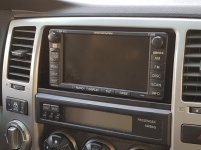
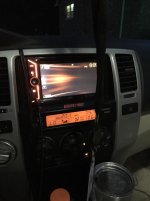
I've seen a couple threads but I haven't found one that shows a complete install/ Replacment of the JBL synthesis stereo. From my understanding I need to get the following:
PAC RP4.2-TY11 Wiring Interface
Metra 95-8210 Dash Kit
3.5 to RCA female
The head unit
The directions as far as wiring the head unit power/speaker wires to the Wiring Interface (I'm guessing it goes to that) have little explanation. As well as if there any splicing to keep the steering wheel controls or the factory AUX location.
I've done dozens of stereo installs but they've all consisted of one or two harness that wires to the stereo and that was it. This ones a little more advanced and I'd like to see a well written tutorial if it exist. I'm sure it's not that difficult and I'm all for saving 300-400 for an installer.
Any tips and quid lines would be greatly appreciated.
I've seen a couple threads but I haven't found one that shows a complete install/ Replacment of the JBL synthesis stereo. From my understanding I need to get the following:
PAC RP4.2-TY11 Wiring Interface
Metra 95-8210 Dash Kit
3.5 to RCA female
The head unit
The directions as far as wiring the head unit power/speaker wires to the Wiring Interface (I'm guessing it goes to that) have little explanation. As well as if there any splicing to keep the steering wheel controls or the factory AUX location.
I've done dozens of stereo installs but they've all consisted of one or two harness that wires to the stereo and that was it. This ones a little more advanced and I'd like to see a well written tutorial if it exist. I'm sure it's not that difficult and I'm all for saving 300-400 for an installer.
Any tips and quid lines would be greatly appreciated.
You need to do a bit more research - it's all out there. At a minimum you need the adapter & y-cable for the antenna, and the previously mentioned steering wheel control unit.
You need to do a bit more research - it's all out there. At a minimum you need the adapter & y-cable for the antenna, and the previously mentioned steering wheel control unit.
The wiring kit I bought includes the steering wheel, factory aux, (back up camera and navi if it was equipped) and let's my after market head unit communicate with the JBL amp. I found out I wire everything from my new head unit the wiring kit, and the wiring kit plug right into the factory plugs.
It is not needed. The factory unit uses the diversity antennas to pick which has the strongest signal to use. Your aftermarket headunit does not have that logic built in, so combining the antennas is more likely to cause multipath interference than give you a stronger radio signal.
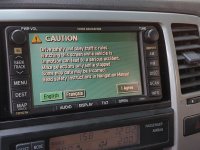
I'm fixing to pull the factory nav and put in a kenwood nav unit. Is the rp4.2-ty11 the new preferred jbl interface or should I go with a tyto-01 for the interface and a maestro sw for steering controls?
It's a 2004 Limited, so I can't use the maestro rr, which would have been awesome to have.
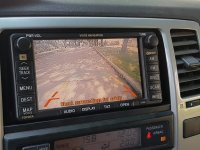
I know the rp4.2-ty11 has the 6v out I need for the factory reverse camera and it would be a single module to install instead of 2, but I haven't seen much about it's reliability. Any thoughts?
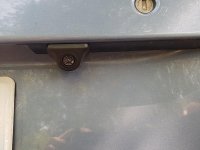
How was the quality of this camera? Is the license plate light bulb the same type as the original bulb? Is the camera fixed or adjustable?
I am using the license plate frame camera at the moment which shows very well and it is adjustable. Thinking of possibly upgrading as this seems it would make it look more factory.
I'd like to know this as well as I want to add a rear camera to my Joying unit. They are trying to sell me theirs, but I want something more OEM. I added LED bulbs to my stock lights so curious to see if the light in the camera location would be as bright or is the same bulb, then of course how well the camera works.
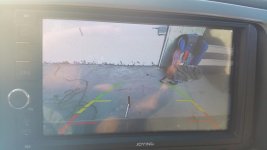
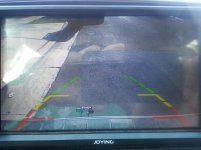
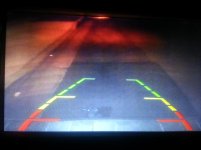
As promised and only a week late. Quality is poor as I'm using my old cell phone atm. This camera allows me to put my bumper within an inch of an object.
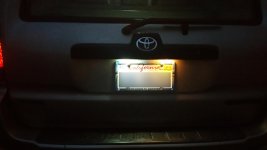
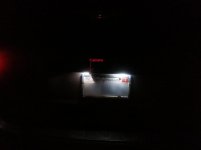
Photo #1 shows OEM license bulb(Right) vs LED Swap(Left) Photo #2 shows LED Swap(Right) vs backup camera LED(Left) Photo #3 backup camera image as well as the original angle. There is a tool sticking out of my hitch receiver. Photo #4 After I corrected the angle of the camera by using rubber washer/grommet to keep tension but allowed to me tighten one side and keep the other "loose" but snug. Again my hitch is visible showing you how far offset the camera is by being mounted on the Driver side. Photo #5 Night comparison. It does have a night vision mode (black and white) but you will never see it due to your backup lights.
As promised and only a week late. Quality is poor as I'm using my old cell phone atm. This camera allows me to put my bumper within an inch of an object.
Bought mine with this JVC double-din. Perfect fit, touch screen, and has everything but nav. PO also put in some banging upgraded speakers, need to take one of the doors off and see what's inside. No back-up camera yet, but plan on getting one of the wireless ones to connect to head unit.
It is not needed. The factory unit uses the diversity antennas to pick which has the strongest signal to use. Your aftermarket headunit does not have that logic built in, so combining the antennas is more likely to cause multipath interference than give you a stronger radio signal.
Looks great! I recently installed the same thing and was wondering, do you HAVE to have the navigation antenna installed in order for the time/date to set correctly? It's driving me crazy.