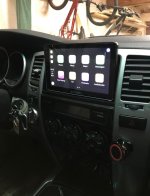
Radio Upgrades... Let see them.

Ive ordered my HU and will install once it gets here. What USB did you use and how has it worked so far?

Bought the outlet from Amazon for $14:

https://www.amazon.com/Socket-Port-...s=gateway&sr=8-1-fkmrnull&tag=viglink20350-20

The audio outlet has a USB plug on the back, which connects to back of HU with a USB extension cable. The charge outlet has two wires on back, which I tapped into the nearby cigarette lighter.

The only complaint on the outlet is that cables plugged in aren't very snug. I sometimes lose connection if I bump into it. Otherwise, it's been great with Android Auto (don't have iPhone).

Use good quality USB cables, rated for USB 2.0 or 3.0. Initially I used a cheap Dollar store cable and the HU wouldn't recognize my phone (said either invalid USB drive, or no device connected). Problem solved when I switched to a good cable.
 
Pioneer AVH-W4400NEX DVD Receiver
T2hZQ5P.jpg


Pioneer ND-BC8 Universal rear-view camera at Crutchfield.com
WSQjCBW.jpg

oWi5DsX.jpg


So a side note: when i placed my order for the Pioneer it kept trying to recommend a different interface box, yet i would loose all the fade options on the radio. Now not a huge issue, but on my motorcycle i lost the same control and it bugs me just enough to make me annoyed. So i went with the 2nd recommended Accessory install pack and it worked out great.
 
Last edited:
Pioneer AVH-W4400NEX DVD Receiver
T2hZQ5P.jpg


Pioneer ND-BC8 Universal rear-view camera at Crutchfield.com
WSQjCBW.jpg

oWi5DsX.jpg


So a side note: when i placed my order for the Pioneer it kept trying to recommend a different interface box, yet i would loose all the fade options on the radio. Now not a huge issue, but on my motorcycle i lost the same control and it bugs me just enough to make me annoyed. So i went with the 2nd recommended Accessory install pack and it worked out great.

Just as a head's up, the PAC RP4.2-TY11 Radiopro4 Ty11 is an all-in-one unit that does both the amp turn on, as well as the steering wheel controls, for the JBL system. It allows for front/rear fade.

uDUrBrV.jpg


Your installation looks awfully familiar. :)

bf9A9Xe.jpg
 
Last edited:
Good to know the plug works well with Android, I use a Samsung. When you lose connection is that due to a poor wiring connection on the plug, or is the USB itself lose in the plug. Annoying Im sure, but I think I could improve them before install.
 
Good to know the plug works well with Android, I use a Samsung. When you lose connection is that due to a poor wiring connection on the plug, or is the USB itself lose in the plug. Annoying Im sure, but I think I could improve them before install.

The USB outlet connector has a little too much wiggle room. It's never lost connection on it's own, so the problem is very minor. It only loses connection if I use my hand to bump or tap the cable plugged into the outlet (i.e., when I go to open my center console).
 
Just as a head's up, the PAC RP4.2-TY11 Radiopro4 Ty11 is an all-in-one unit that does both the amp turn on, as well as the steering wheel controls, for the JBL system. It allows for front/rear fade.

uDUrBrV.jpg


Your installation looks awfully familiar. :)

bf9A9Xe.jpg

are you using android auto? I tried the android wireless but the samsung s8+ doesnt work. i am able to connect bluetooth audio, and also screen mirror just fine. but the actual app usage is for not. I wonder if maybe i connected to usb 1 in the back (for apple) instead of usb 2 for android.....
 
Bought the outlet from Amazon for $14:

https://www.amazon.com/Socket-Port-...s=gateway&sr=8-1-fkmrnull&tag=viglink20350-20

The audio outlet has a USB plug on the back, which connects to back of HU with a USB extension cable. The charge outlet has two wires on back, which I tapped into the nearby cigarette lighter.

The only complaint on the outlet is that cables plugged in aren't very snug. I sometimes lose connection if I bump into it. Otherwise, it's been great with Android Auto (don't have iPhone).

Use good quality USB cables, rated for USB 2.0 or 3.0. Initially I used a cheap Dollar store cable and the HU wouldn't recognize my phone (said either invalid USB drive, or no device connected). Problem solved when I switched to a good cable.

Small sample size, but I am returning the Vigo Series port you mentioned. When connected to a OEM apple firewire USB cable, the screen is extremely garbled and unusable. I disconnected it and went straight from the female usb Alpine cable to the apple firewire, and problem solved.

At least one other person in the Amazon reviews saw the same thing. Too bad as I liked the look of the Vigo. I'll need to add a dremelled port or find another Vigo style port that has a better USB connection.

This is a brand new Alpine ilx-w650
4Rw0tpq.jpg


Only when connected to CarPlay over the Vigo port does the screen look like this. On Radio mode or with the Vigo port bypassed, no issues at all.

https://www.amazon.com/gp/product/B013W8LQ7C/ref=ppx_yo_dt_b_asin_title_o02_s00?ie=UTF8&psc=1

Looks to be the same as

https://www.amazon.com/Socket-Port-...s=gateway&sr=8-1-fkmrnull&tag=viglink20350-20

For those wondering. Both come in the same box covered in Japanese script.


T4R has two antenna systems. I just plugged the one regular connector that fits the HU. Reception not as clean as before, but good enough for the rare occasion I use it. Search on this forum and you'll find a long discussion about combining the two antennas. People seem to have mixed results.

I think the 3rd connector is for steering wheel controls, which I do not have. Left it unconnected.

My FM reception is OK using the large standard antenna port, but without the smaller one I have zero AM reception. That kinda sucks, but the whole reason I upgraded was that I listen to podcasts 99% of the time that I want talk radio.
 
Last edited:
The USB outlet connector has a little too much wiggle room. It's never lost connection on it's own, so the problem is very minor. It only loses connection if I use my hand to bump or tap the cable plugged into the outlet (i.e., when I go to open my center console).

Thanks, I think I will give it a shot. I like the idea having an OEM look and not having to pull USB connections from the glove box etc. when I want to connect.
 
T4R has two antenna systems. I just plugged the one regular connector that fits the HU. Reception not as clean as before, but good enough for the rare occasion I use it. Search on this forum and you'll find a long discussion about combining the two antennas. People seem to have mixed results.

I think the 3rd connector is for steering wheel controls, which I do not have. Left it unconnected.

Hopefully @riceandpho will see this and help, but he posted someplace (maybe even in this thread) an adapter that lets you connect both antenna jacks. I think it was something made for GM cars from what I remember, but it’s been awhile.
 
Hopefully @riceandpho will see this and help, but he posted someplace (maybe even in this thread) an adapter that lets you connect both antenna jacks. I think it was something made for GM cars from what I remember, but it’s been awhile.

Metra 40-UV43 Male to Female Motorola Antenna Cable
SCOSCHE MDAB 1988-05 GM Micro/Delco Antenna Adapter; Tip only
 
Small sample size, but I am returning the Vigo Series port you mentioned. When connected to a OEM apple firewire USB cable, the screen is extremely garbled and unusable. I disconnected it and went straight from the female usb Alpine cable to the apple firewire, and problem solved.

At least one other person in the Amazon reviews saw the same thing. Too bad as I liked the look of the Vigo. I'll need to add a dremelled port or find another Vigo style port that has a better USB connection.

Only when connected to CarPlay over the Vigo port does the screen look like this. On Radio mode or with the Vigo port bypassed, no issues at all.

https://www.amazon.com/gp/product/B013W8LQ7C/ref=ppx_yo_dt_b_asin_title_o02_s00?ie=UTF8&psc=1

Looks to be the same as

https://www.amazon.com/Socket-Port-...s=gateway&sr=8-1-fkmrnull&tag=viglink20350-20

For those wondering. Both come in the same box covered in Japanese script.

Bummer, I guess that explains the 3.5 star rating. A reviewer said he got one that didn't work, but customer service sent a replacement for free and had no issues with second unit.
 
are you using android auto? I tried the android wireless but the samsung s8+ doesnt work. i am able to connect bluetooth audio, and also screen mirror just fine. but the actual app usage is for not. I wonder if maybe i connected to usb 1 in the back (for apple) instead of usb 2 for android.....

The 2300 only comes with one USB port. Wireless Android Auto is supported on the AVH-W4500NEX apparently. Mine, however, must be done through the USB. I use it quite a lot. It was a key reason why I went with the 2300.
 
Anybody install a Pioneer 8400NEX in a limited? Im getting conflicting information on whether it will work due to the limiteds trip computer, and would lose the ability to tilt the face plate or use CD's and DVD'S
 
Hey all, I’m new here. I just purchased my first 4Runner Saturday (wife does have one). Mine is a white 2008 SR5 4WD and after just 2 days am absolutely in love with it. Traded a 2016 Mazda6 for it so still getting used to it but having a lot of fun.

But the reason I came to this thread, I am looking to upgrade the head unit. Reading through I have seen a lot of Pioneer love. I was looking into Sony or Kenwood myself but the posts have me thinking Pioneer. My main issue with not going Pioneer is I know some models no longer support waze. Has anyone had issues with that?
 
Hey all, I’m new here. I just purchased my first 4Runner Saturday (wife does have one). Mine is a white 2008 SR5 4WD and after just 2 days am absolutely in love with it. Traded a 2016 Mazda6 for it so still getting used to it but having a lot of fun.

But the reason I came to this thread, I am looking to upgrade the head unit. Reading through I have seen a lot of Pioneer love. I was looking into Sony or Kenwood myself but the posts have me thinking Pioneer. My main issue with not going Pioneer is I know some models no longer support waze. Has anyone had issues with that?

If you like Sony, I can recommend the XAV-AX1000, which I installed in my daughter’s Camry, and I’m strongly considering for my 4Runner because it works so well. It does have CarPlay and supports Waze, but it is a wired version of CarPlay because of the ~$300 price-point. If you’re seeking wireless, it’s double that on average for any of the brands. The upside to the plug in version is that it keeps your phone charged while driving, down side is if you make a lot of short trips, it can wear your phone battery out quicker than normal. I’ve had both good and bad experiences with pioneer (which I currently have a single din Bluetooth pioneer in my runner), so I’m personally leaning toward the Sony I mentioned when I get around to doing the swap.
 
If you like Sony, I can recommend the XAV-AX1000, which I installed in my daughter’s Camry, and I’m strongly considering for my 4Runner because it works so well. It does have CarPlay and supports Waze, but it is a wired version of CarPlay because of the ~$300 price-point. If you’re seeking wireless, it’s double that on average for any of the brands. The upside to the plug in version is that it keeps your phone charged while driving, down side is if you make a lot of short trips, it can wear your phone battery out quicker than normal. I’ve had both good and bad experiences with pioneer (which I currently have a single din Bluetooth pioneer in my runner), so I’m personally leaning toward the Sony I mentioned when I get around to doing the swap.

I did see that one in my research. Good to hear someone does have it and likes it. Bang for buck it looks fantastic. My one issue (not really an issue just being nit-picky) is that model has the front USB. I am being weird and looking for a back USB so I can run it into a built in on one of the empty areas next to the DAC in the center.

It looks like Crutchfield no longer carries the the XAV-AX100 which had the back USB. Not sure if I am willing to go for the XAV-AX200SXM. Decisions!
 
I did see that one in my research. Good to hear someone does have it and likes it. Bang for buck it looks fantastic. My one issue (not really an issue just being nit-picky) is that model has the front USB. I am being weird and looking for a back USB so I can run it into a built in on one of the empty areas next to the DAC in the center.

It looks like Crutchfield no longer carries the the XAV-AX100 which had the back USB. Not sure if I am willing to go for the XAV-AX200SXM. Decisions!

That USB issue was the one thing I didn’t like either! I wanted the rear USB for exactly the reason you mentioned, but the slower software on the AX100 made it not worth it just for that. Since I have a magnetic dash mount that I really like, having the front USB really isn’t a deal breaker anymore because I’d have to run a cable back to the dash area anyway. With the USB there, I could use one of those really short cables so it be be a clean setup anyway.
 
Joying 8"

Just replaced a 7" Joying android unit with a 8" screen version. It is awesome, Everthing works great, units has it's own sim card and gets cell service. Fun upgrade.
 

Attachments

  • joy2 (2).jpg
    joy2 (2).jpg
    120.7 KB · Views: 1,802
Can anyone recommend a radio with android auto that won't break the bank?

  • wireless android auto, or usb behind head unit.
  • hard volume buttons
  • simple look.
  • external mic included
  • ability for backup camera hookup
  • simple plug and play, ie: not having to cut and splice everything
 

Members online

Forum statistics

Threads
278,310
Messages
3,554,078
Members
248,016
Latest member
Advally Service

Trending content

Back
Top