
torque app setup question

jgue467

Senior Member
I tried searching answers to this but couldn't find any. So forgive the ignorance but here's where I'm at. I downloaded the 'pro' version of torque to my s3, performed basic profile setup. Then obtained a 327 like below, it came with a mini-cd with 3 folders; PC, fone & usb driver. I am supposed to load some of this onto fone or just plug into 4rnr's odb2 port? thanks...
 

Attachments
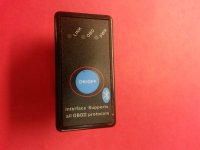
  • My 327.jpg
    My 327.jpg
    142.9 KB · Views: 360
Last edited:
Register to hide this ad
What's in the fone folder?

As far as I know, if the adapter is plugged in and emitting a signal, Torque should be able to find it and mate with it.
 
Pretty EZ setup

Thanks Durk - I went out a few minutes ago for a quick attempt during lunch, yeah it did not need that software - who knows what its for? Really just needed to pair fone to device - ez. played with app for a few minutes, pretty cool with all the variations you can create - can play with this toy for awhile! :banana:
 
This might be apples and oranges but I bought dashcommand and a cheapo wifi odb to use with my ipad. The ODB should plug into your ODB port and send a wireless signal to the device you have your program loaded to. Sometimes there can be connectivity issues so if you are not seeing real time mpg, mph, revs etc try resetting the connection.

I great move though. I love mine and it has really helped me improve my driving habits...I went from 18 to 22 mpg by using one of these.
 

Members online

Forum statistics

Threads
278,304
Messages
3,554,040
Members
248,016
Latest member
Advally Service

Trending content

Back
Top