TOYOTA TIS Techstream

if it works in win7 64bit it should work in win8. the underlying os in win 8 is still win 7 with a really fancy UI called metro. win 7 was aero.
 
Right folks

So I have managed to get this thing working on Win7 Pro 64Bit with no problems.

1) installed Techstream version 8.20.? that came with my MVCI. Did not use the maninmenu that came with it as it had a virus, surprise surprise.
2) updated it with version 8.30.?? that I found on this thread further back and replaced mainmenu with the one from the update.
3) installed the MVCI drivers as per this thread: http://www.toyota-4runner.org/gener...ta-tis-techstream-8-x-windows-7-8-64-bit.html
Most important for me was the step with the registry update (making sure the folder names are correct).
4) when starting techstream, go into VIM select and change to the reg entry you've just made.
 
well after a long wait, I bought an adapter from simvalley.com from California. needless to say the customer service is not the best, have seen worse.

email said it would be delivered on 30-dec-13, 2 emails later and still nothing. today I get the package and its dated 3-jan-2014 ship date from stamps.com

anyway. decent instructions says cant install in win7 64bit or win8. doesn't matter anyway, I have some old laptops rotting away anyway. pull out the daughters old hot pink dell xps with vista, do a factory recovery and up and running with techstream 8.10.0021.

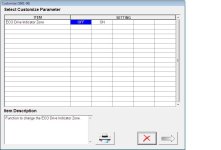
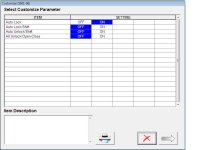
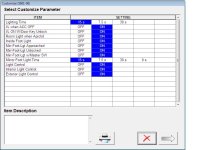
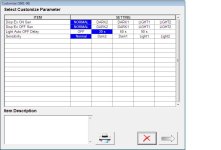
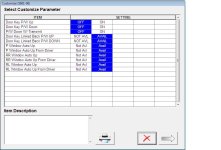
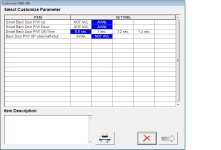
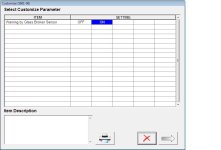
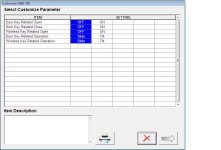
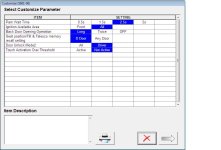
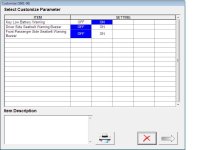
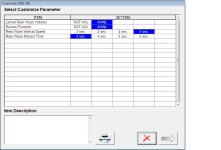
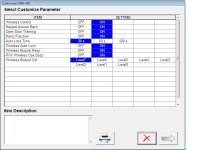
attached are actual screenshots of settings you can customize for the 2014 LE w/ Smart Key. yours may/may not have these settings.
 

Attachments

  • display.jpg
    display.jpg
    57.1 KB · Views: 3,994
  • door lock.jpg
    door lock.jpg
    58.8 KB · Views: 4,317
  • illuminated entry.jpg
    illuminated entry.jpg
    71.4 KB · Views: 5,283
  • light control.jpg
    light control.jpg
    63.1 KB · Views: 4,064
  • power window.jpg
    power window.jpg
    73.3 KB · Views: 4,357
  • psd & pbd operation.jpg
    psd & pbd operation.jpg
    63 KB · Views: 3,978
continuation of pics

.
 

Attachments

  • security.jpg
    security.jpg
    55.8 KB · Views: 3,779
  • slide roof.jpg
    slide roof.jpg
    62.2 KB · Views: 3,850
  • smart key access.jpg
    smart key access.jpg
    64.7 KB · Views: 4,593
  • warning.jpg
    warning.jpg
    59.5 KB · Views: 3,912
  • wiper.jpg
    wiper.jpg
    61.9 KB · Views: 5,402
  • wireless door lock.jpg
    wireless door lock.jpg
    67.8 KB · Views: 4,025
Techstream crashes

Hello, I just got new MINI-VCI J2534 cable for connecting to my lexus.
Application launches, it says connected to vehicle, but when I press customize settings or health check, it thinks about it for like one minute and application crashes itself.
When I check data and trouble codes on applications, it shows fine, but Health check and Customize settings does not work which is most important things.

I have two laptops with win 8.1, win7. installed 7.10, 7.20, 8.00, 8.30 versions on both computers, reinstalled drivers, ran applications as administrator, ran in compatibility modes. My win 7 laptops is 32-bit system. Changed regions on techstream still the same.
It connects successfully, but it doesn not shows VIN number, it says VIN not recognized, but I added it maunually.
It recognizes car model, but I need to select type of model to JZ160.
Installed win XP on virtual machine, still the same issue, everything works, except health check and customize settings. Here is the video link, you can see what exactly I am doing
https://docs.google.com/file/d/0ByTyFfyvkRq5cVFBRGtuM2lRSEE/edit

Any ideas?
Many thanks!

 
Got my J2534 cable and V8.10.021 of TIS installed. Most everything seems to work (except I don't see a place to modify TPMS, but I haven't really looked too deeply) with the exception of the Engine/Tranny "Data List". That's the one Data List I want to look at so I can extract extended PIDs! Any idea on what steps do go through to troubleshoot?

I'm on a 32bit XP Home laptop. V1.41 firmware on the cable. Ran TISKEY during install. Using "Europe" region as directed in readme.

edit: Changed region to North America. No help.
 
Last edited:
Got my J2534 cable and V8.10.021 of TIS installed. Most everything seems to work (except I don't see a place to modify TPMS, but I haven't really looked too deeply) with the exception of the Engine/Tranny "Data List". That's the one Data List I want to look at so I can extract extended PIDs! Any idea on what steps do go through to troubleshoot?

I'm on a 32bit XP Home laptop. V1.41 firmware on the cable. Ran TISKEY during install. Using "Europe" region as directed in readme.

edit: Changed region to North America. No help.

Post up if you get that data list to work. I've tried 3 different computers and several versions of Techstream, but always get a "Fatal Error" when I try to do the data list on the ECU
 
hey so i was looking on ebay and realized that it seems you cant buy these anymore on there? can anyone find them? all i found was the cable
 
Thanks to NoDak for the screenshots. Does anyone know if there's an option when you lock the vehicle and set alarm; can you adjust this action so the headlights do not come on and/or the horn does not honk?
There are times when I don't want either of these things, it would be nice if you just got a short flash of the parking lights...
 
We went to one of our favorite restaurants the other evening for dinner and I got lucky and got one of the prime parking spots smack dab in the front of the restaurant. The front of this place is all glass.
But I didn't set my alarm this one time because if I had, my headlights would have been blasting several customers at front tables for many seconds.
I guess a lot of people have come to expect it with newer cars these days but I still find it irritating- I also make it a point when I pull into a parking spot like that to dim my headlights before I pull in...
 
Thanks to NoDak for the screenshots. Does anyone know if there's an option when you lock the vehicle and set alarm; can you adjust this action so the headlights do not come on and/or the horn does not honk?
There are times when I don't want either of these things, it would be nice if you just got a short flash of the parking lights...

i guess it depends. i usually have my headlight stalk control set to DRL off. when i lock (interior) or use the handle to lock (rarely) no lights come on. i never use the remote to lock it so i cant say. advantage of having smart key system.

looking thru the custom user settings, there is no entry to set alarm settings.
 
forgot to add, if your looking at this for a 2013, my screenshots/advice is based on a 2014, ymmv.
 
Thanks to NoDak for the screenshots. Does anyone know if there's an option when you lock the vehicle and set alarm; can you adjust this action so the headlights do not come on and/or the horn does not honk?
There are times when I don't want either of these things, it would be nice if you just got a short flash of the parking lights...

That sounds like an aftermarket alarm module of some sort...the factory alarm only blinks the turn signals and beeps the much quieter meep meep buzzer, not the actual horn. Just for clarification, you're arming/disarming through the remote buttons that are built into the head of factory key right? And not a separate alarm remote fob?
 
Yes I should have clarified I've got a 2013 SR5; no aftermarket alarm just a factory system and yes I get out shut the door and hit the alarm button on the key FOB. it is (one or two) very short beeps of the actual horn and the headlights stay on for X seconds.
Like NoDak, I've also not been using my FOB lately and as I get out I just hit the lock button on the driver's inside door then shut it. this has the same effect: short horn beep and headlights stay on for X seconds....
 
maybe someone with a 2013 & TIS can look into the settings to see if there is a way to shutoff/mod the factory alarm.

i do remember the beeps can be turned off, but not sure on the lights.
 
Yes I should have clarified I've got a 2013 SR5; no aftermarket alarm just a factory system and yes I get out shut the door and hit the alarm button on the key FOB. it is (one or two) very short beeps of the actual horn and the headlights stay on for X seconds.
Like NoDak, I've also not been using my FOB lately and as I get out I just hit the lock button on the driver's inside door then shut it. this has the same effect: short horn beep and headlights stay on for X seconds....

Not sure if it's the same as my 13 LE but if I hit the lock button twice on the key fob it turns off the headlights. If I just push once lights stay on until timed out. Might be worth trying.
 
Yes I should have clarified I've got a 2013 SR5; no aftermarket alarm just a factory system and yes I get out shut the door and hit the alarm button on the key FOB. it is (one or two) very short beeps of the actual horn and the headlights stay on for X seconds.
Like NoDak, I've also not been using my FOB lately and as I get out I just hit the lock button on the driver's inside door then shut it. this has the same effect: short horn beep and headlights stay on for X seconds....

So what you're saying is, when you arm the alarm the actual horn beeps and then headlights turn on (even if you exit the vehicle with the headlights off)?

That really does not sound like the OEM alarm at all....perhaps it is this "premium alarm" option I keep hearing about or perhaps aftermarket unit integrated into the OEM alarm system?

The only arming/disarming beeps I ever here are those really quiet chirps from the small buzzer. The only time the actual horn goes off is if the alarm is trigger. And the only time the headlights turn on (from and off state) is also when the alarm is triggered :noidea:
 
Hmmmm well I don't know what to tell you; I bought this SR5 straight off the dealership lot brand new and no special order items. If it has a unique alarm I sure wasn't aware of it. I did try the double push on the FOB as someone suggested but the lights still stayed on for a period of time (and yes even if the lights were off when I parked) By the way it is not a loud honk of horn; you can tell the system barely gives voltage to the horn enough to honk it for a fraction of a second.
I guess I can read through my paperwork tonight and see if there's any mention a special alarm came with the car.....
 

Members online

Forum statistics

Threads
278,312
Messages
3,554,086
Members
248,016
Latest member
Advally Service

Trending content

Back
Top