Ultimate Scion Headunit (stereo) thread

I just recently did this install with a t10015 to a 2008 4runner. Everything on the unit works. The only things that don't work are the steering controls for volume, station change, mode and usb/aux doesn't work. Any suggestions would help a lot. Thanks.

There should be another harness you have to use that controls all those accessories. Does that sound familiar?
 
I'm looking for a little help with this install for those that use the USB.

I have this cable: PT546-00120-US, but what do I then plug into that (short 6") cable to utilize the USB input?
 
Bluetooth without the mic?

Has anyone successfully hacked the "no Bluetooth without the mic plugged in" issue?
Handsfree is nice but $50 to $70 is pushing the limits of my spending for this at the moment (trying to keep funds to buy one of those fancy Indel fridges in the group by section) and was wondering if there was a temporary solution to at least get the Bluetooth streaming audio to work even without having the mic harness.

I keep seeing the following in pinouts of the T1819 and it has me wondering if anyone has tried jumping the pins as mentioned here to bypass the mic.

8pin microphone connector (not sure about the pinout):
1 -> TSW-, connect to ground (6) to tell the radio that there is a mic / enable Bluetooth
2 -> MIC+
3 -> MCVD (+5V output to power the mic amplifier)
4 -> not used
5 -> MIC-
6 -> audio shield (ground) for pin 2+5
7 -> not used
8 -> not used


or if someone has the mic harness laying around and wanted to play around with a multimeter to see whats going on in the harness and maybe deduce a resistance value or jumper configuration.
Im not sure what TSW- stands for...my only familiarity with that designation is Turn Signal or Temp Switch.
Personally don't want to just start jumping pins to try it out but if and when I get a harness I'll ohm it all out and report back.
 
Thank you for the excellent info. It sounds like you used to have the JBL Synthesis RDS system, is that a correct assumption? I don't know if the RDS is common to all the Synthesis system!

Also it sounds like it'd be a good idea to purchase the non JBL stereo surround bezel to make the fit/finish look nice.

Also, what the optional USB/AUX harness give you? Does this allow the ability to charge your smartphone and to use the headphone jack on the smartphone?

Thanks for your inputs.


I just did this install in my 2005 w/ JBL. Here's what you'll need:

PT546-00120-AD Antenna Adapter- (You'll only need the part that plugs into the antenna)
PT546-00120-CH- Accessory Harness Adapter- Steering wheel controls, etc.
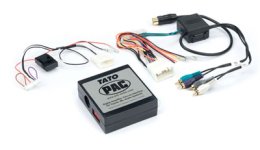
Metra TYTO-01- Converts the analog output of the head unit to the digital signals the Synthesis amp is looking for.
71-1761- Reverse Wiring Harness- Allows you to plug the converter into the Scion head unit without hacking up any vehicle wiring.

Optional:
PT546-00120-US- USB/Aux Adapter
PT546-74120-MC- Bluetooth Mic, but also necessary to enable bluetooth functionality for A2DP streaming.

The install was fairly straightforward once I figured out I needed the "reverse" harness shown above. You have to solder the reverse wiring harness to the Metra converter, but it's just matching colors:

5aobgBPl.jpg


One other odd thing to keep in mind. The "amp" label in the JBL Synthesis system is somewhat of a misnomer, it's really more of a controller. When you remove the stock head unit, you HAVE to center the fade/balance, turn bass/mid/treble adjustment to zero, and turn the stock head unit to MAX before you disconnect the battery. Because the head unit in the JBL Synthesis setup does not control these functions (the "amp" does), if you leave them low, that's now your new "max" values.

Other than that, you'll also have to deal with the poor fitment with the bezel, if that bothers you. The JBL head units are a different shape than the normal ones, so the Scion head units don't fill up the bezel quite as well. You'll either need to source a non-JBL bezel or make an adapter ring.

F8bZmrBl.jpg
 
Last edited:
Thank you for the excellent info. It sounds like you used to have the JBL Synthesis RDS system, is that a correct assumption? I don't know if the RDS is common to all the Synthesis system!

Also it sounds like it'd be a good idea to purchase the non JBL stereo surround bezel to make the fit/finish look nice.

Also, what the optional USB/AUX harness give you? Does this allow the ability to charge your smartphone and to use the headphone jack on the smartphone?

Thanks for your inputs.

Yes, I believe that's correct. I didn't ever get the USB/AUX harness so I couldn't tell you. If you find a good deal on a non JBL bezel, it would be worth picking up, yes.
 
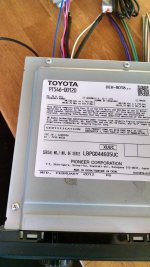
Got my T1819 finally!!!

Ok gents,

I got my radio from a board member who owns a 3rd gen, and also have the following harnesses:
PT546-74120-MC
Metra 71-1761
PT546-00120-CH
PT546-00120-AD (kind of, this one is made for a 3rd gen, so it looks little different)

So, before I tear the dash apart is there anything else I need to have for my JBL Synthesis radio system? I think I still need the Metra TYTO-01 before I start this project, correct? This part is rather expensive on Amazon.
 

Attachments

  • IMG_20160217_071012607.jpg
    IMG_20160217_071012607.jpg
    136 KB · Views: 2,600
  • IMG_20160217_071021549_HDR.jpg
    IMG_20160217_071021549_HDR.jpg
    138.2 KB · Views: 1,692
So, before I tear the dash apart is there anything else I need to have for my JBL Synthesis radio system? I think I still need the Metra TYTO-01 before I start this project, correct? This part is rather expensive on Amazon.

I would go with the PAC TATO over the Metra unit. That's what I'm using now, and it seems to be better than the Metra, quality wise.

Make sure you turn your volume all the way up and center fade/balance before you pull the factory head unit (and remove CDs!).
 
I would go with the PAC TATO over the Metra unit. That's what I'm using now, and it seems to be better than the Metra, quality wise.

Make sure you turn your volume all the way up and center fade/balance before you pull the factory head unit (and remove CDs!).

Ok, thanks for the info. Looks like Amazon has them for a little less price than METRA http://www.amazon.com/PAC-Digital-A...=UTF8&qid=1455734206&sr=1-2&keywords=pac+tato

So, here's a dumb question: is this thing a must have for JBL Synthesis because this system has an external amp?

This link says to just pull out the JBL amp and skip the PAC TATO.
http://www.toyota-4runner.org/engin...ories/102442-scion-radio-jbl.html#post1093091
 
Last edited:
Ok, thanks for the info. Looks like Amazon has them for a little less price than METRA http://www.amazon.com/PAC-Digital-A...=UTF8&qid=1455734206&sr=1-2&keywords=pac+tato

So, here's a dumb question: is this thing a must have for JBL Synthesis because this system has an external amp?

This link says to just pull out the JBL amp and skip the PAC TATO.
http://www.toyota-4runner.org/engin...ories/102442-scion-radio-jbl.html#post1093091

As other posts have stated, the JBL system is not a typical amp so you need the interface. If you gut it, you can install a typical setup since scion HU is more similar to any other aftermarket.

I just finished mine over the weekend. If the PAC or Metra works, the install should be very straight forward if you follow their instructions. Mine didn't go so well. I spent many hours trying to troubleshoot, assuming that I wired something wrong. It ended up being the Metra. Got a new one and now it sounds great. I wasted so many freaking hours.
 
Ok, thanks for the info. Looks like Amazon has them for a little less price than METRA http://www.amazon.com/PAC-Digital-A...=UTF8&qid=1455734206&sr=1-2&keywords=pac+tato

So, here's a dumb question: is this thing a must have for JBL Synthesis because this system has an external amp?

This link says to just pull out the JBL amp and skip the PAC TATO.
http://www.toyota-4runner.org/engin...ories/102442-scion-radio-jbl.html#post1093091

"Pulling the amp" requires essentially installing an entire new speaker system, and running wires, etc. Not really the same category of work as just using an adapter. But as others have said, yes, you have to have an adapter. It'll work fine for the cost, especially if your speakers are in good shape.
 
"Pulling the amp" requires essentially installing an entire new speaker system, and running wires, etc. Not really the same category of work as just using an adapter. But as others have said, yes, you have to have an adapter. It'll work fine for the cost, especially if your speakers are in good shape.


Yiikes, thanks for the explanation. I'll just get the stupid thing and get going on this project.
 
And an adapter like.. Metra 40-GM12 GM Antenna Adapter (...002EXF0G/ref=cm_sw_r_other_awd_-lFZwb6FYRKMR

Not a must have but it will help low power stations and might as well do it while you're in there.

I do have a section of the canyon where I lose NPR every day so it'll be good to pull in low power stations.

What does the METRA 40-GM12 do exactly?

Edit: I think I figured it out. This adapter allows me to plug in the Toyota "mini" antenna plug into the 2-into-1 adapter that I need to buy (amazon link previously). Looks like this unit will work as well and the first reviewer says he has a 4Runner too. http://www.amazon.com/Scosche-Mda-B...7068&s=car&vehicleId=6&vehicleType=automotive
 
Last edited:
Sorry for belaboring this point but I haven't ordered the two-into-one antenna adapter thing. This is also a must have, correct?

Amazon.com: Metra 40-UV43 Male to Female Motorola Antenna Cable: Car Electronics

I used those exact parts and then spent the next week trying to figure out why I was getting bad reception. I thought I didn't wire the power antenna correctly. I then unplugged the Y adapter, plugged the large plug directly in, left the small plug hanging, and reception was perfect.

I say all that not to discourage you from buying it. In fact I think you should. I think you should buy mine. ;)
 
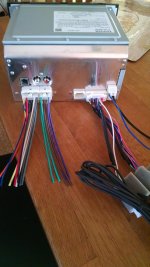
I started my radio install today and need some clarification. Before disconnecting my radio, I made sure to center the fader/balance and crank the volume to MAX.

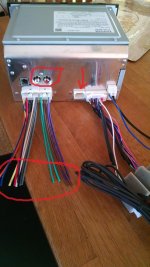
In the picture below, I've circled two things and placed an arrow over the RCA outputs.

Large circle:
I see that I have to connect the following wires to the vehicle: illumination, POS CONST, POS IGN, NEG. The remaining wires are all for speakers. I'm assuming I don't connect the speaker wires since they're all going to the JBL amp in the cargo area, correct?

Small Circle:
Are these RCA jacks for the backup camera?

Arrow:
Does anything go into this connector?

Scion radio marked up.jpg

Here's a picture of the radio belonging to another member on the previous page. It seems that his speaker wires are going straight to his METRA unit, which makes sense to me, hence the confusion with my unit.

Scion radio non JBL unit.jpg

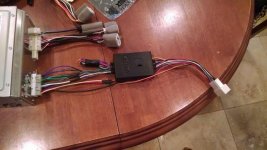
Ok, now it's time for the PAC TATO questions. I have 4 RCA wires, not sure where they need to go!

There is a second harness (left, in the pic below) which is 11 pin and it appears to be an optional harness for some other PAC SWI device that I don't need to worry about, correct?

PAC TATO needs POS ACC, POS CONST, NEG, ILLUM wires to be connected. Seems pretty straight forward.

TATO.jpg

Thanks for your help.
 

Attachments

  • Scion radio marked up.jpg
    Scion radio marked up.jpg
    136.3 KB · Views: 2,860
  • Scion radio non JBL unit.jpg
    Scion radio non JBL unit.jpg
    46.5 KB · Views: 1,806
  • TATO.jpg
    TATO.jpg
    17.4 KB · Views: 1,806
Last edited:
Ok, now it's time for the PAC TATO questions. I have 4 RCA wires, not sure where they need to go!

There is a second harness (left, in the pic below) which is 11 pin and it appears to be an optional harness for some other PAC SWI device that I don't need to worry about, correct?

PAC TATO needs POS ACC, POS CONST, NEG, ILLUM wires to be connected. Seems pretty straight forward.

View attachment 193868

Thanks for your help.

Basically, the wires weren't going straight into the Metra unit, I made that harness by soldering together the Metra harness and the OEM harness that plugs into the unit. "Big Circle" in your pictures, I think. If I remember right, the green, purple, brown grey, etc. are the wires you'll need to solder to the RCA connector wires. I expect you'll need to clip off the RCA connectors.

The "Arrow" is for the OEM USB port, I think.

Hope that helps.
 
Basically, the wires weren't going straight into the Metra unit, I made that harness by soldering together the Metra harness and the OEM harness that plugs into the unit. "Big Circle" in your pictures, I think. If I remember right, the green, purple, brown grey, etc. are the wires you'll need to solder to the RCA connector wires. I expect you'll need to clip off the RCA connectors.

The "Arrow" is for the OEM USB port, I think.

Hope that helps.

I don't think I need to play with any of the speaker wires in the big circle, correct? The JBL amp is already taking care of driving the speakers.
 
I don't think I need to play with any of the speaker wires in the big circle, correct? The JBL amp is already taking care of driving the speakers.

No, you'll need them. Here's how it works:

Scion HU -> 4 analog channels -> PAC TATO -> 2 analog channels, 2 digital information channels -> JBL Amp/controller

The 2 digital information channels are things like fade, balance, etc. that tell the amp how to split up the 2 analog channels to the ten speakers or whatever.
 

Members online

Forum statistics

Threads
278,307
Messages
3,554,054
Members
248,016
Latest member
Advally Service

Trending content

Back
Top