update microSD navigation maps

My 16GB was slightly smaller than the original and failed to take the image so I had to use a 64GB I had laying around. I was able to put the image on it. On the computer the copy looks fine, same folder/file structure. It looks like the radio detects it however the map is black. I'm going to try with some other cards. I have a few more 16GB and a 32GB somewhere.

I wonder if the Toyota cards have a unique serial or model number on the card that the radio checks.

I'd take note of the name of the card and make sure you name it exactly the same.

I'll pull my card out tonight and do some analysis to see if there is any other meta-data that may need to be dup'd.
 
I'd take note of the name of the card and make sure you name it exactly the same.

I'll pull my card out tonight and do some analysis to see if there is any other meta-data that may need to be dup'd.

I assume you mean the volume name. dd with do a byte for byte copy of a device. The data and volume name are identical.

I'm still looking around for a slightly larger 16GB or 32GB card to try.
 
I assume you mean the volume name. dd with do a byte for byte copy of a device. The data and volume name are identical.

I'm still looking around for a slightly larger 16GB or 32GB card to try.

Ya the volume for the partition will be the same, but I'm wondering about any other meta info.

Also, I tried making a backup copy of my map data, but I only had a 32GB card to try. I got the same result, black screen. I have a couple of ideas though..

I ordered a 16GB card btw of the exact same type and will try that here soon too.
 
Ya the volume for the partition will be the same, but I'm wondering about any other meta info.

Also, I tried making a backup copy of my map data, but I only had a 32GB card to try. I got the same result, black screen. I have a couple of ideas though..

I ordered a 16GB card btw of the exact same type and will try that here soon too.
I'm starting to wonder if they implemented DRM.

https://en.wikipedia.org/wiki/Secure_Digital#Card_security
 
We really just need someone to hack the HU. If Jeeps (and Teslas?) can be controlled remotely, we can get Google Maps cached instead of the garbage OEM Nav
 
Take this comment with a HUGE grain of salt...

When my car was broken into about a year ago, I was pleased to find that the thief had not stolen my Navigation SD card.

When I was at the dealer so price compare some of the parts I would need to fix my vehicle, I started talking to one of the Toyota Tech's that (supposedly) is their resident expert on Entune/Nav/Radio. I mentioned my the SD card and he stated "It wouldn't have mattered if they had taken your SD card because it is useless without your radio. Each SD card is locked to a specific radio serial number and each radio serial number is locked to a VIN."

So if he was right, it seems as if there is a unique metadata identifier or serial number that the Nav unit looks for.

Now... whether or not this is true... I have no clue. It is merely something that was told to me by the Toyota tech.
 
Take this comment with a HUGE grain of salt...

When my car was broken into about a year ago, I was pleased to find that the thief had not stolen my Navigation SD card.

When I was at the dealer so price compare some of the parts I would need to fix my vehicle, I started talking to one of the Toyota Tech's that (supposedly) is their resident expert on Entune/Nav/Radio. I mentioned my the SD card and he stated "It wouldn't have mattered if they had taken your SD card because it is useless without your radio. Each SD card is locked to a specific radio serial number and each radio serial number is locked to a VIN."

So if he was right, it seems as if there is a unique metadata identifier or serial number that the Nav unit looks for.

Now... whether or not this is true... I have no clue. It is merely something that was told to me by the Toyota tech.

Anyone have access to two similar 4runners with sdcards? You could try swapping them to test this.
 
sd cards

Anyone have access to two similar 4runners with sdcards? You could try swapping them to test this.

about six months ago I bought an upgrade SD card for my 14 4Runner Trail from Ebay. It plugged in and works just fine. (I think it was from a Highlander or some other model).
 
Last edited:
I couldn't find the MicroSD slot either on my 2013 Ltd. Did you ever find out where or how to update the Navigation for yours? I want to update my maps, but don't know how. Thanks

I'm in the same boat as you. Dealer stated it is not updatable. I'll probably have to purchase an aftermarket head unit. I do not want a separate GPS
 
. . . . When I was at the dealer so price compare some of the parts I would need to fix my vehicle, I started talking to one of the Toyota Tech's that (supposedly) is their resident expert on Entune/Nav/Radio. I mentioned my the SD card and he stated "It wouldn't have mattered if they had taken your SD card because it is useless without your radio. Each SD card is locked to a specific radio serial number and each radio serial number is locked to a VIN."

So if he was right, it seems as if there is a unique metadata identifier or serial number that the Nav unit looks for.

Now... whether or not this is true... I have no clue. It is merely something that was told to me by the Toyota tech.


Did anyone figure out if the SD card is tied to a vehicle?

I can tell you from testing on my 2014 TEP, this is absolutely FALSE and/or misinformation to prevent card stealing. I proved it on my own vehicle.

As posted here preciously,

My 2014 TEP (purchased in March 2014) map data page info shows:
Map Ver 05-33-12 .... 2013-09-2
2013-2014 Ver.1a
(Part# 86271 35011)


Feb 2016 . . .
I plugged in a
Part # 86271 35013

which showed Map Ver 05-33-13 .... 2013-12-3
2013-2014 Ver.1b


March 2017 . . .
Now it seems they have changed to a more universal card/part number that works across multiple vehicle types.

The newest version:

The internal date on the card is 2016-05-1!
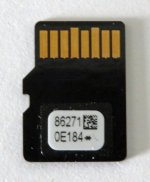
The version number is 86271 oe184
Map Ver 05-36-21 2016-05-1

When I powered up after insertion it also updated my Audio software from 0101D1 to 0101D4 from the card.

It makes sense that they are getting away from the vehicle specific part numbers and including audio software updates helps them in the long run.

When I put my old card back in, it worked just fine. Do this powered off, never on.

No, I don't still have the new card, so don't ask. I was lucky to test with it as it was and that was supervised. (get it?)

NO, the cards are not tied or locked to a specific radio. Of course the part numbers are for use in only the models they are designed for, but not limited or registered to a specific vehicle after use.

 
I can tell you from testing on my 2014 TEP, this is absolutely FALSE and/or misinformation to prevent card stealing. I proved it on my own vehicle.

As posted here preciously,

My 2014 TEP (purchased in March 2014) map data page info shows:
Map Ver 05-33-12 .... 2013-09-2
2013-2014 Ver.1a
(Part# 86271 35011)


Feb 2016 . . .
I plugged in a
Part # 86271 35013

which showed Map Ver 05-33-13 .... 2013-12-3
2013-2014 Ver.1b


March 2017 . . .
Now it seems they have changed to a more universal card/part number that works across multiple vehicle types.

The newest version:

The internal date on the card is 2016-05-1!
The version number is 86271 oe184
Map Ver 05-36-21 2016-05-1

When I powered up after insertion it also updated my Audio software from 0101D1 to 0101D4 from the card.

It makes sense that they are getting away from the vehicle specific part numbers and including audio software updates helps them in the long run.

When I put my old card back in, it worked just fine. Do this powered off, never on.

No, I don't still have the new card, so don't ask. I was lucky to test with it as it was and that was supervised. (get it?)

NO, the cards are not tied or locked to a specific radio. Of course the part numbers are for use in only the models they are designed for, but not limited or registered to a specific vehicle after use.

Part number for this newest card is 86271 oe184?
 
Part number for this newest card is 86271 oe184?

Yes, that's correct.

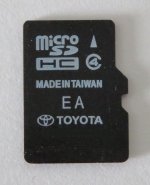
I think I also saw a reference somewhere on the web to a 86271 OE184a, but that's not the one I had. The photo is extreme macro mode so it's a bit fuzzy.

From a Toyota dealer web site:

  • <label>Manufacturer:</label> Toyota
  • <label>Part Number:</label> 86271-0E184
  • <label>Part:</label> Micro SD Card
  • <label>Replaces:</label> 86271-0E180, 86271-0E181, 86271-0E182, 86271-0E183, 86271-35010, 86271-35011, 86271-35012, 86271-35013
 

Attachments

  • IMG_0143a.jpg
    IMG_0143a.jpg
    144.7 KB · Views: 3,179
  • IMG_0144a.jpg
    IMG_0144a.jpg
    134.2 KB · Views: 3,535
Last edited:
Take this comment with a HUGE grain of salt...

When my car was broken into about a year ago, I was pleased to find that the thief had not stolen my Navigation SD card.

When I was at the dealer so price compare some of the parts I would need to fix my vehicle, I started talking to one of the Toyota Tech's that (supposedly) is their resident expert on Entune/Nav/Radio. I mentioned my the SD card and he stated "It wouldn't have mattered if they had taken your SD card because it is useless without your radio. Each SD card is locked to a specific radio serial number and each radio serial number is locked to a VIN."

So if he was right, it seems as if there is a unique metadata identifier or serial number that the Nav unit looks for.

Now... whether or not this is true... I have no clue. It is merely something that was told to me by the Toyota tech.


I know on my wife's 2014 Camry, the dealer must install the map updates. They have to enter your new purchase code serial number into your vehicle with their system. In her case, the map update is installed on an internal storage device. She does not have the micro SD card.

This "might" be what the Toyota tech was referring to in the previous post, except that's not valid or true with the Micro SD map units.
 
Did anyone figure out if the SD card is tied to a vehicle?

I too can verify on the 2014 - 2017 4Runners that all you need is a newer map update microSD card. I bought one off eBay, 2017 update, 86271-OE184. I have the Entune with the hard drive. When I put the OE184 microSSD in, and turned the key to ACC, I was prompted with:
"New software found"
"New software is ready for update. Park your car in a safe location, and turn the engine off and on to complete the update, INSTALL"
"Installing the new software... Please keep the media inserted and do not turn off the engine"
"Software update has been finished successfully to version v0101D4, RESTART"
Process took 9 minutes.

Before: Map version 05-33-08 2013-06-8 (86271-35010)
After: Map Version: 05-36-51 2016-05-1 (86271-OE184)

I read here that Toyota map updates are released in the fall. Toyota drops the price in the spring. I think Toyota dealership quoted me (Spring price) $149 plus labor. Buyer beware on eBay because people are selling old microSD map updates. I was going to upgrade the head unit if I could not get a fair price on the map update microSSD. Dash comes apart pretty easily. I took the dash apart to clean the multi-information center display because previous owner got something on the inside display lens.
 
Last edited:
how exactly do you open the microSD cover plastic

2016 TEP, the microSD text is printed on the lower right "button" but i have no idea how to open it and dont want to break it.

anyone know how?
 
2016 TEP, the microSD text is printed on the lower right "button" but i have no idea how to open it and dont want to break it.

anyone know how?

The "button" is more of a cover. To remove the microSSD HC cover just pull from the bottom. You can feel an opening along the bottom of the cover that you can get your finger nail in.

IMO, don't remove the microSSD card under power. I know typically microSSD/SSD can be removed under power but why chance corrupting the microSSD data. Push the microSSD in to remove.
 

Members online

No members online now.

Forum statistics

Threads
278,306
Messages
3,554,045
Members
248,016
Latest member
Advally Service

Trending content

Back
Top