Aftermarket Stereo

Windows based in dash ??!!

Wanted to share with everyone what I bumped into today -

2Din Car PC Mini ITX SE | Custom Gaming Computers | Gaming Desktops

Windows based navigation system. The housing (case) can actually be purchased and can be built like you would a regular PC

banner_Car_PC_V2_SE.png


Case on Ebay

2Din in Dash 7" Samsung HDMI Touch Screen Monitor Mini ITX USB SD Raspberry Pi | eBay
 
Holy cow, that's awesome! I've built a few mini-ITX machines before, but I never considered putting one in a 2-din car stereo case! I wonder how it would handle heat. When my car has been sitting in the sun, and it's 120 degrees in that sucker, how will that thing handle it? Might just have to leave it off until the A/C can cool the car down a bit. (?)
 
Holy cow, that's awesome! I've built a few mini-ITX machines before, but I never considered putting one in a 2-din car stereo case! I wonder how it would handle heat. When my car has been sitting in the sun, and it's 120 degrees in that sucker, how will that thing handle it? Might just have to leave it off until the A/C can cool the car down a bit. (?)

Right.. not much room for a massive heat sync either..

How cool of a project would that be though?

I did read a review from a Jeep owner that the double din didn't fit his car.. So fitment I'm sure would also be an issue.

But the fact that someone went through the trouble of putting together a case with a samsung touch screen is incredible if you ask me!!
 
On their website I see that they have two models. One is 8.25" deep, and the other is 7.25" deep. The deeper model looks to have slightly better external connectivity, such as USB 3.0, an extra DVI output, etc. But internally they look to be pretty much the same.
 
Kingpin, I just did this and it worked! Thanks! After finishing the camera, I searched everywhere for the reverse wire. I am trying to avoid running the wire all the way to the tail light. Any chance you've found a wire close to the unit? Anyone? Thanks!

[MENTION=2054]Kingpin[/MENTION]s pictures are down, but I'm trying to do this. Anyone know which wire gives the factory backup camera signal so I can splice this into an RCA?
 
Last edited:

Well, I did...haha. I still have the factory camera installed in addition to the new camera and an extra input on my new screen so I figured I'll try and wire it up just for kicks (yes I know I know I'm running out of things to do on this truck). So all the old harnesses are dangling back behind my new stereo.

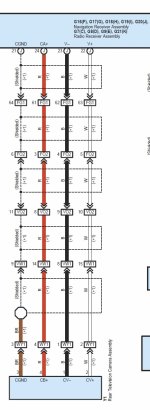
I have already done the mod listed above to trigger my camera with a switch. I'm just trying to find the wire the carries the actual video signal so I can splice it into an RCA plug. According to the wiring diagrams it should be white (if I am reading it correctly). I've done some probing but am coming up empty.
 
Well, I did...haha. I still have the factory camera installed in addition to the new camera and an extra input on my new screen so I figured I'll try and wire it up just for kicks (yes I know I know I'm running out of things to do on this truck). So all the old harnesses are dangling back behind my new stereo.

I have already done the mod listed above to trigger my camera with a switch. I'm just trying to find the wire the carries the actual video signal so I can splice it into an RCA plug. According to the wiring diagrams it should be white (if I am reading it correctly). I've done some probing but am coming up empty.

Ooooooh, fail on my part, I thought you meant the signal to turn on the backup cam, sorry! I was wondering why you were asking something so simple, lol.

This might not be as helpful for you since it's from my 2012 with entune, but I've noticed that the wire coloring generally tends to be similar from year to year (just pinned differently); so maybe it might be a "white w/ black stripe" wire that you're looking for?

86898d1366662560-anyone-has-wiring-diagram-nav-entune-2012_3.jpg


EDIT: Scratch that, I think what you need to find is a pair that has a white and black...now that I think about it I recall there being a thicker wire that runs to the back of the headunit and then splits apart into two wires (right before terminating at the plug), which goes into the plug at two adjacent pins :noidea:
 
Last edited:
Ooooooh, fail on my part, I thought you meant the signal to turn on the backup cam, sorry! I was wondering why you were asking something so simple, lol.

This might not be as helpful for you since it's from my 2012 with entune, but I've noticed that the wire coloring generally tends to be similar from year to year (just pinned differently); so maybe it might be a "white w/ black stripe" wire that you're looking for?

86898d1366662560-anyone-has-wiring-diagram-nav-entune-2012_3.jpg


EDIT: Scratch that, I think what you need to find is a pair that has a white and black...now that I think about it I recall there being a thicker wire that runs to the back of the headunit and then splits apart into two wires (right before terminating at the plug), which goes into the plug at two adjacent pins :noidea:

Hmmm ok I'll check that thanks.

I was basing my searching off of these two posts. Both are for a non-nav backup camera system but I was thinking the info should be similar.

http://www.toyota-4runner.org/5th-gen-t4rs/61082-aftermarket-stereo-27.html#post1322905
http://www.toyota-4runner.org/5th-gen-t4rs/139693-sr5-factory-rear-view-camera-aftermarket-head-unit.html

Nothing is working for me so far, but I'll take another crack at it after dinner probably.
 
Last edited:
Hmmm ok I'll check that thanks.

I was basing my searching off of these two posts. Both are for a non-nav backup camera system but I was thinking the info should be similar.

Nothing is working for me so far, but I'll take another crack at it after dinner probably.

Okay sorry for confusing the shiet out of you, I just remembered the only reason I was able to see that the two wires came in pairs was because I unwrapped the entire factory harness :tape:

You probably won't be able to see it just by looking, lol.

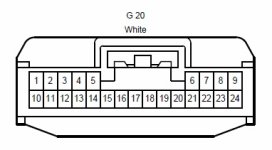
So...to make it up to you, I think I found what you are looking for below.

Pin 22 :)
 

Attachments

  • nav.jpg
    nav.jpg
    120.9 KB · Views: 2,526
  • g20.jpg
    g20.jpg
    22.9 KB · Views: 2,632
Okay sorry for confusing the shiet out of you, I just remembered the only reason I was able to see that the two wires came in pairs was because I unwrapped the entire factory harness :tape:

You probably won't be able to see it just by looking, lol.

So...to make it up to you, I think I found what you are looking for below.

Pin 22 :)

Awesome, thanks! I tried this again today and it's still not working. I'll bet my installer disconnected the factory backup camera when he installed the 360 system. I should be taking the rear garnish off soon so I'll double check the camera then.
 
I'm hoping someone can help with questions regarding a new head unit install in a non-navigation, non JBL 2011 SR5.
First, is it safe to assume that the electrical diagrams available for the 2010 would match the 2011?
I'd like to install one of the new Pioneer units (probably the AVH-3600BHS). I'm trying to retain the vehicle USB port, AUX input, and steering wheel controls. The Axxess AX-TOYUSB-2 USB adapter is supposed to work, and its connector appears to be correct (based on the 2010 Toyota non-nav head unit pictures in this thread). I've also found the Metra 70-8114 harness which is supposed to plug directly into the Metra steering wheel control adapter ASWC-1, providing a direct connection to the vehicle's wiring (20 pin connector) to tie the steering wheel buttons and aux audio connector to the replacement head unit without using any taps/wire cuts. However, no resources specifically state that the 70-8114 will work with the 2011 (only the 2010), so I'd like to hear from anyone that's had any experience with a similar install in a 2011. I'd also like to utilize the existing vehicle microphone for the Pioneer, but I'm a bit confused by the wiring diagram references. I can't match the individual connection designations to specific plugs. I was hoping to locate the vehicle microphone leads and use a 3.5 mm plug to connect them to the Pioneer. I've ID'd the microphone signal wires (pins 2 and 5 at the factory head unit) but don't know whether or not it's an electret that needs power and if the power is supplied separately or on the signal wire and whether or not the Pioneer would supply power on the tip of the 3.5 mm.
Sorry for the long, rambling post.... if anyone has any experience in these areas, and/or can shed some light on how closely the 2011 wiring might match the 2010, it would be greatly appreciated.

EDIT: D'oh! I've just realized the plug cross reference is on the diagram..... "E" is G9. The microphone connections would be on "C", G7.
 
Last edited:
Kenwood

Just fishing. Do not see anyone using Kenwood products, any reason? Looking at the eEcelon DDX791. Do you think the pioneer AVH-x8500KHS is a better unit? Thank for the input.
 
Just fishing. Do not see anyone using Kenwood products, any reason? Looking at the eEcelon DDX791. Do you think the pioneer AVH-x8500KHS is a better unit? Thank for the input.

Most of us seem to prefer the pioneer. I wish I would have gotten a navigation unit.

Something like this would be my pick if I had to do it over. I really wanted dual zone too though.

http://amzn.to/OW6rCM
 
Just fishing. Do not see anyone using Kenwood products, any reason? Looking at the eEcelon DDX791. Do you think the pioneer AVH-x8500KHS is a better unit? Thank for the input.


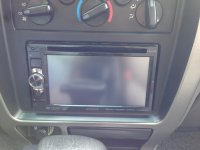
I have been a Kenwood fan for quite some time.
 

Attachments

  • IMG_0152.jpg
    IMG_0152.jpg
    134.6 KB · Views: 2,197
Just fishing. Do not see anyone using Kenwood products, any reason? Looking at the eEcelon DDX791. Do you think the pioneer AVH-x8500KHS is a better unit? Thank for the input.


Pioneer has a better iPod interface. If you constantly use that. If you use the navigation use kenwood and don't look back.
 
Just fishing. Do not see anyone using Kenwood products, any reason? Looking at the eEcelon DDX791. Do you think the pioneer AVH-x8500KHS is a better unit? Thank for the input.

I liked the fact that the Kenwood had an actual volume knob, but it was limited in how it handled music files on a USB hard drive. The Pioneer handled more files/folders, which was a deciding factor for me.
 
I'm hoping someone can help with questions regarding a new head unit install in a non-navigation, non JBL 2011 SR5.
First, is it safe to assume that the electrical diagrams available for the 2010 would match the 2011?
I'd like to install one of the new Pioneer units (probably the AVH-3600BHS). I'm trying to retain the vehicle USB port, AUX input, and steering wheel controls. The Axxess AX-TOYUSB-2 USB adapter is supposed to work, and its connector appears to be correct (based on the 2010 Toyota non-nav head unit pictures in this thread). I've also found the Metra 70-8114 harness which is supposed to plug directly into the Metra steering wheel control adapter ASWC-1, providing a direct connection to the vehicle's wiring (20 pin connector) to tie the steering wheel buttons and aux audio connector to the replacement head unit without using any taps/wire cuts. However, no resources specifically state that the 70-8114 will work with the 2011 (only the 2010), so I'd like to hear from anyone that's had any experience with a similar install in a 2011. I'd also like to utilize the existing vehicle microphone for the Pioneer, but I'm a bit confused by the wiring diagram references. I can't match the individual connection designations to specific plugs. I was hoping to locate the vehicle microphone leads and use a 3.5 mm plug to connect them to the Pioneer. I've ID'd the microphone signal wires (pins 2 and 5 at the factory head unit) but don't know whether or not it's an electret that needs power and if the power is supplied separately or on the signal wire and whether or not the Pioneer would supply power on the tip of the 3.5 mm.
Sorry for the long, rambling post.... if anyone has any experience in these areas, and/or can shed some light on how closely the 2011 wiring might match the 2010, it would be greatly appreciated.

EDIT: D'oh! I've just realized the plug cross reference is on the diagram..... "E" is G9. The microphone connections would be on "C", G7.

Update: I've installed the Pioneer head unit and can report that the Metra 70-8114 harness does in fact match the 20 pin 4Runner plug and is the correct pinout for steering wheel controls and the factory 3.5 mm AUX input. On my system, the aux input exhibited a ~ 20 Hz noise that was present with the ignition off and did not appear related to cable routing/induction, and was not related to the steering wheel control adapter. However, the noise disappears completely when the connection is actually terminated into a device. I can't report on the AX-TOYUSB-2 USB adapter because I inadvertently ordered the AX-TOYUSB (version 1) adapter, which definitely does not fit. So far, no luck getting the steering wheel phone controls to operate the Pioneer voice command/hook functions, even with manual programming. Metra is saying the Pioneer does not accept those commands via the 3.5 mm control input; I haven't verified that yet. The buttons work if other functions are assigned.
 
Just fishing. Do not see anyone using Kenwood products, any reason? Looking at the eEcelon DDX791. Do you think the pioneer AVH-x8500KHS is a better unit? Thank for the input.

Pulling the trigger today on a Pioneer AVH 5600 BHS with satellite and steering wheel controls. Installer says he can maintain the original USB as well as the dimming when turning on the headlights. He is also going to try to tap into the steering wheel phone buttons but is not promising that he will get them to work.
 

Members online

Forum statistics

Threads
278,312
Messages
3,554,085
Members
248,016
Latest member
Advally Service

Trending content

Back
Top