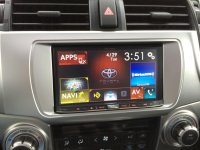
Aftermarket Stereo

Pulling the trigger today on a Pioneer AVH 5600 BHS with satellite and steering wheel controls. Installer says he can maintain the original USB as well as the dimming when turning on the headlights. He is also going to try to tap into the steering wheel phone buttons but is not promising that he will get them to work.

I've still not been able to get the phone controls to work; the buttons themselves work for any other function I care to program, but I'm starting to suspect that the Pioneer (AVH-X3600BHS) does not support those commands via the 3.5 mm input. I've sent a note to Pioneer support but have yet to hear back...........
 
I have a Pioneer AVIC-Z110 with bluetooth controls. The Metra ASWC works with the audio steering wheel controls as well as the blutooth controls.

The bluetooth controls did not work by default... I had to manually program the ASWC to send the proper blue tooth commands.

Manual configuration is in the installation instructions. It was a little tedious, but it only took about 5-10 minutes.

lowrange, you don't happen to have the instructions at this time, do you? I had a AVH5600 installed by a shop and they could not get the phone connections to work. Thanks for the help, Keith
 
I've still not been able to get the phone controls to work; the buttons themselves work for any other function I care to program, but I'm starting to suspect that the Pioneer (AVH-X3600BHS) does not support those commands via the 3.5 mm input. I've sent a note to Pioneer support but have yet to hear back...........

My installer could not get the phone controls working either. He wants me to come back, which I will do. He also set the up and down controls to seek and not to go to the next preset. He will have to fix that as well as the mode button. Currently it just mutes the volume to a low level. I want it to change the modes as it should. Does your do that? I installed a AVH 8500BHS. Sound is way better than OEM. I only have the 8 speaker system but the wife even says it sounds better which says a lot.

Thanks, Keith
 
My installer could not get the phone controls working either. He wants me to come back, which I will do. He also set the up and down controls to seek and not to go to the next preset. He will have to fix that as well as the mode button. Currently it just mutes the volume to a low level. I want it to change the modes as it should. Does your do that? I installed a AVH 8500BHS. Sound is way better than OEM. I only have the 8 speaker system but the wife even says it sounds better which says a lot.

Thanks, Keith

If I try to include the telephone controls in the automatic programming sequence, they appear to do nothing at all; if skipped as part of automatic programming, they're mapped as voice command = attenuation/mute, and on/off hook = folder prev/next. I'm sure that's just where they happen to land in the sequence of commands for the ASWC-1.
Since my original post, Pioneer has responded:
"Thank you for contacting Pioneer Electronics (USA) Inc.
The Pioneer will do the answer and end call functions through the wired remote. It will not initiate the calls."
I take that to mean that the on-hook/off-hook buttons are supposed to work with the AVH-X3600 wired remote connection, but the voice command button will not. I'm going to pop the vent controls cover off again (that's where I left the ASWC-1 for easy access) and manually program the on/off hook buttons and see if they'll operate when the Pioneer is in phone mode. If that works, then that will be a step in the right direction. It's possible to invoke the voice command feature on the Pioneer by holding the big "home" button down, so that's almost as convenient as the steering wheel button.

EDIT: I just finished manual programming... the on-hook/off-hook buttons work correctly, and I programmed the voice command button for "mute".
 
Last edited:
If I try to include the telephone controls in the automatic programming sequence, they appear to do nothing at all; if skipped as part of automatic programming, they're mapped as voice command = attenuation/mute, and on/off hook = folder prev/next. I'm sure that's just where they happen to land in the sequence of commands for the ASWC-1.
Since my original post, Pioneer has responded:
"Thank you for contacting Pioneer Electronics (USA) Inc.
The Pioneer will do the answer and end call functions through the wired remote. It will not initiate the calls."
I take that to mean that the on-hook/off-hook buttons are supposed to work with the AVH-X3600 wired remote connection, but the voice command button will not. I'm going to pop the vent controls cover off again (that's where I left the ASWC-1 for easy access) and manually program the on/off hook buttons and see if they'll operate when the Pioneer is in phone mode. If that works, then that will be a step in the right direction. It's possible to invoke the voice command feature on the Pioneer by holding the big "home" button down, so that's almost as convenient as the steering wheel button.

EDIT: I just finished manual programming... the on-hook/off-hook buttons work correctly, and I programmed the voice command button for "mute".

jtiner, how hard was it to get the on/off hook to work? Taking mine back to the installer. Did you need to se the LED display and exactly what page of the directions did you follow? Thanks for the help, Keith
 
Roadstar01-
The manual programming was fairly easy. There are two documents available, one for the original ASWC and one for the ASWC-1. The manual programming instructions are the same, but the ASWC instructions are laid out in a much easier to follow way. Not sure if forum rules allow links so I'll send it as a PM.
At some point in the instructions there's a typo and the instructions say "then the LED will stop flashing and turn solid green" and it actually turns red or vice versa, but the rest is easy to follow.
You just reset the whole ASWC-1 by holding the reset for more than 10 seconds, then momentarily press the steering wheel control buttons in particular sequences listed in the instructions.
When I finished manually programming the buttons, the unit correctly set itself for "Pioneer" mode, and I did not have to manually set the radio type.
EDIT: I forgot you asked about the specific page; manual programming instructions start at page 8 on the ASWC .pdf I used. Those had all of the steps/tables together in one area and were a little more concise than the ASWC-1 instructions.
 
Last edited:
Update: I've installed the Pioneer head unit and can report that the Metra 70-8114 harness does in fact match the 20 pin 4Runner plug and is the correct pinout for steering wheel controls and the factory 3.5 mm AUX input.

This is helpful and correct -- the correct adaptor for the 2013 4Runner w/ base radio is the 70-8114, not the AX-TOY28SWC.
 
Ok guys, have some questions/thoughts I wanted to share. Been thinking about getting aftermarket speakers. Was thinking of getting 6x9 coaxials up in front doors, 6.5" components for rear doors, but putting the tweeter up in the dash up front. Then maybe 6.5" coaxials in the gate. Anyone else do this? Just stock SR5 Premium sound with navigation. Don't want to go crazy, not huge audiophile, but would like upgrade.

Thoughts on brands? Would like to at least keep or hopefully even better the bass from stock. Also, what do you guys think this will cost installed going with average setup? Thanks.
 
Ok guys, have some questions/thoughts I wanted to share. Been thinking about getting aftermarket speakers. Was thinking of getting 6x9 coaxials up in front doors, 6.5" components for rear doors, but putting the tweeter up in the dash up front. Then maybe 6.5" coaxials in the gate. Anyone else do this? Just stock SR5 Premium sound with navigation. Don't want to go crazy, not huge audiophile, but would like upgrade.

Thoughts on brands? Would like to at least keep or hopefully even better the bass from stock. Also, what do you guys think this will cost installed going with average setup? Thanks.

I personally would go to Best Buy or somewhere and listen to the various speakers. People used to say you shouldn't mix and match - i.e. go with pioneer head unit and speakers. Don't really know how true that is anymore, or ever, really. It's probably more important to have all of the speakers be the same. Also, i don't think they make brackets for the 4Runner, so you'd have to make them to fit any speakers - they do have connectors so you can just plug and play. YMMV on the price.
 
Ok guys, have some questions/thoughts I wanted to share. Been thinking about getting aftermarket speakers. Was thinking of getting 6x9 coaxials up in front doors, 6.5" components for rear doors, but putting the tweeter up in the dash up front. Then maybe 6.5" coaxials in the gate. Anyone else do this? Just stock SR5 Premium sound with navigation. Don't want to go crazy, not huge audiophile, but would like upgrade.

Thoughts on brands? Would like to at least keep or hopefully even better the bass from stock. Also, what do you guys think this will cost installed going with average setup? Thanks.
the front doors are mid-woofer only in the stock configuration, so putting coaxials there would be a waste.

go back and skim this thread. everything you're asking about has been done time and time again...
 
I don't comment too often on here, but I've been following this thread since I just got a Pioneer AVIC-8000NEX installed in my 2010 Limited. The installer is telling me that they used the shark fin adapter for the SiriusXM antenna connection, but I am having A LOT more dropouts with the new install than with the factory radio. Does anyone know where the SiriusXM antenna run is so I can verify that they did use the factory shark fin antenna? Does anyone have any ideas for how to resolve this?
 
Microphone placement

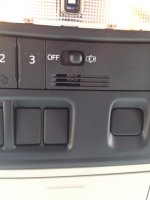
I see where people on the forum have discussed where to put the aftermarket mic. I just put mine in the same spot as the factory mic. Remove the overhead console and the factory mic will easily move out of place. I used the factory mic to wedge the new mic in place.

Edit (5/24/14): I was having issues with Siri (as in, it never understood me) when driving on the interstate, so I put in some open cell foam around the mic, over the slots, etc. to deaden the road noise. Hope it works (probably won't).

IMG_0485.jpg
 

Attachments

  • IMG_0485.jpg
    IMG_0485.jpg
    132.2 KB · Views: 5,758
Last edited:
I don't comment too often on here, but I've been following this thread since I just got a Pioneer AVIC-8000NEX installed in my 2010 Limited. The installer is telling me that they used the shark fin adapter for the SiriusXM antenna connection, but I am having A LOT more dropouts with the new install than with the factory radio. Does anyone know where the SiriusXM antenna run is so I can verify that they did use the factory shark fin antenna? Does anyone have any ideas for how to resolve this?


So I answered my own question... Slide the front passenger seat all the way back, flip forward the carpet under the front of the seat, and voila!

I also think I discovered why my signal sucks... The installer CUT my factory antenna wire and SPLICED the new wire into it!!!! I offered to buy the adapter for them to use, but they told me not to!!! Before I get too pissed, is the antenna splice condition all-or-nothing? In other words, is it either going to transmit the full signal or nothing at all, or is it possible for the condition of the wire to affect antenna signal strength?
 
I like your bluetooth mic location

I see where people on the forum have discussed where to put the aftermarket mic. I just put mine in the same spot as the factory mic. Remove the overhead console and the factory mic will easily move out of place. I used the factory mic to wedge the new mic in place.

View attachment 117750

I like your bluetooth mic location; thats the same place i'm hiding mine once i receive my Pioneer Avic-8000NEX.
Can't wait.:drummer:
 
I like your bluetooth mic location; thats the same place i'm hiding mine once i receive my Pioneer Avic-8000NEX.
Can't wait.:drummer:

Thanks, it was really easy to route there, especially because I already had the lower dash off. I installed a 4000NEX -- didn't need the navigation, but wanted the larger screen. I am, to say the least, very happy with the unit. Bluetooth is a little quirky, hopefully the bugs will get squished with the firmware update.

If you have any questions, feel free to ask.

FYI - my parts list:

Scosche TA2106B
Pioneer AVH-4000NEX
Metra 70-1761 Radio Wiring Harness For Toyota 87-Up Power 4 Speaker
Metra ASWC-1 Universal Steering Wheel Control Interface
Metra 70-8114
Genuine DIYBypass for All AVH Pioneer (you won't need this for the 8000, there's a software hack after you permanently ground the green wire)
Pioneer ND-BC6 Universal Rear View Camera
Axxess AX-FMUSBEXTCB (I added a USB port to the center console)
Hacked-up old USB extension cable (for keeping stock USB plug)
 
Last edited:
NicNeo, i'm looking at getting the NEX8000 as well for my 2010 SR5, along with these speakers JL Audio C2690TX 6X9, C2-650 x 6.5 and C2-075ct tweeters. Let me know when you get that installed and how you like it. I've been holding off for a long time from getting a new head unit. Almost got the AVIC series multiple times but this NEX seems like it could be the one.
 
NicNeo, i'm looking at getting the NEX8000 as well for my 2010 SR5, along with these speakers JL Audio C2690TX 6X9, C2-650 x 6.5 and C2-075ct tweeters. Let me know when you get that installed and how you like it. I've been holding off for a long time from getting a new head unit. Almost got the AVIC series multiple times but this NEX seems like it could be the one.

I just had an AVIC-8000NEX installed in my 2010 4Runner Limited on Friday... I LOVE it! It's fast, beautiful, and intuitive. The GPS is better than Garmin. The capacitive touch screen works well (WAY better than a resistive touch screen, but not as smooth as a modern smart phone or tablet). Plus, if you have an iPhone, you'll get to use Apple CarPlay starting early this summer with a firmware update! The unit supports iDataLink Maestro SW, and will support Maestro RR with a firmware update early this summer.

There is NOTHING I don't like about this unit!
 

Attachments

  • IMG_7457.jpg
    IMG_7457.jpg
    125.7 KB · Views: 9,778
I just had an AVIC-8000NEX installed in my 2010 4Runner Limited on Friday... I LOVE it! It's fast, beautiful, and intuitive. The GPS is better than Garmin. The capacitive touch screen works well (WAY better than a resistive touch screen, but not as smooth as a modern smart phone or tablet). Plus, if you have an iPhone, you'll get to use Apple CarPlay starting early this summer with a firmware update! The unit supports iDataLink Maestro SW, and will support Maestro RR with a firmware update early this summer.

There is NOTHING I don't like about this unit!

That looks freakin' awesome man; still can't wait to get mine.
 
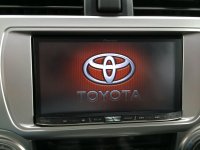
Here are a Toyota splash and background jpeg that I made in Photoshop for my AVIC-8000NEX, but they should work on any of the NEX units (and most likely others as well).

On the NEX homepage, the small Toyota logo on the background jpeg fits perfectly in the middle of the icons (see my previous post). The orange honeycomb background is the same color as the panel lights, so it ties everything together.

For the Source/App screens, I set the background to the Pioneer stock honeycomb pattern with the orange theme... the source screens have have so much info on them that there isn't a good place to put a logo.

(EDIT) NOTE: The forum picture manager reduced the file size of these pics... not sure how they will look on your head unit! I tried zipping them up, but the zip file was too big to post. You can find the full size jpegs here... http://avic411.com/index.php?/topic/36-custom-background-gallery/?p=277955
 

Attachments

  • Toyota Background.jpg
    Toyota Background.jpg
    31.7 KB · Views: 13,881
  • Toyota Splash.jpg
    Toyota Splash.jpg
    58.5 KB · Views: 9,676
Last edited:

Members online

Forum statistics

Threads
278,311
Messages
3,554,082
Members
248,016
Latest member
Advally Service

Trending content

Back
Top