Aftermarket Stereo

Ok, so I can confirm that the AX-TOY28SWC adapter works for my 2014 SR5P with stock navigation. Connected it to the OEM harness, and connected power and ground wires, then connected box from ASWC-1. Little disappointed in the controls gained though. Volume works, and the up and down buttons to scroll or move from folder to folder. And the mode button works. However, the right and left don't work at all, and the middle button or back buttons don't work. I was really hoping that this would work to go through folders on my USB card and search for songs easier, like with the stock setup.

So it works, just not to the extent I was hoping.
 
Back of Non Nav SR5 /TE 2010
BackofStereo.jpg~original

Has anyone been able to get the AX-TOYUSB-2 adapter to work with the non-JBL system? I am assuming it is the upper white plug in the pic. The harness that connects there is too wide for the adapter, and it's the smallest plug I can find back there.
 
I am asking about the AX-TOYUSB-2 not the AX-TOY28SWC which is the 28 pin adapter (which does fit). The AX-TOYUSB-2 is the USB adapter. Confusing names.

USB Adapter

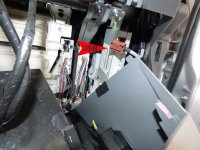
The plug for this adapter on the non JBL is behind the glove box. The stock plug connects to a silver box (labeled Panasonic) mounted vertically on the passenger kick panel behind the glove box (on mine anyway).

You'll need to disconnect the stock plug from this silver box, connect it to the adapter, and run the adapter to the stereo.
 
The plug for this adapter on the non JBL is behind the glove box. The stock plug connects to a silver box (labeled Panasonic) mounted vertically on the passenger kick panel behind the glove box (on mine anyway).

You'll need to disconnect the stock plug from this silver box, connect it to the adapter, and run the adapter to the stereo.

I will have to look for that box tonight. I don't remember seeing it in the kick panel but didn't look too far up.
 
The plug for this adapter on the non JBL is behind the glove box. The stock plug connects to a silver box (labeled Panasonic) mounted vertically on the passenger kick panel behind the glove box (on mine anyway).

You'll need to disconnect the stock plug from this silver box, connect it to the adapter, and run the adapter to the stereo.

You were right on the money with this one. Never would have thought to look there. Real pain to get to.
 

Attachments

  • stereo43.jpg
    stereo43.jpg
    66.6 KB · Views: 2,752
Yup, that's the one!
Yeah, it is a PITA to get to. I just zip tied the adapter cable to the loom that the stock USB wire ran in back to the stereo.
 
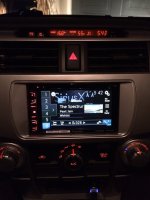
So todays lessons learned. There was one issue with the new head unit I couldn't figure out. The dimming didn't work. I tried auto, manual, day, night, nothing was triggered by the light switch. Pulled everything back out, tested the orange connection, 12v when the headlights are on, but not the parking lights, which is OK. Still can't get it to dim.

Then I turn the key to on, nothing... wait... it slowly dims. Put the key back to ACC, nothing.

So the key has to be on, and the dimming function is very gradual. I was looking for the instant dim the way every other stereo I ever owned functioned.

So for those with a Pioneer AVHX series (maybe others) now you know what to look for if your auto dimming doesn't seem to work.
 
Can anyone tell me what they are replacing their dash speakers with currently?

I can't find any of the infinity kappa 32.9c for sale anywhere from this thread http://www.toyota-4runner.org/5th-g...rence-kappa-3-5-dash-speakers.html#post689563

I'd like to drop something in here without doing a ton of cutting.

I used these.

Focal IS 690TOY
6"x9" component speaker system designed to fit select Toyotas

Pretty happy with the way they sound.
Minimum cutting involved.
 
I see where people on the forum have discussed where to put the aftermarket mic. I just put mine in the same spot as the factory mic. Remove the overhead console and the factory mic will easily move out of place. I used the factory mic to wedge the new mic in place.

Edit (5/24/14): I was having issues with Siri (as in, it never understood me) when driving on the interstate, so I put in some open cell foam around the mic, over the slots, etc. to deaden the road noise. Hope it works (probably won't).

View attachment 117750

Any pointers on running the microphone wire from the dash at the head unit up to that location? particularly curious about entering dash from A-pillar, and also route from A-pillar along front edge of headliner.

Thanks!
 
Ended up routing the microphone next to the overhead console. Debated pulling the factory mic and replacing with the Pioneer mic, but preferred to leave flexibility to reposition the mic, and mounted on the driver's side edge of console, next to visor.

Love the install, and the Pioneer AVH-X2700BS. Install was in family member's 2010, and was replacing the Kenwood DDX392 I installed 2 months ago (bluetooth quality was terrible on Kenwood). Very pleased with fit, and sound quality, even with stock speakers!

Thanks to Nororola for advice on the mic routing!
 

Attachments

  • IMG_2784r.jpg
    IMG_2784r.jpg
    105.2 KB · Views: 2,075
Last edited:

Members online

Forum statistics

Threads
278,312
Messages
3,554,089
Members
248,016
Latest member
Advally Service

Trending content

Back
Top