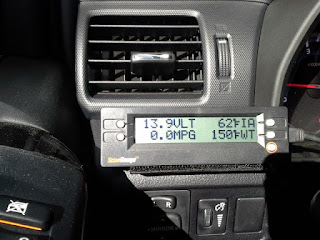
Attn: Scanguage II Owners!

[MENTION=178113]ScanGauge[/MENTION] Can you please explain the procedure to get the free update? On your website it takes me to the cart where I need to pay. I have 2 of them I need to get updated. I'll split the cost with you.
 
Hmmm, hard to say why exactly it's not staying on well. Normally the OBDII connection is pretty snug once it's been pressed all of the way on. If you'd like, PM me your shipping info and I'll get a new cable sent out to you. No charge for the cable since we're trying to fix an issue.

[MENTION=178113]ScanGauge[/MENTION], I received the new cable a couple days ago. So far, so good! Two days of driving and no disconnects! Thank you very much for your help and the new cable, I really appreciate it. :thumb3:
 
[MENTION=178113]ScanGauge[/MENTION] Can you please explain the procedure to get the free update? On your website it takes me to the cart where I need to pay. I have 2 of them I need to get updated. I'll split the cost with you.

Send me a PM and I'll get you set up with an update for both of your units.

[MENTION=178113]ScanGauge[/MENTION], I received the new cable a couple days ago. So far, so good! Two days of driving and no disconnects! Thank you very much for your help and the new cable, I really appreciate it. :thumb3:

Excellent - good to hear the new cable worked!
 
I received my Scanguage this afternoon. Will have to look up the latest instructions and see if I can find the tire temps, tire pressures and hopefully transmission temp gauges.
 
2018 4Runner No TPMS in spare tire. No changes made to Scangauge after unboxing

I measured my tire temps with a laser thermometer dot placed on the metal stem of the TPMS sensor. A little earlier the right side tires had some sun.

LF 60
LR 57.5
RF 70.5
RR 61.5

Scangauge readouts.

TP1 BLANK
TP2 BLANK
TP3 BLANK
TP4 BLANK
TP5 BLANK

TM1 55.1
TM2 55.1
TM3 55.1
TM4 55.1
TM5 -14.5

TT1 BLANK
TT2 BLANK
TT3 BLANK
TT4 BLANK
TT5 BLANK

1TT 66 (RR?)
2TT 59 (LR?)
3TT 78 (RF?)
4TT 60 (LF?)
5TT -40

Looks as if only the n-TT series are reading about right.
 
What is the latest firmware where TPMS works? Looks like I have 4.42. I just received mine from Amazon today and it will not display Tire pressure.

Tire pressure monitoring is the main reason I purchased this. [MENTION=178113]ScanGauge[/MENTION]
 
Last edited:
What is the latest firmware where TPMS works? Looks like I have 4.42. I just received mine from Amazon today and it will not display Tire pressure.

Tire pressure monitoring is the main reason I purchased this. [MENTION=178113]ScanGauge[/MENTION]

4.45 is the firmware when the TPMS capabilities were first added, so we'll need to get your unit updated. If you'd like, send me a PM and I'll get you set up with a free update since you just purchased it.
 
[MENTION=178113]ScanGauge[/MENTION] (or anyone on this forum) is there a function on the Scangauge II to have "presets" to quickly rotate through saved groups of 4 guages?

Now I have my tires set to the order of tire rotation (left top gauge is driver front, left bottom gauge is driver rear, etc) it would be nice to save all 4 settings saved as a preset screen. I would love to have the ability to have other user defined presets for groups of 4 gauges for things like gas mileage, performance, temps, etc.

As-is now, I have to cycle through all buttons each time I want to see the gauges I want to see at once. It wasn't such a problem before, but now that I have the tire gauges and want them to display in a certain order, its a PITA to cycle through the buttons when I want to switch to other gauges and back again.

Is this something that you could program into the next firmware release?


[MENTION=178113]ScanGauge[/MENTION]
I was thinking the same thing. Right now the lower right HOME button with red circle will take you out of the screen with the 4 gauges and back to HOME screen. Be nice if this button could change/scroll to a different/next page (or pages) of 4 gauges before returning to main menu.

I'll see what I can do. Perhaps on a long 'HOME' button press instead of going home it would switch to a page of 4 pre-defined gauges on the gauge screen. First step would be to figure out a way for the user to set the 4 gauges they'd want it to switch to.
[MENTION=178113]ScanGauge[/MENTION] .....Any luck creating a second "page"?
 
[MENTION=178113]ScanGauge[/MENTION] .....Any luck creating a second "page"?

I unfortunately haven't had a chance to work on it much. I have an idea on what I'd like to try though. It's just a matter of figuring out exactly how to implement it and then finding the time to do so.
 
Good spot to mount a ScanGuage

20180318_101522.jpg


20180318_101345.jpg
 
Good spot to mount a ScanGuage

20180318_101522.jpg


20180318_101345.jpg
Hello. I just purchased a ScanGauge 2 today for my '18 TRD Off Road. I followed the installation instructions and when plugged in to the sensor, the tach and temp gauge stopped working and several dash indicator lights came on. At the end of the day, it was unable to connect.

Any thoughts as to what the issue may be?
Thanks.

Sent from my SM-N950U using Tapatalk
 
Hello. I just purchased a ScanGauge 2 today for my '18 TRD Off Road. I followed the installation instructions and when plugged in to the sensor, the tach and temp gauge stopped working and several dash indicator lights came on. At the end of the day, it was unable to connect.

Any thoughts as to what the issue may be?
Thanks.

Might be a bad cable.

If you unplug the scanguage did your tach and temp gauge work correctly?

Did you buy the Scanguage new or used?

Did you try plugging it into a different car?

The OBD2 connector should be an easy press in fit as well as the ethernet cable should snap into either Scanguage jack. Make sure you did not force either one of them to fit incorrectly.
 
Another very happy customer with latest firmware and tire pressure \temperature x-gauges on Scangauge II. What a great experience working with OP-Thank you sir! What a great people, company and product!:clap2:
 
Sent my scangauge 2 in for software update and add the tire pressure codes. Amazing fast turn around time. The day the unit arrived, it was updated and completed then assigned a tracking number. Got it a couple days later.
64a03d536e756b55e5c9c50df54a9180.jpg


Sent from my iPhone using Tapatalk
 
Anyone able to provide the exact codes used? i notice everyone mentioning using TM codes which i cannot find on the scangauge website. I have tried all the TP ones they are listing and none show any pressures. I have a brand new scangauge II firmware 4.51 attempting on a 15 trail premium 4runner.
 
I added the xgauge stuff for the tpms, but nothing is showing up on the gauges. I used the codes from the ScanGauge website (both Method 1 and Method 2) but nothing is showing. Anybody have any ideas? I bought this recently and confirmed I have version 4.5x so it should be compatible.
 
I added the xgauge stuff for the tpms, but nothing is showing up on the gauges. I used the codes from the ScanGauge website (both Method 1 and Method 2) but nothing is showing. Anybody have any ideas? I bought this recently and confirmed I have version 4.5x so it should be compatible.

There are several different sets of codes in pairs of four (one for each wheel). Try code one from each set till you get an accurate reading. Once you get one that works you know you have the proper code set and you can program them all in.
 
Also when you get to a code like TM1, let it sit there a minute or two. Mine would always start at 14.5 and take a minute to get the actual pressure.

In fact just set them to

TM1 TP1
1TT TT1

That would be 1 tire for all four possible locations. Let it run 5 minutes like that. If one pops in, then set all others to that name TM, TP, et. 2,3,4
 

Members online

No members online now.

Forum statistics

Threads
278,315
Messages
3,554,104
Members
248,016
Latest member
Advally Service

Trending content

Back
Top