Entune Retrofit - Basic Non-Nav, Non-JBL, to Entune Swap

rockja

New member
So I have finally (mostly) completed this swap. I have searched the forums and found some good information but found myself with a lot of questions that needed to be answered. Instead of hijacking another thread, I decided to start my own write up. My setup is a 2010 SR5 with the basic stereo head unit. I’ve been wanting to upgrade for a long time but kept holding back because I either didn’t have the info I needed, or I couldn’t find the right deal on an Entune. I really like the factory look and wanted something that would integrate well. A hat tip to these posts that got me most of the way there.
http://www.toyota-4runner.org/5th-gen-t4rs/202001-oem-head-unit-swap-non-jbl-entune.html
https://www.tacomaworld.com/threads/2014-non-jbl-w-navigation-retrofit-diy-w-info-part-numbers.318616/

Wiring diagrams (can’t remember the thread I pulled this from, but thank you!)
http://www.toyota-4runner.org/attachments/5th-gen-t4rs/157284d1431460549-2015-trail-nav-wiring-diagram-bui.pdf
http://www.toyota-4runner.org/attachments/5th-gen-t4rs/157285d1431460567-2015-trail-nav-wiring-diagram-sep.pdf

I’ve spent hours researching connectors, wiring diagrams, photos, compatible parts etc. and have come up with this list of factory and aftermarket parts. This, I believe, is the least expensive route after comparing everything and options.

Parts:
Entune from a 2017 Trail bought from a forum member
$27 (plus $7 for shipping) 20/8 to 28 pin adapter PT546-00120-CH https://parts.mcgeorgetoyota.com/oem-parts/toyota-audio-cd-deck-pt54600120ch
$8.50 DHT Electronics External GPS https://www.amazon.com/dp/B00D1G6HCA?ref=yo_pop_ma_swf
$13.27 Metra 40-LX21 Lexus Radio Antenna Adaptor 2009-Up https://www.amazon.com/dp/B003VYTGUC/ref=cm_sw_r_cp_api_RJVQBbK18S5FC
$15 24 pin connector for back-up camera AX-TOYCAM3 https://www.amazon.com/dp/B01E4B6UQS/ref=cm_sw_r_cp_api_6RgOBb6GH88DE
$11.25 USB adapter https://www.amazon.com/dp/B00XKUVJQG/ref=cm_sw_r_cp_api_RuiNBbCTGVTDB
Listed for reference, but I didn’t buy this part since I don’t use the USB.
$28 Sat Radio Adapter XMM-TOY Sat. Radio Antenna Adapter Cable for Toyota and Subaru :: Antennas, Adapters and Boosters :: Car Stereos and components
Listed for reference, but I didn’t buy this part since I don’t use sat radio.

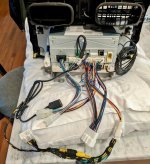
The thing that was throwing me for biggest loop was understanding what each plug on the back of the Entune was for. Below is a photo that gives a high level understanding.
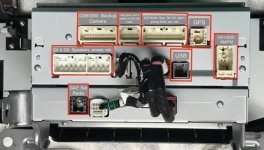
Entune back w:labels 2016.jpg

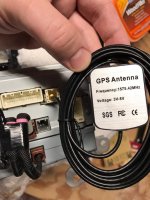
After studying a wiring diagram, I could verify what parts to look for. I think the GPS antenna was the biggest “leap of faith” on this project. Obviously spending $200 - $300 on a factory antenna was not going to cut it, however, there isn’t one on the market with that connector plug. I even tried to search for just the connector on the Toyota parts site, but I don’t think Toyota sells it. I spent a ton of time researching GPS antennas and connectors and finally decided to try the one in the link above and it fits perfectly! Trust me, there’s no falling out with this thing, it’s on there. That custom Toyota connector is a joke. FYI, the radio connectors (nav, sat and AM/FM)… (maybe this was obvious to some, but definitely not me) for the record, they’re all female SMB connections.
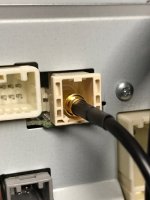
GPS Connection.jpg
GPS Antenna.jpg

To place the GPS antenna, remove the clock in the dash (two screws, very obvious), it’ll expose the area where the stock GPS antenna would go (between the vents). I literally just made sure it was right side up and placed it in there. The GPS signal picked up within a couple mins and works perfectly!

Everything is straight plug and play (except the backup camera). From what I can tell, nav, apps, HD radio, Bluetooth (phone and audio), and the steering wheel controls also work.

In order to activate the premium apps, search for a 4Runner online for sale or whatever with premium Entune and grab the VIN. You’ll need this for verification/activation.

Next steps…

1) The backup camera is going to be a bit of a hack, but I know it’ll work out fine since the wiring diagrams have the wires labeled, and the harness seems to have all the connections I’d ever need for it. I need to purchase some wire and make the runs. Admittedly, I don’t need this since my mirror provides the backup camera, but I want to see this work. There are write ups to access the wires, etc. While in here, I plan to do the rearview on demand hack.

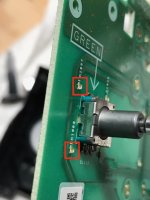
2) Replace the LEDs with color matching ones, either new or from my old head unit. I took apart my old radio, these suckers are small. When I tried to search for them online, they appear to be less than 1mm wide total. Currently looking to desoldering techniques.
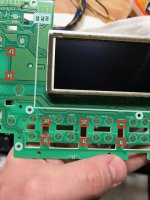
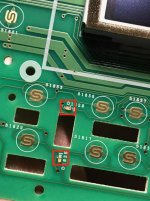
LED 6.jpg
LED 5.jpg
LED 4.jpg

3) Painting or replacing the silver plastic in the rest of the 4Runner to match the black.

Hope this helps anyone looking to do the same! I’ll post updates as they come along, but with a new baby, it’s a little tough to find the extra time :)
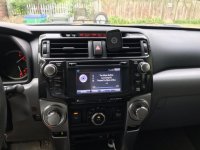
Initial Installation.jpg
Init with blue light.jpg
 

Attachments

  • Entune back w:labels 2016.jpg
    Entune back w:labels 2016.jpg
    104.6 KB · Views: 14,859
  • GPS Connection.jpg
    GPS Connection.jpg
    50.7 KB · Views: 11,101
  • GPS Antenna.jpg
    GPS Antenna.jpg
    70.1 KB · Views: 11,754
  • Initial Installation.jpg
    Initial Installation.jpg
    61 KB · Views: 10,112
  • Init with blue light.jpg
    Init with blue light.jpg
    62.5 KB · Views: 9,911
  • LED 4.jpg
    LED 4.jpg
    97.8 KB · Views: 9,909
  • LED 6.jpg
    LED 6.jpg
    123.6 KB · Views: 10,057
  • LED 5.jpg
    LED 5.jpg
    84.7 KB · Views: 9,933
Register to hide this ad
Man I wish I had this info a week ago, before I went with the Maestro and new HU. Thank you for this information, I'll be selling my 510140 head unit soon.
 
Just curious did the party mode button still work or was it disabled after the swap?


So it does, but it’s not as obvious of a shift as before. Kind of hard to explain.

But I can say in general, this head unit sounds much better than the old one, maybe it’s the new shiny factor, but to me the sound quality has gone up overall


Sent from my iPhone using Tapatalk
 
When I temporarily installed the HU since CD only worked (due to lack of research on my end, until today!) I noticed it sounded much clearer. The following week I added 4 new MB Quart XK1-116 in the rear doors and hatch and it was booming. I did the Subaru Kicker front dash replacement and left the front stock 6x9 for the decent mid bass.
 
Hey i followed your guide. Did you ever have any issues with the volume button not working? And only working during phone calls?
 
We’re you able to get the back up camera working? I did the swap cause the screen on my 2012 cracked so I purchase a 2016 Entune unit installed it but the back up camera and Entune apps don’t work the only thing working is the navigation and and am,fm radio if you could help with the camera issue I’ll really appreciate it
Thanks
 
Hey i followed your guide. Did you ever have any issues with the volume button not working? And only working during phone calls?


Hey, I never had any problems with the controls or volume. Everything worked right away... I could only imagine that there is a connection issue with the wiring harnesses. Do you have a multimeter to test continuity on the buttons and the harness?


Sent from my iPhone using Tapatalk
 
We’re you able to get the back up camera working? I did the swap cause the screen on my 2012 cracked so I purchase a 2016 Entune unit installed it but the back up camera and Entune apps don’t work the only thing working is the navigation and and am,fm radio if you could help with the camera issue I’ll really appreciate it

Thanks


I still have not done the backup camera mod. My rearview mirror has backup in it so it was never a priority to update. I was able to activate the apps by looking up a VIN online for a 4runner that came with this as IRM equipment


Sent from my iPhone using Tapatalk
 
Sorry to revive this, but were you able to figure out what that empty plug is for in the back of the oem radio. You listed on the pic you weren't sure but old one had it. Mine is empty and wanted to make sure I wasn't missing any connections when I was back there. Thanks!
 
Sorry to revive this, but were you able to figure out what that empty plug is for in the back of the oem radio. You listed on the pic you weren't sure but old one had it. Mine is empty and wanted to make sure I wasn't missing any connections when I was back there. Thanks!


I never discovered what that was used for and haven’t had any issues. FYI, l am still running the same setup since I published this article. Too many other projects and kiddos running around to get to the remaining items. Stereo is way better than stock and I’m living with the color mismatch haha


Sent from my iPhone using Tapatalk
 
Thanks to the OP for this thread and the detailed info. I know this thread is old but I have completed the retrofit too, with some differences, as well as getting the backup camera to work. I have a 2012 TE that came with the non-jbl nav unit. Originally, I replaced my factory HU with the Cartrimhome T9 in early 2020. It was great for about a year and a half until the capacitive buttons stopped working as well weird stuff like the youtube app wouldn't output sound, radio stations stopped coming in, etc. I pretty much just started using it for Android Auto.

TRD Jon on YouTube made a video on installing the Beat-Sonic TAV-CB2 S-Connect Interface in his 2019 model which let him use CarPlay/AA on his factory HU. Seemed like a good way to get a stock look, so I decided to go that route. However, a newer HU had to be installed since the Beat-Sonic unit only supports the 14-19 models. Which lead me to this excellent retrofit thread.

These are the items that I purchased to make this work:
- Silver 2017 Nav HU that I purchased for $150 on ebay
- 2017 climate control unit purchased for $75 on ebay from salvage vehicle (not needed, but helps with the light mis-match issue)
- Beat-Sonic TAV-CB2 S-Connect Interface: Beat-Sonic Apple Carplay and Android Auto for 2014-2019 Toyota models with Entune 2.0 and Entune 2.5
- GPS: Amazon.com: DHT Electronics External GPS Antenna with SMB Female for Verizon Samsung 3G Network Extender : Electronics
- 2012 backup camera wiring harness adapter: Amazon.com: AXXESS Toyota Back-Up Camera Retain/Add-On 2012-2015 : Electronics
- 2014-2019 backup camera wiring harness adapter: Amazon.com: AXXESS Toyota 2013-2016 Back-Up Camera Retain/Add-On : Electronics
- XM Satelite adapter: Discount Car Stereo > Antennas and cables > XMM-TOY Toyota, Subaru, Mazda factory XM antenna retention cable

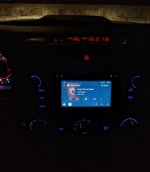
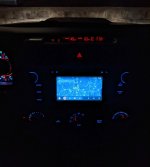
I was able to get everything working except for XM radio, which seems like it should work but says no signal. I'm not really a subscriber, so not a big deal. The new HU has blue lights instead the orange lights that is present in my model year, so I offset that a little by also purchasing a salvage climate control unit from a newer model with blue lights.

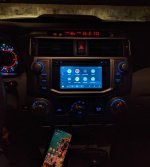
With the Beat-Sonic unit I'm able to get Android Auto/Carplay.

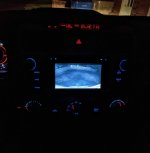
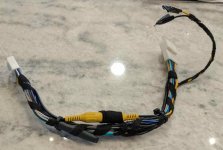
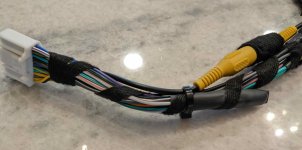
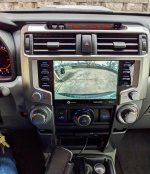
The last pic shows the backup camera working. It took some effort to get this working: To overcome the two different harness plugs, I used the female end of the purchased 2012 backup camera harness and spliced it to the male end of the 2014-2019 backup camera harness. I didn't look at any diagrams I just matched the wires by color. Doing this essentially creates an adapter harness cable. In the end, all the wires will be spliced together with the exception of one black and one yellow wire which were extra and meant for connecting to power and ground if needed. There is also the yellow video composite cables that aren't needed. I taped all of these off so they don't cause an interference. Definitely had my doubts, but it works lol.

I'll also state that if I can find a salvage HU for cheap from a 2020 or newer model I will try to retrofit it because the entune 2.0 HU screens kinda sucks.

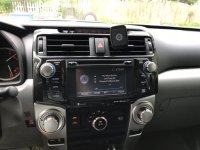
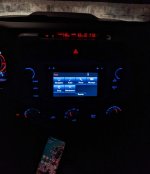
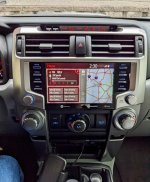
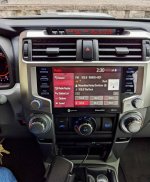
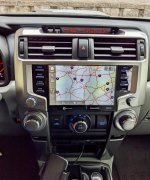
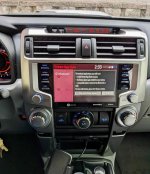
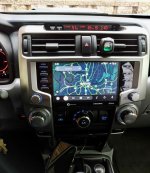
Here's some photos showing stock entune, Android Auto, and the backup camera in action.
 

Attachments

  • PXL_20211218_013604913.jpg
    PXL_20211218_013604913.jpg
    115.4 KB · Views: 6,106
  • PXL_20211218_013326344.jpg
    PXL_20211218_013326344.jpg
    121.2 KB · Views: 6,056
  • PXL_20211218_013952894.jpg
    PXL_20211218_013952894.jpg
    113.9 KB · Views: 6,035
  • PXL_20211218_014042745.jpg
    PXL_20211218_014042745.jpg
    115.5 KB · Views: 6,032
  • PXL_20211218_014351750.jpg
    PXL_20211218_014351750.jpg
    114 KB · Views: 6,005
Last edited:
Thanks to the OP for this thread and the detailed info. I know this thread is old but I have completed the retrofit too, with some differences, as well as getting the backup camera to work. I have a 2012 TE that came with the non-jbl nav unit. Originally, I replaced my factory HU with the Cartrimhome T9 in early 2020. It was great for about a year and a half until the capacitive buttons stopped working as well weird stuff like the youtube app wouldn't output sound, radio stations stopped coming in, etc. I pretty much just started using it for Android Auto.

TRD Jon on YouTube made a video on installing the Beat-Sonic TAV-CB2 S-Connect Interface in his 2019 model which let him use CarPlay/AA on his factory HU. Seemed like a good way to get a stock look, so I decided to go that route. However, a newer HU had to be installed since the Beat-Sonic unit only supports the 14-19 models. Which lead me to this excellent retrofit thread.

These are the items that I purchased to make this work:
- Silver 2017 Nav HU that I purchased for $150 on ebay
- 2017 climate control unit purchased for $75 on ebay from salvage vehicle (not needed, but helps with the light mis-match issue)
- Beat-Sonic TAV-CB2 S-Connect Interface: Beat-Sonic Apple Carplay and Android Auto for 2014-2019 Toyota models with Entune 2.0 and Entune 2.5
- GPS: Amazon.com: DHT Electronics External GPS Antenna with SMB Female for Verizon Samsung 3G Network Extender : Electronics
- 2012 backup camera wiring harness adapter: Amazon.com: AXXESS Toyota Back-Up Camera Retain/Add-On 2012-2015 : Electronics
- 2014-2019 backup camera wiring harness adapter: Amazon.com: AXXESS Toyota 2013-2016 Back-Up Camera Retain/Add-On : Electronics
- XM Satelite adapter: Discount Car Stereo > Antennas and cables > XMM-TOY Toyota, Subaru, Mazda factory XM antenna retention cable

I was able to get everything working except for XM radio, which seems like it should work but says no signal. I'm not really a subscriber, so not a big deal. The new HU has blue lights instead the orange lights that is present in my model year, so I offset that a little by also purchasing a salvage climate control unit from a newer model with blue lights.

With the Beat-Sonic unit I'm able to get Android Auto/Carplay.

The last pic shows the backup camera working. It took some effort to get this working: To overcome the two different harness plugs, I used the female end of the purchased 2012 backup camera harness and spliced it to the male end of the 2014-2019 backup camera harness. I didn't look at any diagrams I just matched the wires by color. Doing this essentially creates an adapter harness cable. In the end, all the wires will be spliced together with the exception of one black and one yellow wire which were extra and meant for connecting to power and ground if needed. There is also the yellow video composite cables that aren't needed. I taped all of these off so they don't cause an interference. Definitely had my doubts, but it works lol.

I'll also state that if I can find a salvage HU for cheap from a 2020 or newer model I will try to retrofit it because the entune 2.0 HU screens kinda sucks.

Here's some photos showing stock entune, Android Auto, and the backup camera in action.
I have a 2012 limited with in dash backup camera non-JBL. I am trying to splice the exact same harnesses for the back-up camera you used. I found them both @ best buy.
Amazon.com: AXXESS Toyota Back-Up Camera Retain/Add-On 2012-2015 : Electronics
Amazon.com: AXXESS Toyota 2013-2016 Back-Up Camera Retain/Add-On : Electronics

One with 16 pin and the other from 2014 and above has 24 pins. The black, yellow and video cables (total 4 wires), now I am down to 20 wires. I am curious to know what have you done with the reminder 4 ?
 
One with 16 pin and the other from 2014 and above has 24 pins. The black, yellow and video cables (total 4 wires), now I am down to 20 wires. I am curious to know what have you done with the reminder 4 ?

[MENTION=692850]Neverbetter[/MENTION] I knew I should have taken a pic of the camera wiring harness lol! I forgot to take a pic due to the surprise that it worked. Honestly, I think I got pretty lucky. I think there are only 3 or 4 of the wires that actually do anything. So this weekend I'll pull it out and take a pic and post it in this thread.
 
Last edited:
how is that beat sonic unit working for you? I want to add CarPlay to my 4Runner...

I had a T9 headunit from Cartrimhome with a giant screen, and Android Auto was gorgeous in use on it. So going back to the stock screen with lower resolution has been the biggest adjustment. The screen really sucks! Overall the beat sonic unit is solid, and I haven't had any issues with it so far. It's really nice having that stock look again, plus, the radio in the stock HU is sooooo much better than the T9.

Would I do it again? Well, I only did the retrofit since my T9 stopped working. Honestly, I'm very tempted to try and retrofit a stock HU from a 20-21 with that big nice screen. Even the baseline non-nav version has CarPlay/AA compatibility, which is all I need. I'm looking around for a salvage one for cheap.
 
I'm very tempted to try and retrofit a stock HU from a 20-21 with that big nice screen. Even the baseline non-nav version has CarPlay/AA compatibility, which is all I need. I'm looking around for a salvage one for cheap.

If you can get this working, you'll be a national hero.

Following this thread with great interest.
 
One with 16 pin and the other from 2014 and above has 24 pins. The black, yellow and video cables (total 4 wires), now I am down to 20 wires. I am curious to know what have you done with the reminder 4 ?

[MENTION=692850]Neverbetter[/MENTION] Here is are pics of the backup camera harness that I made from the Axxess connectors. In reference to the difference between the 24 versus 16 wires, again, I matched all the wires by color. On the 24 pin male end connector there were several colored wires that I taped off because they had no matching wires on the 16 pin female connector, and are in the second pic below. From reading some other posts about the backup camera harness, I think there are only like three or four actual wires that do anything. Again, I feel like I got lucky.
 

Attachments

  • Camera_Harness_1.jpg
    Camera_Harness_1.jpg
    125.6 KB · Views: 3,182
  • Camera_Harness_2.jpg
    Camera_Harness_2.jpg
    131.9 KB · Views: 3,192
Last edited:
If you can get this working, you'll be a national hero.

Following this thread with great interest.

I did it! I found a salvage 2020 non-JBL nav head unit and I have successfully retrofitted it into my 2012 TE!

The 2020 HU was not cheap, even for one from a salvage vehicle it still ran $700, and I feel like I still got it for way cheaper than these can be found for.

If you look at the connectors on the 2020 Entune 3.0 HU versus the 2014-2019 Entune 2.0 HU, nearly all are different. So I found this thread on a Tacoma forum where a few folks had retrofitted an Entune 3.0 HU into older models: New 2020 head unit. Buying? | Page 18 | Tacoma World

After some research I determined that all Entune 3.0 HU's share the same connectors, 4Runner included. Obviously the key to it working was getting a harness that would work. Long story short, I contacted the amazing folks at AutoHarnessHouse|Plug and Play Car Wiring and Audio Gear and they were able to create a custom harness that would allow plug-in-play from the Entune 2.0 connectors into Entune 3.0 connectors. And I'm pleased to say it works perfectly! The harness set me back $190. This includes a connector that enables the navigation to work on the newer unit. If you don't need nav on the HU, then the harness only costs $135.

- Radio: The only connector that required no retrofit.
- GPS: I was able to re-use the gps unit that mentioned in my earlier posts
- Backup camera: See my earlier posts, but I had to create a custom harness from splicing together two Axxess harnesses
- USB: Entune 3.0 HU's use a new connector... Purchased this for $21: Metra Online
- XM Radio: My 2012 apparently has a different XM radio unit than the 2014 and up models, so the adapter that I tried didn't work in either the Entune 3.0 or 2.0 HU's. It might work for folks with 2014+ models. Which is fine, I don't use XM radio
- Entune Apps: Based on people in the Tacoma forum and the message I see on the Entune 3.0 HU, the apps seem like they will work if I had the entune app on my phone.

The install was pretty easy overall. After the initial start, it took like 10 minutes for GPS to reset. It also took about 10-15 minutes for bluetooth to start working. Thankfully, the backup camera works fine using my custom harness too. Android Auto worked immediately when I connected my phone via usb.

All in all, I love the 2020 Entune 3.0 HU. The 8" screen is awesome. After having the T9 and 2017 Entune 2.0 HU, the 2020 HU seems to be the best. The sound quality is on par with the T9. I don't regret going to all of this trouble with how good it turned out. I've also gotta say, the new HU looks so good in my vehicle.

If anyone wants to purchase my Beat Sonic unit that allows CarPlay/Android Auto in the 2014-2019 HU's, send me a message. I've also got a 2017 Entune 2.0 HU if anyone wants it (which I will sell for extremely cheap).

One final caveat: This only works for non-JBL head units. If you have a JBL sound system, you are unfortunately SOL.

One last thing, my apologies to the OP of this thread - I am still a junior member on this forum so I am unable to create new threads. Sorry if I hijacked your thread.
 

Attachments

  • Back_1.jpg
    Back_1.jpg
    131.6 KB · Views: 3,665
  • Entune_1_home.jpg
    Entune_1_home.jpg
    133.7 KB · Views: 3,300
  • Entune_2_Radio.jpg
    Entune_2_Radio.jpg
    131.5 KB · Views: 3,322
  • Entune_3_Nav.jpg
    Entune_3_Nav.jpg
    134.3 KB · Views: 3,304
  • Entune_4_Apps.jpg
    Entune_4_Apps.jpg
    130.4 KB · Views: 3,286
  • Entune_5_BackupCamera.jpg
    Entune_5_BackupCamera.jpg
    133.3 KB · Views: 3,279
  • Entune_6_AA_Maps.jpg
    Entune_6_AA_Maps.jpg
    129.3 KB · Views: 3,329
Last edited:

Members online

Forum statistics

Threads
278,316
Messages
3,554,107
Members
248,016
Latest member
Advally Service

Trending content

Back
Top