Entune Retrofit - Basic Non-Nav, Non-JBL, to Entune Swap

search 2020 plus head units NON jbl version
Secondary market is your best option
ebay
FB market (search junk car, part outs etc)
car-part.com

it will fit perfect into yours, I just completed an install on a 2017 and love it. As for aftermarket I used a sony 8100 and enjoyed but really wanted the stock look. The entune 3.0 brings a new look to the interior and apple car play is great. I use that about 95% of the time.

Thank you for the advice. I will keep a lookout for an affordable one.
 
I decided that I do need the backup camera. I was going to get the rear 4runner plate with backup camera from a newer 4runner, mine is a 2010 and does not have the backup camera. I have a 2016 4runner headunit, that is amazing, I see that there is a modification of two wire harnesses that is required. What wiring will I need from the headunit to the rear backup camera in the tailgate? Thanks Phil
 

Attachments

  • 4Runner 8.jpeg
    4Runner 8.jpeg
    119.4 KB · Views: 436
Tried that.

need more detail to your set up

the balance to the right is the first step.

try the following:

double check the harness wiring to ensure the wires are pinned & in the proper slots

all harness connections are secure, no cut wires etc.
 
Got a entune with nav but only 4 speakers work, 2 front left side and left rear hatch. Why? I'm puzzled

From what I understand, depending on what you had from the factory, you need to find the correct replacement headunit. ie With or without JBL, nav, GPS etc. This may be why some functions may not be working.

For example, for me I needed to find a non-JBL with GPS as I did not have JBL from the factory. Just a thought...
 
Were you able to retain party mode with this swap?

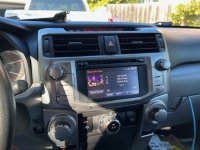
I did it! I found a salvage 2020 non-JBL nav head unit and I have successfully retrofitted it into my 2012 TE!

The 2020 HU was not cheap, even for one from a salvage vehicle it still ran $700, and I feel like I still got it for way cheaper than these can be found for.

If you look at the connectors on the 2020 Entune 3.0 HU versus the 2014-2019 Entune 2.0 HU, nearly all are different. So I found this thread on a Tacoma forum where a few folks had retrofitted an Entune 3.0 HU into older models: New 2020 head unit. Buying? | Page 18 | Tacoma World

After some research I determined that all Entune 3.0 HU's share the same connectors, 4Runner included. Obviously the key to it working was getting a harness that would work. Long story short, I contacted the amazing folks at AutoHarnessHouse|Plug and Play Car Wiring and Audio Gear and they were able to create a custom harness that would allow plug-in-play from the Entune 2.0 connectors into Entune 3.0 connectors. And I'm pleased to say it works perfectly! The harness set me back $190. This includes a connector that enables the navigation to work on the newer unit. If you don't need nav on the HU, then the harness only costs $135.

- Radio: The only connector that required no retrofit.
- GPS: I was able to re-use the gps unit that mentioned in my earlier posts
- Backup camera: See my earlier posts, but I had to create a custom harness from splicing together two Axxess harnesses
- USB: Entune 3.0 HU's use a new connector... Purchased this for $21: Metra Online
- XM Radio: My 2012 apparently has a different XM radio unit than the 2014 and up models, so the adapter that I tried didn't work in either the Entune 3.0 or 2.0 HU's. It might work for folks with 2014+ models. Which is fine, I don't use XM radio
- Entune Apps: Based on people in the Tacoma forum and the message I see on the Entune 3.0 HU, the apps seem like they will work if I had the entune app on my phone.

The install was pretty easy overall. After the initial start, it took like 10 minutes for GPS to reset. It also took about 10-15 minutes for bluetooth to start working. Thankfully, the backup camera works fine using my custom harness too. Android Auto worked immediately when I connected my phone via usb.

All in all, I love the 2020 Entune 3.0 HU. The 8" screen is awesome. After having the T9 and 2017 Entune 2.0 HU, the 2020 HU seems to be the best. The sound quality is on par with the T9. I don't regret going to all of this trouble with how good it turned out. I've also gotta say, the new HU looks so good in my vehicle.

If anyone wants to purchase my Beat Sonic unit that allows CarPlay/Android Auto in the 2014-2019 HU's, send me a message. I've also got a 2017 Entune 2.0 HU if anyone wants it (which I will sell for extremely cheap).

One final caveat: This only works for non-JBL head units. If you have a JBL sound system, you are unfortunately SOL.

One last thing, my apologies to the OP of this thread - I am still a junior member on this forum so I am unable to create new threads. Sorry if I hijacked your thread.

 
Those are extra buttons that the Entune 2.0 HU utilized that is not utilized in the earlier units or the newer Entune 3.0 HU. Only real option would be to swap out to earlier 4Runner wheel controls if it bothers you.

I recently did the swap - adding a 2020+ headunit to my 2015 SR5 PREM with navigation. The only thing I noticed that did not work was the rewind/fastforward buttons on the steering. Also, the up down controls when in phone and other settings. Has anyone else noticed this? Was there a fix? Thanks!
 
Reviving an old thread, thanks to posters here which supplied info for getting this swap done.

I have several of the head units from 2022+, trying to find the matching black trim, finally found one a few weeks ago.

I am currently in the midst of trying to use the 2020+ hazard switch in a 2017. Ordered a bunch of relays and gonna see which works best. Will report back with results.
 
Reviving an old thread, thanks to posters here which supplied info for getting this swap done.

I have several of the head units from 2022+, trying to find the matching black trim, finally found one a few weeks ago.

I am currently in the midst of trying to use the 2020+ hazard switch in a 2017. Ordered a bunch of relays and gonna see which works best. Will report back with results.

I posted here how I fixed the hazard button issue;

OEM 2020+ headunit with Apple Carplay / Android Auto into 2014-2019 | Toyota 4Runner Forum [4Runners.com]
 
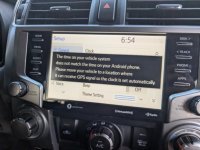
Question on the Android auto side of the swap. I went from 2012 non JBL Nav to 2020 non JBL Non-Nav thanks to autoharnesshouse.com. Everything seems to work. Did the hazard swap. But the auto time set by GPS doesn't seem to be working. I've sent a note to Autoharnesshouse.com and awaiting their reply.

Is there a GPS cable I should have plugged in? Or do I just need to wait for the GPS (in the unit?) to sync with satellites?

Thanks all! This thread has been extremely helpful in my swap.

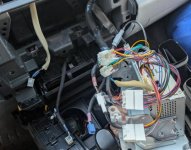
I'll try and post a picture. You'll be able to see the gray plug and blue plugs that aren't used in the swap.
 

Attachments

  • 1000005146_edited.jpg
    1000005146_edited.jpg
    69.4 KB · Views: 275
  • 1000005140_edited.jpg
    1000005140_edited.jpg
    58 KB · Views: 264
Last edited:
Question on the Android auto side of the swap. I went from 2012 non JBL Nav to 2020 non JBL Non-Nav thanks to autoharnesshouse.com. Everything seems to work. Did the hazard swap. But the auto time set by GPS doesn't seem to be working. I've sent a note to Autoharnesshouse.com and awaiting their reply.

Is there a GPS cable I should have plugged in? Or do I just need to wait for the GPS (in the unit?) to sync with satellites?

Thanks all! This thread has been extremely helpful in my swap.

I'll try and post a picture. You'll be able to see the gray plug and blue plugs that aren't used in the swap.

Yes there is a harness needed for the gps, from checking what i have saved its the following part.

Radio Wiring Harness
Part Number: 8684233150
 
i have a 2011 trail with the basic radio. no nav. basic screnn.

it looks like i should just be able to pick up a 2014-2019 entune HU and plug it in and rock and roll. is that correct or since i did not have navigation to begin with do i need an additional piece?

i notice some listings on ebay have an extra box in the back of the HU or they have a micro SD card with nav on them.

anyone know the difference?
So was it an easy plug and play install like you thought?
 

Members online

Forum statistics

Threads
278,316
Messages
3,554,120
Members
248,016
Latest member
Advally Service

Trending content

Back
Top