
You are using an out of date browser. It may not display this or other websites correctly.
You should upgrade or use an alternative browser.
You should upgrade or use an alternative browser.
Here's Some Help with Navigation Install
- Thread starter petegaz
- Start date
If 4runner is like the sienna, the stock nav unit has a separate ECU box which contains DVDrom drive and brain. Retrofitting one of these would mean running some messy wires all over the place to connect them together.
The Solara nav is an all-in-one unit where everything is within the head making installation much easier. Plus the graphic on the Solara seems nicer than the stock Sienna unit, suggesting a possible newer release version. It is also XM capable with an added module.
Stephen
The Solara nav is an all-in-one unit where everything is within the head making installation much easier. Plus the graphic on the Solara seems nicer than the stock Sienna unit, suggesting a possible newer release version. It is also XM capable with an added module.
Stephen
Solara Nav installed in Sienna-Tigard, OR
Bill,
If you are interested I've installed this Solara Nav in our 2004 Toyota Sienna and I am located it Tigard, Oregon. I see you are located in the Portland area. If you want to see what it looks like in person shoot me an Email and we can setup a time to meet. It is really easy to remove from the dash so I would be more than willing to show you the unit and the backup camera display. I also have DVD video on this unit but that is part of a factory DVD player in the Sienna which is not available on your vehicle.
I highly recommend this upgrade.
bigbill25 said:So, is it impossible to get the T4R Nav system after purchase? Is that why everyone is going to the Camry/Solara systems?
--Bill
Bill,
If you are interested I've installed this Solara Nav in our 2004 Toyota Sienna and I am located it Tigard, Oregon. I see you are located in the Portland area. If you want to see what it looks like in person shoot me an Email and we can setup a time to meet. It is really easy to remove from the dash so I would be more than willing to show you the unit and the backup camera display. I also have DVD video on this unit but that is part of a factory DVD player in the Sienna which is not available on your vehicle.
I highly recommend this upgrade.

bigbill25
New member
Re: Solara Nav installed in Sienna-Tigard, OR
Nice. I wouldn't mind taking a look. I actually am in Tigard as well, near Greenberg and 98th.
--Bill
jkm2730 said:If you are interested I've installed this Solara Nav in our 2004 Toyota Sienna and I am located it Tigard, Oregon.
Nice. I wouldn't mind taking a look. I actually am in Tigard as well, near Greenberg and 98th.
--Bill

bigbill25
New member
webshot said:It's too bad we all can't get together! I'm in Oregon right now but in Southern Oregon seeing the family. I gotta go home Saturday though.
You're closer to home than me... I'm in Turkey! Will fly back Saturday. I haven't seen a single T4R over here, BTW...
--Bill
86790-45010
We're actually using third party cameras with good results. Apparently any NTSC camera would work.
Camera Install Thread at Siennaclub
We're actually using third party cameras with good results. Apparently any NTSC camera would work.
Camera Install Thread at Siennaclub
Re: Camera
Best price I found was $467 from a dealer in Seattle. I think retail was ~$650
lojeff said:Anyone have the part number and list price for the camera for these Navigation units?
Best price I found was $467 from a dealer in Seattle. I think retail was ~$650

T4Runner
New member
How bout this?
I really want DVD through my NAV system. Does anyone know if this product works.
http://www.avelectronic.com/products.htm
Its kind of expensive but I would try it if it really worked as described.
I really want DVD through my NAV system. Does anyone know if this product works.
http://www.avelectronic.com/products.htm
Its kind of expensive but I would try it if it really worked as described.

lojeff
New member
I would highly recommend the "Full function Nav while in motion - for passenger only" mod listed in the sienna forum listed below.
http://www.siennaclub.org/forum/index.php?showtopic=2379&st=15&
I think this navigation system is very good but even in the limited time I have had it, I was frustrated that so many features were disabled while driving. I can appreciate toyota's concern but if my wife is driving with me, I can't see the reason to pull off the highway to type in the name of a resturant to see where the closest location may be. This mod does the trick.
In total it took me about 1:10. The whole dash and unit doesn't even have to come out. Just run wires to the speed indicator and power to the timer described in the website and your set. I mounted my toggle switch under the armrest.
If you do the install without the timer, it would take you probably 20 minutes at most but I wanted the automatic toggle rather than manually turning it on and off. The timer recommended was only $17 shipped to my door.
http://www.siennaclub.org/forum/index.php?showtopic=2379&st=15&
I think this navigation system is very good but even in the limited time I have had it, I was frustrated that so many features were disabled while driving. I can appreciate toyota's concern but if my wife is driving with me, I can't see the reason to pull off the highway to type in the name of a resturant to see where the closest location may be. This mod does the trick.
In total it took me about 1:10. The whole dash and unit doesn't even have to come out. Just run wires to the speed indicator and power to the timer described in the website and your set. I mounted my toggle switch under the armrest.
If you do the install without the timer, it would take you probably 20 minutes at most but I wanted the automatic toggle rather than manually turning it on and off. The timer recommended was only $17 shipped to my door.
T4Runner
New member
lojeff said:I would highly recommend the "Full function Nav while in motion - for passenger only" mod listed in the sienna forum listed below.
http://www.siennaclub.org/forum/index.php?showtopic=2379&st=15&
I think this navigation system is very good but even in the limited time I have had it, I was frustrated that so many features were disabled while driving. I can appreciate toyota's concern but if my wife is driving with me, I can't see the reason to pull off the highway to type in the name of a resturant to see where the closest location may be. This mod does the trick.
In total it took me about 1:10. The whole dash and unit doesn't even have to come out. Just run wires to the speed indicator and power to the timer described in the website and your set. I mounted my toggle switch under the armrest.
If you do the install without the timer, it would take you probably 20 minutes at most but I wanted the automatic toggle rather than manually turning it on and off. The timer recommended was only $17 shipped to my door.
Man, I hear ya! That's a great mod and one I will be doing....but my problem is getting the actual video into the NAV.
This is my set up
http://www.toyota-4runner.org/showthread.php?s=&threadid=3538
Any Ideas?
We have been trying to run the voice prompt through radio shack speaker. Works fine with the 9v battery, but gets lots of static when powered through 12v cigarette lighter converted to 9v.
Is anybody powering the radioshack speaker through 12v? Better yet, has anybody figured out how to connect the nav voice out to the JBL amp?
Thanks,
Stephen
Is anybody powering the radioshack speaker through 12v? Better yet, has anybody figured out how to connect the nav voice out to the JBL amp?
Thanks,
Stephen

Toy-Man
New member
I tried several things to try and get voice out of the left speakers in the 4R with no luck. Ended up buying a Motorola SYN897B hands free phone system and modifying the thing to work as a straight Amp. Velcroed the unit up under the dash underhang (the one you have to take off to get at the radio in the first place) made sure the speaker was facing down towards the brake pedal/floor and hard wired it into the 12V ACC bus by taping into the cigarette lighter wiring harness.
The thing works great and has plenty of volume and it sounds good (but I'm partially deaf). I run the nav voice at level 3 in interactive mode and it gives me more than enough volume to hear the directions with the radio on at a comforatable volume. If you need more volume there is plenty of room left.
Here is what the unit looks like.
http://www.pricesnap.com/motv60serv1s.html
I was looking for a solution and managed see this unit at a local farm/auto parts store (turns out it works with my cell phone - talk about luck) and for $19.99 CDN each I couldn't go wrong.
The thing works great and has plenty of volume and it sounds good (but I'm partially deaf). I run the nav voice at level 3 in interactive mode and it gives me more than enough volume to hear the directions with the radio on at a comforatable volume. If you need more volume there is plenty of room left.
Here is what the unit looks like.
http://www.pricesnap.com/motv60serv1s.html
I was looking for a solution and managed see this unit at a local farm/auto parts store (turns out it works with my cell phone - talk about luck) and for $19.99 CDN each I couldn't go wrong.
T4Runner
New member
Toy-Man said:I tried several things to try and get voice out of the left speakers in the 4R with no luck. Ended up buying a Motorola SYN897B hands free phone system and modifying the thing to work as a straight Amp. Velcroed the unit up under the dash underhang (the one you have to take off to get at the radio in the first place) made sure the speaker was facing down towards the brake pedal/floor and hard wired it into the 12V ACC bus by taping into the cigarette lighter wiring harness.
The thing works great and has plenty of volume and it sounds good (but I'm partially deaf). I run the nav voice at level 3 in interactive mode and it gives me more than enough volume to hear the directions with the radio on at a comforatable volume. If you need more volume there is plenty of room left.
Here is what the unit looks like.
http://www.pricesnap.com/motv60serv1s.html
I was looking for a solution and managed see this unit at a local farm/auto parts store (turns out it works with my cell phone - talk about luck) and for $19.99 CDN each I couldn't go wrong.
Can you tell more about how you got the voice into that unit...
Toy-Man
New member
This is not an easy job. Some knowledge of electronics is needed.
I cut off the cable just below the mic (that's the little piece on the coily cable just after the coil stops and before the phone connector).
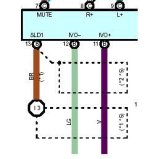
I opened the back of the speaker amp piece and determined which pair was the audio in from the phone. One wire is ground/shield and the other is signal in. I can't remember which ones they were, sorry. I connected the shield to pin 13 on connector R6 and the signal wire to either IVO+ or IVO- (pin 11 or 12 on RC6).
To hard wire the power, there is a resistor in the cigarette lighter plug on the unit that you will have to move to the inside of the speaker enclosure since the amp on this system runs ar around 5 volts not 12v.
I am sorry I did not do a step by step for this procedure since I thought it was going to be a temporary sojution, turns out I am very happy with it. If you are knowledgeable in electronic , it' not hard to figure out how to hook this or other amps up to give you the voice guidance.
GL -TM-
I cut off the cable just below the mic (that's the little piece on the coily cable just after the coil stops and before the phone connector).
I opened the back of the speaker amp piece and determined which pair was the audio in from the phone. One wire is ground/shield and the other is signal in. I can't remember which ones they were, sorry. I connected the shield to pin 13 on connector R6 and the signal wire to either IVO+ or IVO- (pin 11 or 12 on RC6).
To hard wire the power, there is a resistor in the cigarette lighter plug on the unit that you will have to move to the inside of the speaker enclosure since the amp on this system runs ar around 5 volts not 12v.
I am sorry I did not do a step by step for this procedure since I thought it was going to be a temporary sojution, turns out I am very happy with it. If you are knowledgeable in electronic , it' not hard to figure out how to hook this or other amps up to give you the voice guidance.
GL -TM-
I tried a similar hands free car kit. Both the kit and the radio shack speaker had massive noise when powered from the car 12v. This leads me to believe there is some type of feedback from the nav's power into the 12v. I'm suprised it works in your setup without any static. I'll have to look more into this.
Thanks for sharing your setup.
Stephen
Thanks for sharing your setup.
Stephen
Toy-Man,Toy-Man said:
I opened the back of the speaker amp piece and determined which pair was the audio in from the phone. One wire is ground/shield and the other is signal in. I can't remember which ones they were, sorry. I connected the shield to pin 13 on connector R6 and the signal wire to either IVO+ or IVO- (pin 11 or 12 on RC6).
GL -TM-
I have the same problem as Stephen and I have even tried to install an actual 12v JBL car audio amp using low level and high level inputs but I get that whining/hiss/noise. I find what you have written interesting. I did not use the shield (pin13) for anything. I did hook up the shield to the back of the NAV head and also Pins 11 & 12 but I didn't use the other end of pin13 because in the drawings it doesn't go anywhere(I found that rather odd). You are saying that you used pin 13 and either 11 or 12 but not both 11 & 12? Can you verify which of the two (11 & 12 ) you used and verify that you used pin 13 as the return/ground? If this is the case I will try pins 13 and 11/or 12 and see if the whining/hiss/static goes away.
Attachments
Similar threads
- Replies
- 2
- Views
- 3K


