First of all, sorry I don't have any pics, but they would just be of the disassembly of the dash, right? Also, thanks to http://www.castulucci.com/projects/carpc/oemnaviaccess/ for making the dash tear down so easy. With a 10mm ratchet, I had it completely apart in 15 minutes.
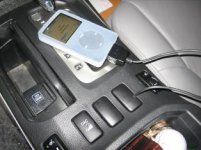
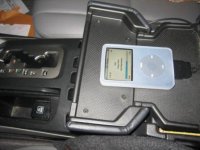
Alright, on to the Dice. I ordered my unit early last week and received it yesterday, so bravo to quick shipping. The unit itself seems sort of cheaply put together, but oh well, it works. The install was a piece of cake, and I ended up mounting the box a bit to the right, behind the little cubby thing under the HVAC controlls. I ran the cable for the iPod under the cupholders and through the open spot next to my downhill assist button. This is just temporary, until I figure out just where I want my iPod to be mounted. (I'm thinking about a custom mount in the flip out part of the lid of the center console. This may require some dremeling, as I would like to be able to close the flip part and keep the iPod in there, almost like a little cubby for it.) Anyways, the unit works great. No more FM modulators for me. And the sound quality is awesome.
**I just ran outside and tooks some pics, as I know any and all threads are worthless without pics**
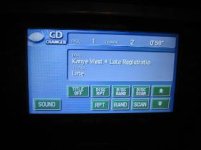
Here are some pics of the finished setup. One is showing the AUDIO screen, displaying the "CD CHANGER". Another pic shows the cord coming out of the open spot, and anothe pic shows where I want to do the custom install. Hit me up with any and all questions.
Ben
Alright, on to the Dice. I ordered my unit early last week and received it yesterday, so bravo to quick shipping. The unit itself seems sort of cheaply put together, but oh well, it works. The install was a piece of cake, and I ended up mounting the box a bit to the right, behind the little cubby thing under the HVAC controlls. I ran the cable for the iPod under the cupholders and through the open spot next to my downhill assist button. This is just temporary, until I figure out just where I want my iPod to be mounted. (I'm thinking about a custom mount in the flip out part of the lid of the center console. This may require some dremeling, as I would like to be able to close the flip part and keep the iPod in there, almost like a little cubby for it.) Anyways, the unit works great. No more FM modulators for me. And the sound quality is awesome.
**I just ran outside and tooks some pics, as I know any and all threads are worthless without pics**
Here are some pics of the finished setup. One is showing the AUDIO screen, displaying the "CD CHANGER". Another pic shows the cord coming out of the open spot, and anothe pic shows where I want to do the custom install. Hit me up with any and all questions.
Ben