Installing SFA12F, can't find location of SAT. cable is? Yes i've searched.

ejason

Member
Installing SFA12F, can't find the location of SAT. antenna cable? Yes i've searched.

I have the SFA12F and want to use the factory antenna. I swear i've seen this hook up before, but for some reason i cant find it.
I have the JBL 12 speaker system. Just installed Pioneer 8100nex. I have everything working except that darn cable.
I've looked at every cable back behind the unit (where i thought i've seen it before) and can't find it. I thought it was located in the pass. side kick panel. The cable connects but the radio doesn't recognize the antenna.

Any help would be great. Thanks.
 
Last edited:
Register to hide this ad
Are you trying to use the stock shark fin antenna's electronics with your 8100?

If so, you will probably not be very lucky with that. I've now seen several different images of the inside of the shark fin antenna, and not all of them come with all 3 anntennas inside. Also, it looks like Toyota used a single cable from the head unit to the rear of the vehicle, then combine it somehow to the 3 antennas in the SFA.

For me, there were indeed 3 antennas in my SFA, one for gps, one for XM/Sirius, and one that I assume is an FM diversity antenna to work with the front aerial. Here's an image of my antennas removed from the SFA:

Sharkfin%20antennas.jpg


I did NOT have the JBL system, nor did mine come with gps, yet the antenna was there. Others I've seen online from 4 runners only had one antenna inside, iirc it was the pink-colored chip which I believe is XM/Sirius. Still, another pic I found while researching antennae for mine had two chips, which should have been XM/Sirius and GPS, but no diversity antenna.

Having said that, you say you have the JBL system, which should have come with at least the two chips in the SFA, and if you've found the connector in the dash and you've used the proper adapter to convert it to Pioneer's GPS input, if its not working, it could be either a bent pin on the adapter (or stock connector going into the adapter), or its seeing both antennas and not understanding what to do.

If you rule out the bent pin issue, then in the rear headliner, to the passenger's side of the SFA in the roof, you will find 1, 2 or 3 wires coming from the SFA and plugging into a 3-hole jumper that runs down to the passenger side rear quarter wall. You might be able to pull all three connectors out of that wire plug, then insert just one of them into the cable. See if it works, if not, then pull it out and try the next one.

For reference, this is the 3 wire connector I'm referring to:

sharkfin%20connector.jpg


FWIW, I too have the 8100nex in mine, and I simply said screw it, removed the antennae from the SFA, dremeled the die-cast plate slightly and stuffed the Pioneer GPS antenna into the housing. It fit perfectly after doing that, I then ran about 3 feet of the wire into the headliner and spliced into the stock gps single cable running to the dash. You have to be very careful and follow some guidelines when splicing RF cables, you cannot just crimp the wires and call it good! It has to be shielded a specific way. I can show you how if you want to go down this path. The only reason why I did this is because Pioneer doesn't have enough cable to make it all the way to the stereo, so I would have had to extend it anyways, and I didn't want to wait for an extension to come in.

As it is now, my gps works EXTREMELY well in the 4runner! I can be in my garage or shop, doors closed (both have a second story above them) and still get almost full signal from all but 1 or 2 satellites!

 
Are you trying to use the stock shark fin antenna's electronics with your 8100?

If so, you will probably not be very lucky with that. I've now seen several different images of the inside of the shark fin antenna, and not all of them come with all 3 anntennas inside. Also, it looks like Toyota used a single cable from the head unit to the rear of the vehicle, then combine it somehow to the 3 antennas in the SFA.

For me, there were indeed 3 antennas in my SFA, one for gps, one for XM/Sirius, and one that I assume is an FM diversity antenna to work with the front aerial. Here's an image of my antennas removed from the SFA:

Sharkfin%20antennas.jpg


I did NOT have the JBL system, nor did mine come with gps, yet the antenna was there. Others I've seen online from 4 runners only had one antenna inside, iirc it was the pink-colored chip which I believe is XM/Sirius. Still, another pic I found while researching antennae for mine had two chips, which should have been XM/Sirius and GPS, but no diversity antenna.

Having said that, you say you have the JBL system, which should have come with at least the two chips in the SFA, and if you've found the connector in the dash and you've used the proper adapter to convert it to Pioneer's GPS input, if its not working, it could be either a bent pin on the adapter (or stock connector going into the adapter), or its seeing both antennas and not understanding what to do.

If you rule out the bent pin issue, then in the rear headliner, to the passenger's side of the SFA in the roof, you will find 1, 2 or 3 wires coming from the SFA and plugging into a 3-hole jumper that runs down to the passenger side rear quarter wall. You might be able to pull all three connectors out of that wire plug, then insert just one of them into the cable. See if it works, if not, then pull it out and try the next one.

For reference, this is the 3 wire connector I'm referring to:

sharkfin%20connector.jpg


FWIW, I too have the 8100nex in mine, and I simply said screw it, removed the antennae from the SFA, dremeled the die-cast plate slightly and stuffed the Pioneer GPS antenna into the housing. It fit perfectly after doing that, I then ran about 3 feet of the wire into the headliner and spliced into the stock gps single cable running to the dash. You have to be very careful and follow some guidelines when splicing RF cables, you cannot just crimp the wires and call it good! It has to be shielded a specific way. I can show you how if you want to go down this path. The only reason why I did this is because Pioneer doesn't have enough cable to make it all the way to the stereo, so I would have had to extend it anyways, and I didn't want to wait for an extension to come in.

As it is now, my gps works EXTREMELY well in the 4runner! I can be in my garage or shop, doors closed (both have a second story above them) and still get almost full signal from all but 1 or 2 satellites!

Yes, the 8100 is what i'm using with the sirius 300v. I don't want to connect the cable at the shark fin but up in the dash area. I can tell you are much better at installing this stuff than I am. Installing this outside in NJ ins't any fun,I'd kill for a garage. I just had to pay someone to swap my front shocks because I lack a place to do it. I hate wasting money like that... anyway.

My GPS antenna was in the middle of my dash behind the clock. (where I installed the new one).
I don't think i have that cable you show.
Overall I thought the install was easy, but finding this cable is just driving me crazy. I do have the 300v1 hooked up with the antenna that came with it. I just want to eliminate that cable and use the factory one. Love the 8100 so far. Much better than that DOS looking screen Toyota used!!

Did you do the screen bypass or install the wired bypass?
 
Last edited:
Screen bypass! Super-easy and free!

So, its a bit early for me here, and I haven't finished my cup of coffee yet, but I'm not following you on the wire that you aren't able to find. Is it the SFA wire in the dash that's missing? The blue connector I posted a pic of is at the rear of the vehicle, behind the headliner, so you won't find that in the dash.

The antenna connector Toyota used in the dash will not fit the Pioneer unit directly, you need either the adapter to change the connector, or modify the stock connector to fit into your XM box (the SXV300v1).

Let's do this, which connector are you unable to find, and where are you trying to plug it into?

And I have a question about the gps antenna "in the dash", was there a Toyota gps antenna in the dash, or did you install the Pioneer gps antenna in the dash? I only ask because I've seen other posts about having some antenna installed in the dash, but haven't seen any pics of this thing, and its not a great place to have a satellite antenna installed. I can't imagine Toyota doing something like this, but nothing would surprise me!
 
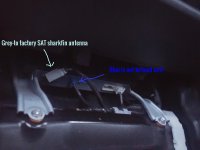
OK, I found the location for hooking up the SFA12F to use factory siriusxm antenna. It is located under the passenger seat. Just plug it and then hookup to the 300v1.
Hope this helps someone in the future. Much easier than running the antenna to the back. I had the JBL nav. head unit.
 

Attachments

  • imageedit_7_8160432554.jpg
    imageedit_7_8160432554.jpg
    134.8 KB · Views: 644
Screen bypass! Super-easy and free!

So, its a bit early for me here, and I haven't finished my cup of coffee yet, but I'm not following you on the wire that you aren't able to find. Is it the SFA wire in the dash that's missing? The blue connector I posted a pic of is at the rear of the vehicle, behind the headliner, so you won't find that in the dash.

The antenna connector Toyota used in the dash will not fit the Pioneer unit directly, you need either the adapter to change the connector, or modify the stock connector to fit into your XM box (the SXV300v1).

Let's do this, which connector are you unable to find, and where are you trying to plug it into?

And I have a question about the gps antenna "in the dash", was there a Toyota gps antenna in the dash, or did you install the Pioneer gps antenna in the dash? I only ask because I've seen other posts about having some antenna installed in the dash, but haven't seen any pics of this thing, and its not a great place to have a satellite antenna installed. I can't imagine Toyota doing something like this, but nothing would surprise me!

Yes, Amazing how easy that bypass was!!
Your correct that it's not in the dash. I believe its a 6 wire plug in my truck. T
I think the connections are different in my truck than yours??
I found the Factory Sat unit under the Pass. seat. It took about 10 minutes to run the wire and hook it all up. Just plugged the grey end in there and ran the other to the 300v1 with the metal end..

There was a Toyota GPS antenna in the dash. The wire went straight up to it. I installed the pioneer GPS antenna next to the Toyota one. Works perfect no connection issues. There is a metal plate there already that i connected to. Your right about a SAT antenna there though. They need to have that line of sight.
 
Yeah, I don't have a box under my pass. seat since mine's an SR5. I'm wondering if the stock antenna is compatible with the SXV300v1? Its possible that the way power is sent to it, that the SXV300v1 doesn't trigger the antenna to actually activate. Most of these antennas use dc voltage over the line to actually power the receiver chip, perhaps the SXV300v1 sends a lower voltage for its original antenna? I don't really know, and I'll be honest with ya, Pioneer's tech support is just piss-poor! If its not in their library of common issues, they will just tell you to return it for a refund or repair! Had my first 8100's nav go out on a road trip, and upon getting back home without nav the whole trip, I contacted them and the guy simply said to return it to the store I bought it from! No other tech support, no knowledge of the system whatsoever, just nothing worthwhile from them.

What I would suggest, if nothing else works for you, is to try contacting Crutchfield! Surprisingly, they are usually quite helpful and actually know quite a bit more than the manufacturers.

Post back with what the solution is too, I'm curious to know how this turns out!
 

Members online

Forum statistics

Threads
278,317
Messages
3,554,128
Members
248,016
Latest member
Advally Service

Trending content

Back
Top