AZBub
New member
UPDATED: 07/07/2019
I’m making this cause it was super annoying going through several different threads to get this to work. FYI you DO NOT need to buy a Toyota expansion from OBD Fusion to make this work.
This App: OBD Fusion by OCTech, LLC OBD Fusion on the App Store
It’s $9.99 but after trying DashCommand and others This appears to have the best interface.
Now. To get Transmission temp to read you need to do some trickery. THIS ONLY WORKS ON 1999 AND NEWER.
To connect to iPhone and NOT affect cell data do this...
As for using your OBD reader and sill have access to a network you will have to set up the OBD tool as a manual connection.
For FOSEAL it is...
Configure IP: Manual
Ip Address: 192.168.0.11
Subnet: 255.255.255.0
Rouder: 192.168.0.10
Once app is installed and you have gone through the instructions to connect to your OBD2 wireless reader you will see this screen.

Then click on Settings.

Then click on User Defined PIDs and press “New”

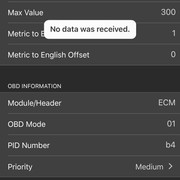
Enter the data from the pic below. Make SURE the formula is exact. You will have to then connect to your vehicle and confirm that it can read it. NOTE- change from ECM to ALL seems to fix the transmission reading.

Once it confirms you can play with the Dash however you feel.

Sent from my iPhone using Tapatalk
I’m making this cause it was super annoying going through several different threads to get this to work. FYI you DO NOT need to buy a Toyota expansion from OBD Fusion to make this work.
This App: OBD Fusion by OCTech, LLC OBD Fusion on the App Store
It’s $9.99 but after trying DashCommand and others This appears to have the best interface.
Now. To get Transmission temp to read you need to do some trickery. THIS ONLY WORKS ON 1999 AND NEWER.
To connect to iPhone and NOT affect cell data do this...
As for using your OBD reader and sill have access to a network you will have to set up the OBD tool as a manual connection.
For FOSEAL it is...
Configure IP: Manual
Ip Address: 192.168.0.11
Subnet: 255.255.255.0
Rouder: 192.168.0.10
Once app is installed and you have gone through the instructions to connect to your OBD2 wireless reader you will see this screen.
Then click on Settings.
Then click on User Defined PIDs and press “New”
Enter the data from the pic below. Make SURE the formula is exact. You will have to then connect to your vehicle and confirm that it can read it. NOTE- change from ECM to ALL seems to fix the transmission reading.
Once it confirms you can play with the Dash however you feel.
Sent from my iPhone using Tapatalk
Last edited: