NAV - Voice Navigation

hey jordan. I was looking for this thread to post a link on siennaclub for ya, only to find you'd already found it! hehe.

When I got my microphone, I opened it up. inside the mic is a circuit board that has a lot of surface mount parts, which I assumed were probably filters of some kind to filter out some of the road noise...just a guess though. it's not just a straight mic connection. (although nobody has tried just plugging a mic in before...dunno, might work)

I can't open mine up easily as it's pretty permanently mounted on the steering column, but maybe someone else could...

Kev
 
Wow thanks for your efforts. I hae given up and just ordered the mic kit from Steve Ganz. He says it will work with the stock Sienna nav system.

Thanks
 
you mean all i have to do is add a mic to my stock nav to have voice command features?! :bugeye:

i see people with the camry nav adding the mic, but anyone with the stock jbl 10 speaker nav do it successfully?

thanks!
 
slowginjoe said:
so i take it the stock sienna nav is the same as the stock 4runner nav?

Unfortunately I can't answer that question - heck I don't even know for sure that the mic/switch will work with the Sienna stock nav system. I'll let you know as soon as I find out:D
 
Help with new 2005 unit and Mic

Hi I have a new 2005 NAV unit factory fitted on my new Toyota corolla verso and have got hold of a mic through friends in Japan.

But there seems to be no socket on the back of the NAV to fit the connector on the Mic/Switch cable.

Looking at some of the picture of older 2004 NAV on the forum this new one looks different. I have fitted a Aux Box ok but there is now only one connector left not used and it looks to have about the right amount of pins but is a different shape.

I notice the oemvalue are selling the new 2005 and still link to say you can fit a mic to it.

Can any one help with some info on this new 2005 unit.


Mike
 
I have the 2004 4Runner, so thsi mike should fit the socket perfectly, right?
What would be the easiest way to access the back of the NAV unit?
Dave
 
jordanthompson said:
Unfortunately I can't answer that question - heck I don't even know for sure that the mic/switch will work with the Sienna stock nav system. I'll let you know as soon as I find out:D

I can confirm the mic kit will work with the stock '04 Sienna nav system. In fact, I found that all I need to do is remove the button that came with the mic kit (cut the wires) and use the "button" (with some minor plastic modification) in the lower right corner of my steering wheel to activate it. See this thread in the Sienna club: http://www.siennaclub.org/forum/index.php?showtopic=3904&st=120&p=43545&
 
jordanthompson said:
I can confirm the mic kit will work with the stock '04 Sienna nav system. In fact, I found that all I need to do is remove the button that came with the mic kit (cut the wires) and use the "button" (with some minor plastic modification) in the lower right corner of my steering wheel to activate it. See this thread in the Sienna club: http://www.siennaclub.org/forum/index.php?showtopic=3904&st=120&p=43545&

Hi thanks for all the help so far.

I wonder, I did not remove the NAV unit, may be I missed a connector hidden by all the wires.

In the diagnostic menu it does show a mirco menu greyed out.

Can some confirm on the NAV were the connector is, I am not at home at them moment so can check the back of the NAV at the moment

There seemed to be one white colour connector left on the back but looking at some of the image I have found, take a look at this one for sale on ebay link below there a picture of the back that the same as mine. The only connector I did see with no plug was the 4th connect in a group of 4 the white one.

http://cgi.ebay.co.uk/ws/eBayISAPI.dll?ViewItem&rd=1&item=5724529724&ssPageName=STRK:MEWA:IT


Mike
 
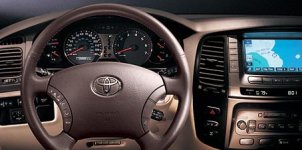
It seesm that in the Sienna, on the right part of the steering wheel there is a prewired switch for the microphone.
I took apart the cover on the right side of my wheel, but unfortunately, it's just a plastic blank...no wiring present on the 4Runner wheel for the microphone switch.
 
I noticed that if you go to partznet and look under a 2004 landcruiser steering wheel, you can buy the right steering wheel switch bank for $41. The LC has the same steering wheel and looking at toyota's website it's right switch bank has one active switch to control the voice command. Anyone tried this already? Also, is the Dark Gray color in the LC same as in our trucks and does the steering wheel button on it light up amber like ours?

the switch on partznet:
http://www.trademotion.com/partloca...=2004&graphicID=8415245&callout=7&catalogid=2


pic of LC steering wheel:
 

Attachments

  • photo_2.jpg
    photo_2.jpg
    26.5 KB · Views: 611
How would you think that would be wired back to the radio? Do you think there is a terminal in the 4Runner that the switch plugs into? (and then goes back to the NAV unit)? I'd doubt it.
 
I have tried it and it works properly, you have to use the button and a ribbon cable to tie into the existing audio controls. You don't have to wire anything to the deck. Works perfectly.

j0.
 
You buy the button and cable. the ribbon cable cross connects to the exisiting audio controls...


Voila you are done.... Simple.

j0.
 
Okay, is the ribbon cable that you're talking about Part #9 listed as switch cable on the previous poster's website for the switch? I think it costs about $25 from Lexus.
The other thing is when I went into diagnostic mode on my HU (stock 04 4Runner NAV), there was nothing that said "microphone" in diagnostic mode. Does that mean that microphone will not work for 04 4Runner stock NAV?
 
Last edited:
j0,
Berfore you plugged the microphone into your NAV HU, if you went into diagnostic mode, did it still say "microphone check" even with the microphone not plugged in?
When I get to that screen on mine (no microphone plugged in), there is no button for microphone check. I'm wondering if it appears after the microphone is plugged in.
Also, the buttons on your screen are green....mine are blue.
 
The buttons where there before i plugged in the mic. So if it doesnt have it, it might not work at all.


j0.
 

Members online

Forum statistics

Threads
278,312
Messages
3,554,086
Members
248,016
Latest member
Advally Service

Trending content

Back
Top