Pioneer radio install help

BigMike18

Member
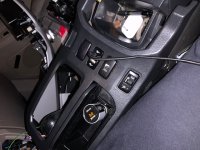
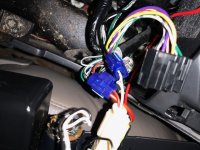
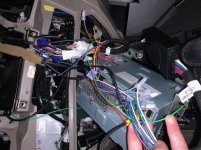
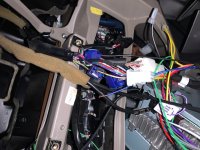
So I’ve followed all the guides on not only YOUTUBE and on here but I’m still struggling with this radio. I’ve included the pictures of the wires and connections but I’ve got no power or really anything. Does anyone have any ideas? Am I splicing wrong or something? Because this usb connector isn’t not working as well and it’s only a ground and power connections so any help would be great

 

Attachments

  • AD7C806D-BFD2-4CFD-A329-5670A5406468.jpeg
    AD7C806D-BFD2-4CFD-A329-5670A5406468.jpeg
    104.5 KB · Views: 628
  • 8048FC6E-7AE2-4262-B8E3-BA6249BE9C9F.jpeg
    8048FC6E-7AE2-4262-B8E3-BA6249BE9C9F.jpeg
    129.4 KB · Views: 644
  • F67D0EC3-DE87-4731-9B00-AA3CEF4B43A1.jpg
    F67D0EC3-DE87-4731-9B00-AA3CEF4B43A1.jpg
    53.9 KB · Views: 625
  • A168A586-3E42-4111-8154-5368CC7AD24E.jpeg
    A168A586-3E42-4111-8154-5368CC7AD24E.jpeg
    113.8 KB · Views: 832
Register to hide this ad
Your post is a little confusing. Your radio doesn't have power, or just your USB? You're using a maestro idatalink it looks like. Do you have JBL? And did you follow the guide with the radio itself?
 
Your post is a little confusing. Your radio doesn't have power, or just your USB? You're using a maestro idatalink it looks like. Do you have JBL? And did you follow the guide with the radio itself?

I have no power the radio isnt turning on or the usb plug which suspect im using the scotchlok splicers wrong but I could be wrong. Im using Tyto-01 from Axxess and then ASWC 1 for steering wheel controls and the pioneer harness. Im using this guy's guide and it worked for him and I do indeed have the JBL Audio in my Limited 05

Parts for Head Unit Installation
 
I don’t have anything to add other than I do a ton of electrical and I can’t stand those scotchlok splicers… they are often time times the root cause for poor/intermittent electrical connections.

If you are going to use them, make sure there is continuity though the insulator using a DMM.
 
I don’t have anything to add other than I do a ton of electrical and I can’t stand those scotchlok splicers… they are often time times the root cause for poor/intermittent electrical connections.

If you are going to use them, make sure there is continuity though the insulator using a DMM.

I agree with this 100%.
Stay away from the connectors if at all possible.
 
Those connector things do look like you may have a problem. In the bottom pic, that yellow wire connector doesn’t look like the blade is seated all the way down. Personally I use posi-lock and posi-taps, but they’re admittedly really expensive. But I’ve used those ‘scothlock’ connectors on other projects too with little issue. My recommendation is to start with all of those and confirm the blade is seated all the way. I’ve had to use pliers to secure them all the way down. Also, it’s been awhile since I’ve done my radio install, but I believe on the main connector, the red and/or yellow wire is the power wire. Obviously, black is ground. So I’d start by trouble shooting those. I remember I had illumination problems and reception problems and that was orange and blue wires respectively. So check all your red/yellow/black wire connections first.
 
I had very similar issues trying to use the adapter connections. After mine did not power up, I got a Toyota wiring diagram and spliced everything in. I got the nex1400 w Apple CarPlay. It’s still working over a year later.
 
I just installed an android unit in my 2007 4runner.

The wiring was a pain. I followed the directions from Crutchfield but it wouldn't power on. So I found a thread from J.A. (on here) and i cut the yellow wire and soldered it to the red wire. Now it powers up and no issues - other than i guess it won't hold a memory anymore as it's only powered by ignition.
 

Members online

Forum statistics

Threads
278,312
Messages
3,554,089
Members
248,016
Latest member
Advally Service

Trending content

Back
Top