Rearview camera mod WITH NAV

I can successfully confirm " IT WORKS", this for a 2013 with Entune Nav.

All credit goes to Eddie on this one, I was just the first to hook it up.

:cheers: for being that brave soul and trusting my hunch.

Guess it's safe for me to try this on my own vehicle now? :p
 
Ok, I did a bit of probing around in my car with a DMM and I've come down to this conclusion (note, this is based off a 2012 TE w/ entune nav, but I'd imagine that it should be pretty similar for all entune nav units).

I am about 90% certain that the below picture is the correct plug and pins you need to splice into for the rear camera mod, but of course my car is not operational so I can't verify these pins during actual operation.

I did however used the 2010 EWD posted by Nashman as a guide to tracing the wires at different junction points throughout the vehicle and this is how I deduced the pin layout depicted below.

It appears that most of the wiring harnesses are pretty similar between the 2010 and 2012 models throughout the vehicle, and only some wires were moved around to accommodate newer components.

The plug you are looking for is a 28 pin white plug, it should be pretty much self explanatory because this is the only plug back there that looks like this.

Once you've located this plug and before proceeding to cut and splice, could you please take a DMM and verify that the blue wire is a switched +12v ignition signal (which goes on and off with the ignition switch) and that the red wire is a switched +12v reverse signal (which goes on when the gear is placed into reverse)?

If the signals on each pin turn out to be correct according to your DMM, then the rest of the mod should be smooth sailing from there...(1) cut the red wire, (2) connect the nav end of the red wire to center pole of the SPDT, (2) connect the harness end of the red wire to one of the switched poles of the SPDT, (3) don't cut and just tap into the blue wire and connect that to the remaining switched pole of the SPDT.

Please someone correct me if I am wrong, but I think it seems like we should be in good shape?

If I beat you to this mod, I will of course update this thread, but please note that I work at a snail's pace when it comes to all things car related so don't hold your breath :p

I just finished testing this out on my vehicle and can confirm that it works on a 2012 entune unit as well. Happy modding :)
 
*update*

I have had this for about a month now, and it has been working flawless 99.999% of the time, switches on input command and when in reverse.

However, twice now when it has been very cold out (below -0) the cam will not work on ANYTHING, not with the switch or when in reverse. Then in the very next trip latter in the day everything works perfect again? This has only happened twice and both times when the 4R was a Popsicle.

I don't think it would be a loose wire as I have been offroad many times on a bumpy ride and it has never cut out on me. Just seems odd that it has only happened when temps are -0, and to me it seems temp related.

Any ideas? Doe's the factory cam not work when it's this cold?
 
Sorry to see you are having problems, what you are describing sounds like a connection problem at the common terminal? (the red wire that goes to the head unit)

I wonder if it could be something related to the switch? I had the strangest issue I couldn't track down until I started to handle the switch itself. One of the terminals on the back was ever so slightly loose, so if I pulled on it it would disconnect from the switch body slightly, and if I pushed it back in, the switch worked perfectly fine.

Things seem to be working flawlessly on my end now, minus the faulty switch I had ended up replacing (that's what I get for buying a cheap switch :))
 
Sorry to see you are having problems, what you are describing sounds like a connection problem at the common terminal? (the red wire that goes to the head unit)

I wonder if it could be something related to the switch? I had the strangest issue I couldn't track down until I started to handle the switch itself. One of the terminals on the back was ever so slightly loose, so if I pulled on it it would disconnect from the switch body slightly, and if I pushed it back in, the switch worked perfectly fine.

Things seem to be working flawlessly on my end now, minus the faulty switch I had ended up replacing (that's what I get for buying a cheap switch :))

That's what I am leaning toward as well "faulty switch" maybe. It has only happened twice and has been over 2 weeks ago so I am hoping it fixed itself out.
 
has anyone considered using the factory parking assistant switch from the SR5 for this? would require additional wiring (on-power, another ground). But it would be factory looking.
Not sure anyone answered this, and after reading it I had some extra thoughts/questions in my head...

I have a '13 TE for reference and I like my mods to look as profession and "factory original" as possible. I must say the mods done with the SPDT really do look profession, but not factory enough for my liking. Which lead me down the following thought process.

If the parking assistant switch is not installed, is the wiring harness still there?

Could this harness be used for power/ground, and at the same time further up use three wires to complete the install from the splice at the back of the head unit? Obviously, this will render the remaining wires not used from that harness useless; which would need to be capped/taped/tucked.

Would this would work? Is my above method frowned upon for any reason? Just a newbie trying to learn the ropes.

Also, I'm going to look around for a EWD of the specific harness I mentioned, if someone has it could they post it? I'll edit if I find it first.
 
Last edited:
Not sure anyone answered this, and after reading it I had some extra thoughts/questions in my head...

I have a '13 TE for reference and I like my mods to look as profession and "factory original" as possible. I must say the mods done with the SPDT really do look profession, but not factory enough for my liking. Which lead me down the following thought process.

If the parking assistant switch is not installed, is the wiring harness still there?

Could this harness be used for power/ground, and at the same time further up use three wires to complete the install from the splice at the back of the head unit? Obviously, this will render the remaining wires not used from that harness useless; which would need to be capped/taped/tucked.

Would this would work? Is my above method frowned upon for any reason? Just a newbie trying to learn the ropes.

Also, I'm going to look around for a EWD of the specific harness I mentioned, if someone has it could they post it? I'll edit if I find it first.

Toyota appears to be very cheap with the wiring harnesses, so if the option is not there, I would not count on the extra harness being there. I took apart my entire dash in my TE and did not encounter any extra switch plugs hiding behind the panels...
 
Toyota appears to be very cheap with the wiring harnesses, so if the option is not there, I would not count on the extra harness being there. I took apart my entire dash in my TE and did not encounter any extra switch plugs hiding behind the panels...
Man that sucks. I guess I'll have to keep an eye out when I tear my dash apart to see if it's there. Or create my own harness. Thanks.
 
Man that sucks. I guess I'll have to keep an eye out when I tear my dash apart to see if it's there. Or create my own harness. Thanks.

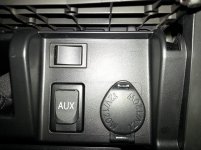
Is this factory fit and finish enough for ya? :)
 

Attachments

  • nav_switch.jpg
    nav_switch.jpg
    92.9 KB · Views: 1,899
OK so I just finished this mod on my 2013 TE w/ NAV. Here's some pix...


OK so one thing I'd like to say about installing the switch next to the cigarette lighter. Follow this order when disassembling:

1. Remove side dial covers
2. Remove AC Controls
3. Remove NAV
*4. Remove center console covering (Remove both shift knobs by unscrewing)
*5. Remove thin but wide grey plastic strip between bottom of Cigarette/USB peice and center console. You'll see it between the 4wd shift knob and black plastic of the Cigarette bin.
*6. Finally remove Cigarette lighter piece by pulling straight out.
 
In addition to this camera anytime mod I have already done. This weekend I will be attempting to add a A/V input so I can watch TV, DVD, Xbox, and most importantly mirror my smart phone all on the OEM screen. This is for a 2013 Entune system. :bigok:
 
In addition to this camera anytime mod I have already done. This weekend I will be attempting to add a A/V input so I can watch TV, DVD, Xbox, and most importantly mirror my smart phone all on the OEM screen. This is for a 2013 Entune system. :bigok:

Post how to when done, I want to add a front view camera and mirroring the smartphone sounds pretty nifty too :)
 
Guess it seems not many here are interested, just letting everyone know it is done. :bigok:


Secret unlock screen option :wow2:


2lkths7.jpg


Here is TV input, video quality is actually pretty great. Their is more options for screen resolution/quality now.

2nanou9.jpg

ir3htt.jpg

qn2n9f.jpg


Next up is mirroring smartphone or Ipad so I can use google earth/maps. Also thinking of adding the old XBOX360 since XBOX One comes out soon.
 
Guess it seems not many here are interested, just letting everyone know it is done. :bigok:


Secret unlock screen option :wow2:


Here is TV input, video quality is actually pretty great. Their is more options for screen resolution/quality now.


Next up is mirroring smartphone or Ipad so I can use google earth/maps. Also thinking of adding the old XBOX360 since XBOX One comes out soon.

Did you have to add a switch or is there a TV input in the entune head unit? Any difference in how to do this from the instructions above?
 
Guess it seems not many here are interested, just letting everyone know it is done. :bigok:


Secret unlock screen option :wow2:

Next up is mirroring smartphone or Ipad so I can use google earth/maps. Also thinking of adding the old XBOX360 since XBOX One comes out soon.

That's real cool man, can you tell me what module you ordered to integrate into the factor entune unit like that???
 
Switch details

I want to do this on my 2010 Nav unit. A few questions about the switch options:
1. If the SPDT switch is one that has an ON-OFF-ON configuration, where its off if in the center position, does putting the switch in the center (OFF) position cause the nav screen to not have any backup cam image at all, even if I'm in reverse? And then the first "ON" side is "stock" as if the switch were never installed, and the other direction "ON" is always-on? Or should I just be looking at ones that are just ON-ON?? It's not clear to me if the RadioShack one is ON-OFF-ON or just ON-ON type switch.
2. Does the amperage rating of these switches matter? The RadioShack one that was used here is rated at 3amp at 125VAC, but some if the ones I see online are higher amperage ratings....?

Here are a few I was looking at:
round ON-OFF-ON
rectangular ON-ON
rectangular ON-OFF-ON

Any help is appreciated!
 
Looks like [MENTION=90191]joeee128[/MENTION] has an ON-OFF only switch...now I'm real confused. If you turn off the switch, does that not kill the signal completely?? I'm up too late for this!
 
Guess it seems not many here are interested, just letting everyone know it is done. :bigok:


Secret unlock screen option :wow2:


2lkths7.jpg


Here is TV input, video quality is actually pretty great. Their is more options for screen resolution/quality now.
Next up is mirroring smartphone or Ipad so I can use google earth/maps. Also thinking of adding the old XBOX360 since XBOX One comes out soon.

Patiently waiting for a continuation of this thread.....what did you have to do to accomplish this?!?
and did you ever figure out how to mirror your phone???
 

Members online

Forum statistics

Threads
278,307
Messages
3,554,055
Members
248,016
Latest member
Advally Service

Trending content

Back
Top