Scion SNS 200 HU installed

jdkilroy

New member
Just wanted to give a heads up on this new(er) Scion HU. I managed to work one of these into my T4R purchase because the dealer misrepresented the sound system pretty badly. Otherwise it is a pretty spendy unit at around 1800.00 online but I'm sure it is going to start showing up cheaper before long.

Started with a bare bones non-JBL 6 speaker, single CD system as installed from factory in a 2008 V8 SR5. (turns out the radio was a refurbished unit from factory !)

This was basically an easy, plug and play swap. At this point, I am using the amp in the HU. I plugged in the existing plugs from that bare bones radio; that connected to existing speaker wiring, the steering wheel controls, antenna.

New items included the GPS antenna, the Bluetooth antenna, the XM antenna and I am still in the process of acquiring a AUX/USB set-up.

I placed the GPS and XM antennas on the roof beneath the front end roof rack covers; one on each side. The GPS connects near instantly.

I did not connect the VSS, PKB, or REV wires and the unit is behaving fine. As far as I know, there is no hack available for this unit to get around the lockout and that is what it does. The install instructions even state that you shoud cut the VSS wire and tape it off as there is no need to connect it ...?

The reason I didn't connect the PKB and REV wire is that I was not absolutely sure which they were. (There is an unbelievable amount of conflicting information on these forums)

At any rate: The new head unit installed without any modification to the dash or the HU what-so-ever. I removed the brackets from the old radio, put them on the new one and it was perfectly positioned.

I also took the opportunity to replace all the speakers: I used all Alpine; 6x9" three-ways in the front, 6.5" two-ways in the rear and midrange/tweeter combo preplaced factory tweeters in the front doors.

I was stunned to find out how CHEAP the OEM speakers were. the magnets for the 6x9's were about quater-sized in diameter and about 3/4" thick. the entire speaker unit weighed a few ounces... tops. I'm serious, they were ridiculous. To replace the speakers, I cut the originals out from the plastic housing that is mounted to the inside of the doors. I reused these housing to mount the new speakers in so once again, plug and play. No cutting of the doors. I retained the factory appearance as the door panels still provide the grilles for the new speakers.

I plan to add an amp to this system in the future which will be really "easy" using the included pigtail that provides preamp out for all speakers, subwoofer, video and back-up cam.

I will say that the system sounds really really good as it is. Since the HU is made for Scion by Alpine, it is now a completely Alpine system. Clean, tight and really adjustable.

I looks pretty much factory except for the two blue buttons on the sides but I can live with that.
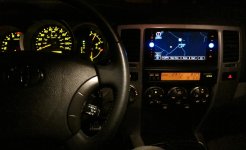
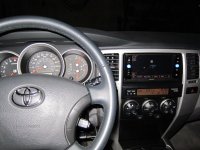
IMG_0160.jpg
IMG_0159.jpg

The Bluetooth connects with my phone immediately when I turn the ignition on. I don't even have take it out of my pocket. A simple set of touch screen commands transferred my phone contacts to the HU so now I can just use that to make calls.
Still learning all that this unit can do and not do so I'll add to this along with more pics in a bit.

Having a lot of difficulty adding pictures to my post tonight so will try later.

Jon
 

Attachments

  • IMG_0160.jpg
    IMG_0160.jpg
    127.5 KB · Views: 2,157
  • IMG_0159.jpg
    IMG_0159.jpg
    133.7 KB · Views: 1,825
Last edited:
Register to hide this ad
I also took the opportunity to replace all the speakers: I used all Alpine; 6x9" three-ways in the front, 6.5" two-ways in the rear and midrange/tweeter combo pre-placed factory tweeters in the front doors.

......

I will say that the system sounds really really good as it is. Since the HU is made for Scion by Alpine, it is now a completely Alpine system. Clean, tight and really adjustable.

Nice!!!!

Although the AMP is made by Alpine, I don't think would have the same quality sound as a $300 aftermarket Alpine unit.

I looked up the specs on a $700 SCION unit by Alpine a few months ago and what I found was that it had a signal-to-noise ratio of ~ 55 db.

In contrast, my Alpine 9835 has a signal-to-noise ratio of 109 db. Kenwood Excellon is at 110 db.

I am sure your unit sounds great and it does look super clean but for audio enthusiasts I would go with a Kenwood or aftermarket Alpine NAV unit.

It sounds like you got a great deal though.

:)
 
So... Brian's observations/concerns not withstanding, (they are valid in theory)

I have installed an Alpine amp (PDX-F4) to receive and process the SNS 200 pre-amp output and the result is really quite impressive. I'm not talking about volume impressive (although there is plenty of that), I am instead referring to sound quality, clarity, transparency.... At this point, there is no sub installed (the wires have been run as far as the back seat)

Using a CD as a reference, I am very pleased with sound quality. The transparency of the music is more than I could have hoped for. Crystal clear, the bass is very tight. The midrange has a lot of depth and the highs are clear although a tad harsh at times. Adjusting the tweeter crossovers should fix that. (Aiming them away from the front seat listeners softened it a bit) Using an iPod for a source via the USB conection (all files are Apple Lossless) finds the sound quality no less impressive.

The SNS 200 has some interesting sound adjustment controls: It actually has presets programmed into it for the different Scion vehicles. (the 4Runner is probably closest to the xB) The HU allows reversing the polarity of the sub output from the touch screen which should be interesting to play with.

Steering wheel controls work fine, the Blutooth connection for phone control is flawless. I found a connector to replace the "AUX" plug in the middle console with a "USB/AUX" and with a slight modification to the HU end of the connector, I now have full USB/iPod connectivity and control from HU.

So far, I think this Scion unit is working very well and sounding even better. As a (nearly) plug and play unit, you could do a lot worse for not much less money. Is it an audiophiles dream-come-true... ? no, but I appreciate quality sound and I'm getting a fair bit of it in my 4Runner these days.

Problems:
Antenna/reception: sucks, period. Need to work out that diversity antenna thing or I'm just going to install the same mast antenna that my 2004 Tundra has which gets outstanding reception. (already ordered it).

I have a vicious "pop" through the system on start-up if I just turn the key right over to start the engine. If I allow the electronics to power up prior to starting, no "pop." I put a resistor in line in the power switch wire to the amp to drop the current but either i need to drop it further or it's originating elsewhere. any ideas ?


Any suggestions on a lockout workaround ?

Pics to follow. Jon
 
Last edited:
I put a resistor in line in the power switch wire to the amp to drop that voltage but either i need to drop it further or it's originating elsewhere. any ideas ?

That is concerning. What logic led you to add a resistor (which btw shouldn't drop the voltage at all -think of plugging in lightbulbs in your house) to solve the popping?

Did you run new power and ground from the battery to the deck? I usually recommend this for all audio upgrade installs (kind of like a personal best practice).
 
Last edited:
Brian,

Corrected my statement which should make more sense; please change "voltage" to "current."

I do not have any schematics for the amp and I suspect it takes very little current to activate the power switch so the amp turns on with the HU. I tapped into the power plug in the console for the 12V turn-on source but that supplies considerably more current that is required to trigger the switch in the amp. I suspect that there might be a current spike as everything powers/starts up and that is producing the "pop."

The amp has a dedicated 4 gauge power line and ground. Power is direct from battery to amp. Ground is a < 12" connection from amp to chassis. (I connected to bolt that holds passenger seat rail to floor of vehicle after cleaning to ensure good connection)

Another oddity that I discovered this AM on way to work was that my L turn blinker blinks 2x the rate that the R side does .... hmmmm. hopefully only a bulb.
 
Last edited:
Hmmm, what if you unplug the L/R audio plugs going into the amp so it has no signal input. Now try the start up again ... if it still pops in every speaker then your amp is probably causing it.
 
Trouble shooting 101 (thanks Brian)

So I unplugged the HU inputs to the amp and started the vehicle several times with nary a "pop."

Plugged the inputs back in and braced myself; started without allowing the electronics to power up and ... "POP" actually, there are two "pops" in close succession. So the '"pop" appears to be originating in the HU or between the HU and the amp.

PS: the fast blinker is, as designed, expected and hoped for... a blown front directional bulb.

At this point, I think I may need to put ground loop isolators between the HU and the amp. Either that or some sort of a custom filter, capacitor/diode combo that with kill the "pop" without reducing frequency response.

Or... I could just try to remember to let the electronics power up before starting. which is odd because even when I do that, they are all disconnected from power again while the starter cranks and the engine fires up.
 
So it would seem that the head unit (Scion) is emitting a pop when all is turned on at once.

Are the speakers wired into an amp under the drivers seat or they coming out of the back of the HU, powered by the scion?

It sounds like you have pr-outs going into an amp. I would hook up two front speakers to the head unit, unplug the amp and see if they pop.

If they do pop with the amp disconnected then you have a bad HU correct?

I would isolate the problem this way before adding loop isolators ect. Most loops can be avoided by proper power and ground + disconnecting all accessories (radar, chargers).

ALSO, if the problem occurs with the engine off, then it isn't really a typical loop issue because those usually increase linearly with engine RPM.

Good Luck.
 
Last edited:
Amp is beneath passenger seat. HU connected to amp via preamp out circuit. All previous speaker wires connected to HU amp are dead-ended (no load).

No "pop" with HU disconnected and amp live so adequate ground connection.. right?

No "pop" or interference with HU alone using built in HU amp to power same speakers. (as before amp install but after HU and speaker replacement)

No background noise or hum once all is powered up with engine running. No background noise in blue tooth phone mode during call (automatically mutes stereo output during call)

All other functions working fine, GPS, iPod etc

So where the hell is that "pop" coming from ? (Its the kinda "pop" like an acorn fell on your car from way up in that oak tree)
 
At this point I am out of ideas.

T4R is not really very strong on the audio /hr electronics knowledge.

If it was my car, at this point I would take the information gathered and paste it into a new thread at AVSforum.com - under the car audio section. Those guys are brilliant and seem like real professionals based on my interactions with them.

Also, as you can by now see, no one really browses this sub-section of T4R besides me and you.
 
Last edited:
USB connect for SNS 200

For closure on the "POP" issue I eliminated it by improving the ground connection.

Have had some questions regarding USB/iPod connection to the SNS 200.
This was a little problematic since the vehicle that this unit is intended for already has the USB connection built into the vehicle wiring harness.

USB Interface.jpg

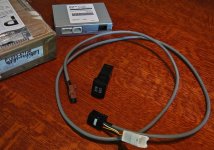
I searched a while and the best I found was this "USB Interface Kit" ( Part # PT233-47100) that was intended for a Camry I think. (I found it used on ebay)
All I needed from the kit was the AUX/USB socket to replace the AUX socket inside my center console and the connecting wire to connect that socket to the HU.
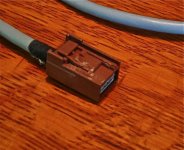
The plug that goes into the back of the HU required a little bit of trimming as seen in the photo but otherwise locked into place and worked perfectly.

Trimmed plug:
Plug trim.jpg

Hopefully that's helpful.

If you really want to make me feel bad, post where you found the cable alone for 20 bucks...
 

Attachments

  • USB Interface.jpg
    USB Interface.jpg
    111.8 KB · Views: 5,216
  • Plug trim.jpg
    Plug trim.jpg
    105.9 KB · Views: 1,762
Last edited:

Members online

Forum statistics

Threads
278,311
Messages
3,554,082
Members
248,016
Latest member
Advally Service

Trending content

Back
Top