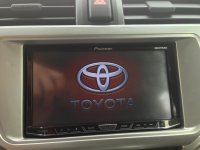
Aftermarket Stereo

That looks freakin' awesome man; still can't wait to get mine.

Just saw you live in Salisbury! I'm in slower-lower. Sound-FX in Lewes did the install. Overall they did great, but they CUT AND SPLICED my freakin' factory XM antenna!!! I'm making them replace it and use the TSS shark-fin adapter wire (SFA12F)!
 
Last edited:
Just saw you live in Salisbury! I'm in slower-lower. Sound-FX in Lewes did the install. Overall they did great, but they CUT AND SPLICED my freakin' factory XM antenna!!! I'm making them replace it and use the TSS shark-fin adapter wire (SFA12F)!

Ouchh! At that Spliced factory XM antenna. I know antennas are sensitive when interfered with. I'm installing my HU myself; i'm more comfortable with dealing with my own created issues than someone else's. Thanks for the heads-up on the shark-fin adapter; i just ordered one.
 
Thanks, it was really easy to route there, especially because I already had the lower dash off. I installed a 4000NEX -- didn't need the navigation, but wanted the larger screen. I am, to say the least, very happy with the unit. Bluetooth is a little quirky, hopefully the bugs will get squished with the firmware update.

If you have any questions, feel free to ask.

FYI - my parts list:

Scosche TA2106B
Pioneer AVH-4000NEX
Metra 70-1761 Radio Wiring Harness For Toyota 87-Up Power 4 Speaker
Metra ASWC-1 Universal Steering Wheel Control Interface
Metra 70-8114
Genuine DIYBypass for All AVH Pioneer (you won't need this for the 8000, there's a software hack after you permanently ground the green wire)
Pioneer ND-BC6 Universal Rear View Camera
Axxess AX-FMUSBEXTCB (I added a USB port to the center console)
Hacked-up old USB extension cable (for keeping stock USB plug)

I was wondering how I was going to deal with the motion bypass; I saw a few how-tos on YouTube of how to get past it. Does the 8000 have a VSS connection for vehicle speed like the Avic-Zs.
 
I was wondering how I was going to deal with the motion bypass; I saw a few how-tos on YouTube of how to get past it. Does the 8000 have a VSS connection for vehicle speed like the Avic-Zs.

I don't know about the VSS, but per Official NEX Bypass (AVIC Units Only) - NEX - AVIC411.com

Step 1 ground parking brake wire (green)
Step 2 turn power on push main menu button (bottom center)
Step 3 push AV icon (bottom center)
Step 4 on AV icon screen push off button (towards bottom)
Step 5 touch quadrant 4 (half inch in and half inch up from left lower corner of touch screen) hold your finger there for about 10-12 seconds. "set on" icon will appear that means you are done.
 
I was wondering how I was going to deal with the motion bypass; I saw a few how-tos on YouTube of how to get past it. Does the 8000 have a VSS connection for vehicle speed like the Avic-Zs.


Yes, the 8000NEX has a VSS connection. It is a pink wire. Someone over at AVIC411.com has scanned and uploaded the install manual if you want to take a look. Lots of good stuff at that site.

http://avic411.com/index.php?/topic/38749-pioneer-nex-installation-manual/?p=277911
 
I just had an AVIC-8000NEX installed in my 2010 4Runner Limited on Friday... I LOVE it! It's fast, beautiful, and intuitive. The GPS is better than Garmin. The capacitive touch screen works well (WAY better than a resistive touch screen, but not as smooth as a modern smart phone or tablet). Plus, if you have an iPhone, you'll get to use Apple CarPlay starting early this summer with a firmware update! The unit supports iDataLink Maestro SW, and will support Maestro RR with a firmware update early this summer.

There is NOTHING I don't like about this unit!

I've been eyeing this unit for a while.. I am waiting for more reviews to surface before going forward with the purchase.
I heard some bad reviews about the original app radio interface. Have you had a chance to link up your phone and play around to give any feedback?
 
I've been eyeing this unit for a while.. I am waiting for more reviews to surface before going forward with the purchase.

I heard some bad reviews about the original app radio interface. Have you had a chance to link up your phone and play around to give any feedback?


I did... I wasn't blown away by AppRadio and probably won't use it too much in the future. That certainly isn't a deal breaker for me though, especially with Apple CarPlay coming this summer to take its place (I have an iPhone). Here are my issues with AppRadio...

1) With iPhone, you have to use both a USB/Lightning cable AND an HDMI cable plugged into Apple's Digital Lightning AV Adapter... It is a pretty clumsy setup. Also, you can't use the 8000NEX's iPod mode using this connection... It has to be plugged in by USB only! I'm not familiar with how Android works. For iPhone, I'll gladly give up AppRadio to have a fully functional iPod mode. The standard iPod mode is very intuitive and beautiful. Scrolling through music is just as fast as doing it on my phone's screen.

2) It is a totally separate experience from the rest of the 8000NEX. It is basically an app that overlays all the awesome features that the 8000NEX comes with. The actual AppRadio software is run by your phone, not the head unit. The head unit just interfaces with it.

3) AppRadio IS buggy and temperamental. Sometimes apps start, sometimes they don't.

4) There aren't many apps! The only one I would consider using is the Escort Live app with my Passport Max radar detector... But it honestly isn't worth the hassle. Pandora is built in to the 8000NEX and works great, so there is no reason for having it separately in AppRadio.

At the end of the day, the 8000NEX has all the sources I care about built right in WITHOUT messing with AppRadio. I have Pandora, iPod mode, SiriusXM, BT, etc. accessible right from the home screen, and they all work wonderfully. The 8000NEX's native OS is so much better than AppRadio that I don't miss it, AT ALL. Plus, CarPlay is coming soon, and it will take the place of AppRadio on the home screen for iPhone users.

 
I did... I wasn't blown away by AppRadio and probably won't use it too much in the future. That certainly isn't a deal breaker for me though, especially with Apple CarPlay coming this summer to take its place (I have an iPhone). Here are my issues with AppRadio...

1) With iPhone, you have to use both a USB/Lightning cable AND an HDMI cable plugged into Apple's Digital Lightning AV Adapter... It is a pretty clumsy setup. Also, you can't use the 8000NEX's iPod mode using this connection... It has to be plugged in by USB only! I'm not familiar with how Android works. For iPhone, I'll gladly give up AppRadio to have a fully functional iPod mode. The standard iPod mode is very intuitive and beautiful. Scrolling through music is just as fast as doing it on my phone's screen.

2) It is a totally separate experience from the rest of the 8000NEX. It is basically an app that overlays all the awesome features that the 8000NEX comes with. The actual AppRadio software is run by your phone, not the head unit. The head unit just interfaces with it.

3) AppRadio IS buggy and temperamental. Sometimes apps start, sometimes they don't.

4) There aren't many apps! The only one I would consider using is the Escort Live app with my Passport Max radar detector... But it honestly isn't worth the hassle. Pandora is built in to the 8000NEX and works great, so there is no reason for having it separately in AppRadio.

At the end of the day, the 8000NEX has all the sources I care about built right in WITHOUT messing with AppRadio. I have Pandora, iPod mode, SiriusXM, BT, etc. accessible right from the home screen, and they all work wonderfully. The 8000NEX's native OS is so much better than AppRadio that I don't miss it, AT ALL. Plus, CarPlay is coming soon, and it will take the place of AppRadio on the home screen for iPhone users.

I have the app radio 3. It's really good for the price. It is buggy at times but for half the price of the higher end units, it does the job for me. Plus if I want to upgrade later on. It's cheap enough for someone to buy without any hesitation
 
I have the app radio 3. It's really good for the price. It is buggy at times but for half the price of the higher end units, it does the job for me. Plus if I want to upgrade later on. It's cheap enough for someone to buy without any hesitation


Yeah, I guess what I'm trying to say is that AppRadio is just a footnote on the NEX line of head units... It certainly doesn't hurt what would be an absolutely FANTASTIC head unit even without AppRadio. DannyLlama, if you don't like it, don't use it and don't look back... There's enough other features that you WILL be satisfied with, and AppRadio is not a necessity. The 8000NEX shouldn't be judged on the merits of AppRadio alone.
 
Yeah, I guess what I'm trying to say is that AppRadio is just a footnote on the NEX line of head units... It certainly doesn't hurt what would be an absolutely FANTASTIC head unit even without AppRadio. DannyLlama, if you don't like it, don't use it and don't look back... There's enough other features that you WILL be satisfied with, and AppRadio is not a necessity. The 8000NEX shouldn't be judged on the merits of AppRadio alone.

I get and respect everything that you have noted and I appreciate the feedback. However, I don't agree, because having an "app ready" unit is a priority for me.

What features does it have that the other manufactures don't have? Most double din units have Pandora, xm, etc.... How is this unit superior?

I Was hoping that the app radio functionality is some what stable, because that is the home run for me.
 
Here are a Toyota splash and background jpeg that I made in Photoshop for my AVIC-8000NEX, but they should work on any of the NEX units (and most likely others as well).

IMG_0530.jpg I used your splash screen, well done!
 

Attachments

  • IMG_0530.jpg
    IMG_0530.jpg
    119.4 KB · Views: 5,391
I get and respect everything that you have noted and I appreciate the feedback. However, I don't agree, because having an "app ready" unit is a priority for me.


What features does it have that the other manufactures don't have? Most double din units have Pandora, xm, etc.... How is this unit superior?


I Was hoping that the app radio functionality is some what stable, because that is the home run for me.


Gotcha, no worries! I'm would think the AppRadio mode works as good as it does on the stand-alone AppRadio units. Other than that, I can't really give an educated answer... I've never used AppRadio until getting the 8000NEX, and I got it primarily because it was announced that Apple CarPlay is coming to it. I'm definitely looking forward to what Apple has in store for app access in CarPlay. The unit also supports MirrorLink for app support on Android devices, but I have no clue how that works.
 
First post and maybe I missed it through all my searching but if I was to replace all 8 speakers how would the wiring work?

I only have seen harnesses for 4 speakers? What about the ones in the hatch? Or the dash? Or are they off of the FR, FL, RR, RL?

Thanks!
 
First post and maybe I missed it through all my searching but if I was to replace all 8 speakers how would the wiring work?

I only have seen harnesses for 4 speakers? What about the ones in the hatch? Or the dash? Or are they off of the FR, FL, RR, RL?

Thanks!

The rear hatch speakers are connected to the rear passenger speakers. So it's FL FR RR RF
 
Gotcha...

So the front dash speakers are off of the FR FL? That makes it easy. Thanks!

Not entirely easy. Kind of less than ideal. You will be sending a full range signal to the dash and front door. Almost guaranteed to overload the dash speaker (popping sound) when you turn it up. You will probably need a bass blocker.
 
Installation finally complete

NicNeo, i'm looking at getting the NEX8000 as well for my 2010 SR5, along with these speakers JL Audio C2690TX 6X9, C2-650 x 6.5 and C2-075ct tweeters. Let me know when you get that installed and how you like it. I've been holding off for a long time from getting a new head unit. Almost got the AVIC series multiple times but this NEX seems like it could be the one.

I finally finished installing my unit after being delayed by UPS (Bad Weather they said), enabled the motion bypass and i have to say i'm very impressed.
The GPS is not that bad but i use Waze from my phone using AppRadio.
I got the AppRadio Unchained to work; i can now play all video apps from my phone to my unit and that includes Netfilx, Plex and so on.
<a href="http://s943.photobucket.com/user/nicneo/media/IMG_0178_zps054abcab.jpg.html" target="_blank"><img src="http://i943.photobucket.com/albums/ad277/nicneo/IMG_0178_zps054abcab.jpg" border="0" alt=" photo IMG_0178_zps054abcab.jpg"/></a>
<a href="http://s943.photobucket.com/user/nicneo/media/IMG_0177_zps222e0f32.jpg.html" target="_blank"><img src="http://i943.photobucket.com/albums/ad277/nicneo/IMG_0177_zps222e0f32.jpg" border="0" alt=" photo IMG_0177_zps222e0f32.jpg"/></a>
<a href="http://s943.photobucket.com/user/nicneo/media/IMG_0180_zpse647b036.jpg.html" target="_blank"><img src="http://i943.photobucket.com/albums/ad277/nicneo/IMG_0180_zpse647b036.jpg" border="0" alt=" photo IMG_0180_zpse647b036.jpg"/></a>

Watching Wheeler Dealers on Plex
<a href="http://s943.photobucket.com/user/nicneo/media/IMG_0183_zps224db1c7.jpg.html" target="_blank"><img src="http://i943.photobucket.com/albums/ad277/nicneo/IMG_0183_zps224db1c7.jpg" border="0" alt=" photo IMG_0183_zps224db1c7.jpg"/></a>

Veep on HBO Go.
<a href="http://s943.photobucket.com/user/nicneo/media/IMG_0181_zps325227b9.jpg.html" target="_blank"><img src="http://i943.photobucket.com/albums/ad277/nicneo/IMG_0181_zps325227b9.jpg" border="0" alt=" photo IMG_0181_zps325227b9.jpg"/></a>

Worth it. :humble:
 
Last edited:
I finally finished installing my unit after being delayed by UPS (Bad Weather they said), enabled the motion bypass and i have to say i'm very impressed.
The GPS is not that bad but i use Waze from my phone using AppRadio.
I got the AppRadio Unchained to work; i can now play all video apps from my phone to my unit and that includes Netfilx, Plex and so on.

Worth it. :humble:


Sorry to be a pest but can I ask you for as detailed of a review of the unit as possible? Including the unchained functionality... I am a google play subscriber and that is a priority for me if I can control it from the unit.

Do you have to leave it unlocked? That's what i have heard.

Thanks
 
Sorry to be a pest but can I ask you for as detailed of a review of the unit as possible? Including the unchained functionality... I am a google play subscriber and that is a priority for me if I can control it from the unit.

Do you have to leave it unlocked? That's what i have heard.

Thanks

I'm sorry for the late response; A Lot of work plus family.
Anyway for a detailed review i would recommend other sites like Pioneer AVIC-8000NEX Navigation receiver at Crutchfield.com or Youtube https://www.youtube.com/watch?v=SlvPVmqzvKA
As far as controlling your mobile device from the unit, the device has to remain unlocked, gets pretty hot too.
 

Members online

No members online now.

Forum statistics

Threads
278,312
Messages
3,554,089
Members
248,016
Latest member
Advally Service

Trending content

Back
Top