
You are using an out of date browser. It may not display this or other websites correctly.
You should upgrade or use an alternative browser.
You should upgrade or use an alternative browser.
"Group Buy" for Ipod Interfaces from Vais Technology
- Thread starter Editorchops
- Start date

Installed!
My VAIS aic-100i is installed and working with a few caveats but overall I'm very happy with the sound and control of the ipod.
I just traded my ipod photo for a ipod video which is only supported by the aic-100i in simple mode but Eugene is working on a firmware update to include the ipod video for HU navs.
My NAV on my 4R LTD did not display cd text in either cd or md mode. I've asked Eugene about this, it may be a limitation of the HU and not the aic but I'm guessing.
The AUX input function and playlist features all work as advertised but not being able to see the text of the playlists on my HU or on the ipod forces me to use it in simple mode. For me, this works as the larger display on the ipod video will allow me to mount it on the dash, (Proclip) and easily see the info while being able to use steering wheel control for next song and volume. A nice feature is that when you use the steering control the ipod display lights up for a few seconds allowing you to glance at song info.
The sound on the aic-100i is excellent, better than expected. The hard-drive noise for me is livable, (only between songs when spinning up), hence I wont install a ground loop isolator as I don't want to introduce any compromise to fidelity.
I placed the unit in glove box loosely as it was easy to feed the cable from behind HU to glove box and ipod cable easily goes thru bottom of glove box without inhibiting glove box closure. Also, this allows easy access to aux input and, for me, easy disconnection of AIC when Eugene is ready with firmware upgrade for ipod video support.
I hope that my HU will eventually show song info but even without I'm satisfied with the quality of this product and could not be happier with the sound.
If you organize your playlists in a memorable fashion the HU mode may work for you but I like to randomize my entire collection. Also, not so sure I want to be mucking with NAV display for every song change, could end up with a messy screen quickly thinking it better to use the NAV screen only for navigation.
Finally, the aic-100i supports many HUs and the absence of cd-text in my case was disappointing but the other features such as aux input and working steering wheel controls, the quality of the unit and provided cables and the support I've received from VAIS, (not to mention group buy price!), have made me a very happy customer.
PS: total install time was about 1.5 hours but I've disassembed my dash once before and take advantage of being able to clean dash parts while removed.
My VAIS aic-100i is installed and working with a few caveats but overall I'm very happy with the sound and control of the ipod.
I just traded my ipod photo for a ipod video which is only supported by the aic-100i in simple mode but Eugene is working on a firmware update to include the ipod video for HU navs.
My NAV on my 4R LTD did not display cd text in either cd or md mode. I've asked Eugene about this, it may be a limitation of the HU and not the aic but I'm guessing.
The AUX input function and playlist features all work as advertised but not being able to see the text of the playlists on my HU or on the ipod forces me to use it in simple mode. For me, this works as the larger display on the ipod video will allow me to mount it on the dash, (Proclip) and easily see the info while being able to use steering wheel control for next song and volume. A nice feature is that when you use the steering control the ipod display lights up for a few seconds allowing you to glance at song info.
The sound on the aic-100i is excellent, better than expected. The hard-drive noise for me is livable, (only between songs when spinning up), hence I wont install a ground loop isolator as I don't want to introduce any compromise to fidelity.
I placed the unit in glove box loosely as it was easy to feed the cable from behind HU to glove box and ipod cable easily goes thru bottom of glove box without inhibiting glove box closure. Also, this allows easy access to aux input and, for me, easy disconnection of AIC when Eugene is ready with firmware upgrade for ipod video support.
I hope that my HU will eventually show song info but even without I'm satisfied with the quality of this product and could not be happier with the sound.
If you organize your playlists in a memorable fashion the HU mode may work for you but I like to randomize my entire collection. Also, not so sure I want to be mucking with NAV display for every song change, could end up with a messy screen quickly thinking it better to use the NAV screen only for navigation.
Finally, the aic-100i supports many HUs and the absence of cd-text in my case was disappointing but the other features such as aux input and working steering wheel controls, the quality of the unit and provided cables and the support I've received from VAIS, (not to mention group buy price!), have made me a very happy customer.
PS: total install time was about 1.5 hours but I've disassembed my dash once before and take advantage of being able to clean dash parts while removed.

slowginjoe
New member
Re: Hold On...
it's most likely not showing text because he has the video ipod version. i get mine tomorrow and will try it out as soon as i can. i have a 20GB photo ipod, not video. if it doesn't show text then i bet there'll be alot of people wanting a refund!
gRunner3 said:I think for many of us the whole reason we went this route was to get song & track info displayed on the head unit. If that doesn't work then there were other alternatives to consider.
Do you have a factory nav unit and if so, what year?
it's most likely not showing text because he has the video ipod version. i get mine tomorrow and will try it out as soon as i can. i have a 20GB photo ipod, not video. if it doesn't show text then i bet there'll be alot of people wanting a refund!
Slowgin, I tested with the Photo iPod 60GB and no text. The Video iPod did not even work except in simple mode as expected per Eugene's communications
Grunner, I have a 2004 LTD with NAV, my HU shows # 17010 in the bottom right corner. CD text is supported and works with CDs that contain it. I don't think we're in luck as of current firmware rev for our units...
Grunner, I have a 2004 LTD with NAV, my HU shows # 17010 in the bottom right corner. CD text is supported and works with CDs that contain it. I don't think we're in luck as of current firmware rev for our units...
slowginjoe
New member
mtnrunner said:Slowgin, I tested with the Photo iPod 60GB and no text. The Video iPod did not even work except in simple mode as expected per Eugene's communications
Grunner, I have a 2004 LTD with NAV, my HU shows # 17010 in the bottom right corner. CD text is supported and works with CDs that contain it. I don't think we're in luck as of current firmware rev for our units...
Hi MtnRunner. Just talked to Eugene at VAIS about this. He said to make sure you reset the unit per the instructions in the VAIS manual since the Toyota nav doesn't support MD text. He also mentioned a full refund if it doesn't display text. Sounds like a nice guy. I get mine today as soon as I get in the office so I will try to install it asap and see how it goes.
slowginjoe said:Hi MtnRunner. Just talked to Eugene at VAIS about this. He said to make sure you reset the unit per the instructions in the VAIS manual since the Toyota nav doesn't support MD text. He also mentioned a full refund if it doesn't display text. Sounds like a nice guy. I get mine today as soon as I get in the office so I will try to install it asap and see how it goes.
I did reset the unit for CD-Text and no go. Eugene just notified me that the firmware for the Video iPod is ready, I'll be sending it to him next week to upgrade.
To be clear: All my tests for CD-Text were done using my older iPod photo 60GB and not the iPod Video. Hoping I get text on the HU with this but if not I'm still sticking with it as it does what I need it to. Granted; others may not feel this way.

YSutarko
New member
if it doesn't display the text, might as well do this ... http://www.mattgilbert.net/carstereoauxinput/
anyone ever try this solution yet?
anyone ever try this solution yet?
Success!!!!!
I did a quick install tonight and got mine working! (2005 Nav Model)
The unit is shipped in MD changer mode and when hooked up this way my head unit didn't even recognize it at all (including the Aux input). The HU operated like nothing was attached at all. But I switched it over to CD changer mode and it recognized it just fine.
The rest of my observations are based on memory so hopefully I have the correct buttons mentioned:
I've read on other forums (Prius) that some people weren't able to fast forward or rewind the songs but I had no problem with that. However, depending on the mode you have the "CD Changer" set to the fast forward and rewind buttons may operate differently. For example, if the "Scan" button is enabled those buttons move up/down your playlists.
Also, if you are on track #1 and want to go backwards to track #99, the track seek button doesn't work going backwards in normal mode but if you have "Disc Rpt" enabled then it will let you go back from #1 to your last track in the playlist. Pretty cool!
The track titles/names come up pretty fast (maybe takes 1 second) and moving to the next song works even faster.
The one thing I wasn't able to do was get the 12 'Disc' buttons to appear. Even if I selected the "Title Off" button there was just an empty space but no quick access buttons to the first 12 playlists. I figure either I'm doing something wrong or the 2005 HU doesn't have that functionality in its software. I pretty sure it has nothing to do with the VAIS unit itself. Could somebody with a 2005 and cd changer confirm this? The only way I could switch playlists was by enabling "Scan" and using the Up/Down arrows or holding the track up/down steering wheel switch for a second until it beeped.
I routed the cable up near the center console which is where I'm going to put mine (I think). But I didn't have the time or energy to start cutting a hole right now so I'm going to wait for the weekend. That means I'm disconnected again. But curiousity made me hook it up tonight to see if it worked.
I gotta say I'm very happy so far.
I did a quick install tonight and got mine working! (2005 Nav Model)
The unit is shipped in MD changer mode and when hooked up this way my head unit didn't even recognize it at all (including the Aux input). The HU operated like nothing was attached at all. But I switched it over to CD changer mode and it recognized it just fine.
The rest of my observations are based on memory so hopefully I have the correct buttons mentioned:
I've read on other forums (Prius) that some people weren't able to fast forward or rewind the songs but I had no problem with that. However, depending on the mode you have the "CD Changer" set to the fast forward and rewind buttons may operate differently. For example, if the "Scan" button is enabled those buttons move up/down your playlists.
Also, if you are on track #1 and want to go backwards to track #99, the track seek button doesn't work going backwards in normal mode but if you have "Disc Rpt" enabled then it will let you go back from #1 to your last track in the playlist. Pretty cool!
The track titles/names come up pretty fast (maybe takes 1 second) and moving to the next song works even faster.
The one thing I wasn't able to do was get the 12 'Disc' buttons to appear. Even if I selected the "Title Off" button there was just an empty space but no quick access buttons to the first 12 playlists. I figure either I'm doing something wrong or the 2005 HU doesn't have that functionality in its software. I pretty sure it has nothing to do with the VAIS unit itself. Could somebody with a 2005 and cd changer confirm this? The only way I could switch playlists was by enabling "Scan" and using the Up/Down arrows or holding the track up/down steering wheel switch for a second until it beeped.
I routed the cable up near the center console which is where I'm going to put mine (I think). But I didn't have the time or energy to start cutting a hole right now so I'm going to wait for the weekend. That means I'm disconnected again. But curiousity made me hook it up tonight to see if it worked.
I gotta say I'm very happy so far.

kglueck
New member
Re: Success!!!!!
Awesome! this is good news. I'm awaiting mine. I get it (according to the ups website) on thursday...it's gonna be a long weekend...I won't get to install it until sunday evening! or maybe the next tuesday!
gRunner3 said:I did a quick install tonight and got mine working! (2005 Nav Model)
Awesome! this is good news. I'm awaiting mine. I get it (according to the ups website) on thursday...it's gonna be a long weekend...I won't get to install it until sunday evening! or maybe the next tuesday!
slowginjoe
New member
WOOHOO!
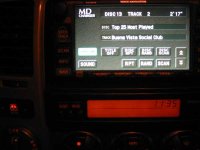
Just installed the unit in my 2003 Limited w/ NAV. The text works!! I will post a write up with pictures soon, including the place that I mounted the unit. The limited length of the cables don't give you much choice. Here's a quick peek at my nav so you guys know I ain't lyin'!!
:rocker:
*mtnrunner - re-program your unit to imitate 'MD-Changer' mode instead of 'CD-Changer' mode and you should see text. This is opposite of what the VAIS manual and gRunner says, but it worked for me. The text didn't work at first in CD Changer mode and I was bummed. But I decided to try the MD Changer mode just for kicks and it worked!
<b>Could this be the very first visual confirmation, in the world, of Ipod text on T4R nav? </b>

Just installed the unit in my 2003 Limited w/ NAV. The text works!! I will post a write up with pictures soon, including the place that I mounted the unit. The limited length of the cables don't give you much choice. Here's a quick peek at my nav so you guys know I ain't lyin'!!
:rocker:
*mtnrunner - re-program your unit to imitate 'MD-Changer' mode instead of 'CD-Changer' mode and you should see text. This is opposite of what the VAIS manual and gRunner says, but it worked for me. The text didn't work at first in CD Changer mode and I was bummed. But I decided to try the MD Changer mode just for kicks and it worked!
<b>Could this be the very first visual confirmation, in the world, of Ipod text on T4R nav? </b>
Attachments
Last edited:
Good Deal Slogin and Grunner, congrats
Let me ask you this; what version iPod's are you testing with? I used the iPod photo 60 GB for my tests and did switch between MD and CD changer modes and no text.
I'm actually meeting Eugene sometime next week, turns out he's only 15 miles from my work. He's going to re-program my AIC for Ipod Video support at which point I'll also ping him about text and rear seat audio.
Rear seat audio: I can't select the CD changer option from my rear seat remote. Has anyone tested this? I got the wireless headphones for my RSA and they're a great deal at $45 but useless without being able to hear the AIC. Being able to skip songs via the remote would be ultra cool too!
Let me ask you this; what version iPod's are you testing with? I used the iPod photo 60 GB for my tests and did switch between MD and CD changer modes and no text.
I'm actually meeting Eugene sometime next week, turns out he's only 15 miles from my work. He's going to re-program my AIC for Ipod Video support at which point I'll also ping him about text and rear seat audio.
Rear seat audio: I can't select the CD changer option from my rear seat remote. Has anyone tested this? I got the wireless headphones for my RSA and they're a great deal at $45 but useless without being able to hear the AIC. Being able to skip songs via the remote would be ultra cool too!
slowginjoe
New member
mtnrunner said:Good Deal Slogin and Grunner, congrats
Let me ask you this; what version iPod's are you testing with? I used the iPod photo 60 GB for my tests and did switch between MD and CD changer modes and no text.
I'm actually meeting Eugene sometime next week, turns out he's only 15 miles from my work. He's going to re-program my AIC for Ipod Video support at which point I'll also ping him about text and rear seat audio.
Rear seat audio: I can't select the CD changer option from my rear seat remote. Has anyone tested this? I got the wireless headphones for my RSA and they're a great deal at $45 but useless without being able to hear the AIC. Being able to skip songs via the remote would be ultra cool too!
I'm using a 20GB Photo Ipod. I haven't tried the rear seat audio yet. I will try it out at lunch.
I've never tried the rear seat audio out since I don't have headphones... not even sure where the remote is anymore.
I have a Ipod 20 GB, not a photo model, with the monochrome screen. I bought it off of Amazon a couple of months ago for $70 off since the new 20 GB photo was replacing it.
I have a Ipod 20 GB, not a photo model, with the monochrome screen. I bought it off of Amazon a couple of months ago for $70 off since the new 20 GB photo was replacing it.
My Bad, Text Works!
I feel really dumb after testing another 60GB Photo iPod today: Text worked! :bash:
I must have ignored the "Title Off" button the first time around.
However, names of Disks, (play lists) don't seem to appear except within the title song display.
But this does provide greater value for me and I do apologize for the earlier misinformation!!!
I'll be driving over to VAIS next week to get my unit upgraded for support of the new iPod with Video. I'll also ask about rear seat audio and post any info I find here.
I feel really dumb after testing another 60GB Photo iPod today: Text worked! :bash:
I must have ignored the "Title Off" button the first time around.
However, names of Disks, (play lists) don't seem to appear except within the title song display.
But this does provide greater value for me and I do apologize for the earlier misinformation!!!
I'll be driving over to VAIS next week to get my unit upgraded for support of the new iPod with Video. I'll also ask about rear seat audio and post any info I find here.
slowginjoe
New member
Re: My Bad, Text Works!
all the info should be there. the playlist name will always show up in the DISC box, and the song, album, and artist info will always show up in the TRACK box. You can toggle between the 3 by pressing DISC SCAN. Good Luck.
p.s. - another hint, by pressing the SCAN button, you toggle the on screen up and down arrows from searching the current song to skipping discs.
mtnrunner said:I feel really dumb after testing another 60GB Photo iPod today: Text worked! :bash:
I must have ignored the "Title Off" button the first time around.
However, names of Disks, (play lists) don't seem to appear except within the title song display.
But this does provide greater value for me and I do apologize for the earlier misinformation!!!
I'll be driving over to VAIS next week to get my unit upgraded for support of the new iPod with Video. I'll also ask about rear seat audio and post any info I find here.
all the info should be there. the playlist name will always show up in the DISC box, and the song, album, and artist info will always show up in the TRACK box. You can toggle between the 3 by pressing DISC SCAN. Good Luck.
p.s. - another hint, by pressing the SCAN button, you toggle the on screen up and down arrows from searching the current song to skipping discs.
Last edited:
kglueck
New member
got mine in today...UPS man laughed as I opened the door as he was reaching for the doorbell...an hour later, I was done. Wow...works *GREAT*...had to swap it to cd-text mode, but other than that it was plug and play with my '04 solara nav... as ren and stimpy would say... Happy Happy Joy Joy!!
not only that, but I (finally, after a year) got off my butt and reinstalled the backup camera on this 4runner. had it pulled from my 03 and just never got around to it. :
:
not only that, but I (finally, after a year) got off my butt and reinstalled the backup camera on this 4runner. had it pulled from my 03 and just never got around to it.
:I'm leaving the aic in the glove box for easy access to the aux and for firmware updates. I'm mounting the ipod on the dash via this mount
I ruled out center column based on the need to drill a hole in it and I ruled out behind HU, the aix is too big and cables too short and no accessibility.
I think I'll like the ipod mounted for when I use simple mode and my iPod travels with me wherever I go so it should be handy.
I ruled out center column based on the need to drill a hole in it and I ruled out behind HU, the aix is too big and cables too short and no accessibility.
I think I'll like the ipod mounted for when I use simple mode and my iPod travels with me wherever I go so it should be handy.
slowginjoe
New member
gRunner3 said:So where have you guys installed the VAIS box as well as your iPod? I'm doing the "permanent" install tomorrow and am still undecided as to the location.
Thanks!
I have the aic mounted underneath the dash, below the glovebox. If you look under there, there is a black panel, right above where the passenger's feet would be. I mounted the aic unit on this black panel with four shallow screws. You can't see the aic unit unless you stick your head down and look up under there, and it's very easy to access to reprogram or use the aux input. All the cabling tucks nicely behind the black panel as well so it looks very clean if somebody does look under there. I have a bunch of pictures of my install, I will put it up when I get a chance.
For the length of cables you get, this is IMHO the best place to install the aic unit in terms of a clean install, invisible during daily use and easy access.
The ipod is in the glove box. I don't think I'll ever need to touch it again except to upload songs! If you mount the aic where I stated, the cable on the ipod is still long enough for it to come out the glovebox and sit in the cupholder, change tray, or a holder on the dash. The glovebox can still close properly even with the cable coming out, as there is a channel inside the door for the cable to come out on the bottom. (Almost like it was made for it.)
I decided against mounting the ipod anywhere visible because of the pain of hiding it everytime I park. It acts just like a md/mp3/cd changer now. You don't need to see it unless you want to update the songs!
* I'll try to post some pics tonight before your install so you can see the exact mounting location.
Last edited:
Similar threads

- Replies
- 301
- Views
- 32K

- Replies
- 3K
- Views
- 2M
- Replies
- 74
- Views
- 17K


