You are using an out of date browser. It may not display this or other websites correctly.
You should upgrade or use an alternative browser.
You should upgrade or use an alternative browser.
Help moving USB from center stack to glove box
- Thread starter esto70
- Start date
bartvonwolf
New member
Yeah, I just moved my USB and left the 12v where it was.On my '16, the USB wiring is long enough to move from the center to the glove box, but the 12v is too short.
Bart
This tread totally cracks me up. I was pissed when I got my 2010 and couldn't find the USB port, only to see it when I reached for the owners manual. I'm thinking why the hell would Toyota put it there? No one would ever want to take their phone/player in and out of the glove box every time or run a damn cord out of it. And you'd be stuck with the garbage interface system.
So I search for a thread on how to swap the USB port to the aux jack position in the center stack and find this thread. Toyota fixed the glitch and there are actually people who want it the other way? At least I can use these instructions to reverse engineer it!
I agree that they should have just put a usb in both places to satisfy everyone.
So I search for a thread on how to swap the USB port to the aux jack position in the center stack and find this thread. Toyota fixed the glitch and there are actually people who want it the other way? At least I can use these instructions to reverse engineer it!
I agree that they should have just put a usb in both places to satisfy everyone.
bartvonwolf
New member
Yeah, it just has to do with how you use your devices. I have a 160GB iPod Classic loaded with music. I can just leave it in the glove box now...forever essentially. I don't ever have to remove it for anything and it is out of sight. And yes, there should be one in the center, one in the glove box AND one in the center console.I agree that they should have just put a usb in both places to satisfy everyone.
Bart
Thanks [MENTION=134155]bartvonwolf[/MENTION]
Your post helped my decision to relocate the USB/Aux. Literally 12-15 minutes total time and my iPod now resides in the glove box out of sight. I have a dual USB charging port coming to replace the USB/Aux I moved.
I'm new to the forum with my first 4Runner, so thank you!
Your post helped my decision to relocate the USB/Aux. Literally 12-15 minutes total time and my iPod now resides in the glove box out of sight. I have a dual USB charging port coming to replace the USB/Aux I moved.
I'm new to the forum with my first 4Runner, so thank you!

SC01
Member
Thanks [MENTION=134155]bartvonwolf[/MENTION]
Your post helped my decision to relocate the USB/Aux. Literally 12-15 minutes total time and my iPod now resides in the glove box out of sight. I have a dual USB charging port coming to replace the USB/Aux I moved.
I'm new to the forum with my first 4Runner, so thank you!
Can you link the kind of dual USB you're getting? I actually would like to have a double USB in my glove box. I know I've seen someone with it on this forum before but I can't find it for anything now. Thanks.

ImfromtheGovt
New member
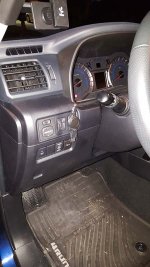
Be careful you get the right one. There are two sizes and at least the blanks on the drivers left side of the wheel are the smaller of the two. I know this because I ordered the wrong one first and had to send it back.
I added the dual USB there because I have a cell mount on the A-pillar and didn't want a charging cable stretched across the steering column.
I added the dual USB there because I have a cell mount on the A-pillar and didn't want a charging cable stretched across the steering column.
Attachments
SC01
Member
That's the one! thanks, I kept typing in double usb and wasn't getting good results
Be careful you get the right one. There are two sizes and at least the blanks on the drivers left side of the wheel are the smaller of the two. I know this because I ordered the wrong one first and had to send it back.
I added the dual USB there because I have a cell mount on the A-pillar and didn't want a charging cable stretched across the steering column.
That's my thinking, I want 1 dual USB in the glove box so I can still hookup my iPod and the other to run a cable back to the stereo head unit where I keep my iPhone. I'm also thinking about getting a 2nd one and installing it below the passenger vents in the back of the center storage compartment. I think that will be good for any passengers and the kid's iPads.
Has anyone done this?
ImfromtheGovt
New member
That's the one! thanks, I kept typing in double usb and wasn't getting good results
That's my thinking, I want 1 dual USB in the glove box so I can still hookup my iPod and the other to run a cable back to the stereo head unit where I keep my iPhone. I'm also thinking about getting a 2nd one and installing it below the passenger vents in the back of the center storage compartment. I think that will be good for any passengers and the kid's iPads.
Has anyone done this?
The dual USB that was in the link above and the one I got are power only. I guess you could figure out how to get to the other pins if you really wanted to, but it seems like more work than its worth. Easier to add a 12v outlet and plug this into it.
https://www.amazon.com/Aukey-CC-S1-...68434198&sr=8-2&keywords=12v+dual+usb+charger
Same thing in the back of the center console for row 2 passengers. Easier to add this (and it will have more uses than just USB too...)

sigepbiker
Member
Just made this change to my 2016 Trail! I always like being able to leave my iPod plugged into the radio when running errands and not having to worry about it being in sight.
I got tripped up on how to pop out the blank spot in the glove compartment. Remove the left side panel with a screw driver so you don't have to remove the whole glove compartment. Then reach in and pop the blank one out. See pics below.

All finished up!


I got tripped up on how to pop out the blank spot in the glove compartment. Remove the left side panel with a screw driver so you don't have to remove the whole glove compartment. Then reach in and pop the blank one out. See pics below.
All finished up!
SC01
Member
The dual USB that was in the link above and the one I got are power only. I guess you could figure out how to get to the other pins if you really wanted to, but it seems like more work than its worth. Easier to add a 12v outlet and plug this into it.
https://www.amazon.com/Aukey-CC-S1-...68434198&sr=8-2&keywords=12v+dual+usb+charger
Same thing in the back of the center console for row 2 passengers. Easier to add this (and it will have more uses than just USB too...)
That's another way too. Honestly I just want the most functionality that fits with my skill set. haha If there's an easy way to do it, get what I want, and keep it safe electrically, that's what I'm after.

Brandonium
Member
This interests me but only if I could split this out so I could have both ports functioning the same in both factory locations. I suppose no one has attempted this yet. You would need to order the USB piece from Toyota to fit in the secondary slot but can you order just this piece from them? And I suppose the fun part would be altering the pinouts of whatever splitter you used to retain not just charging but media integration right?

rdswriter
New member
I recently did the following modification to my 2014 TEP:
Center stack USB/AUX
- moved USB/AUX from the center stack to the glove box
- as others have noted & detailed, this requires no splicing, simply relocating
- used the blank from the lower left driver side to fill the now open USB/AUX location in the center stack (FYI - color/size of a standard switch blank match better than the USB blank cover from the glove compartment)
- put the glove box USB blank in the lower left driver
Center stack 12V socket
- moved the 12V socket from the center stack to the glove box
- requires cutting & splicing because I wanted an "always hot" socket in my glove box to charge phones, etc.
- I cut the 12V socket & connector off the 4Runner harness; then spliced a 3ft section (16ga) wire to the auxiliary brake connector provided with the 4Runner, and installed the 12V socket in the glove box. This wiring is located behind the dash, plugged into the 4Runner harness. I actually needed more USB ports so I plugged in a dual USB 12V socket insert.
New Dual USB in center stack
- purchased a Toyota OEM aftermarket dual USB (fits in a round 12V socket) and installed it in the center stack using spade connectors to the original harness point which I cut to relocate the 12V socket to the glove box.
Now I will have:
- a nano USB in the glove compartment with my music that can be replaced with a larger iPod or any other memory device if wanted.
- always hot 12V socket in glove box with a dual USB insert that will be used to power my CRUX AVITY-01 (but I can pull the insert and still have socket power when the 4Runner is off)
- Toyota OEM "look" for new dual USB in the center stack... that can be used by the passenger or others
I don't have any pics, but I should be finishing up everything this weekend and will update this post with pics once I'm done with everything.
Center stack USB/AUX
- moved USB/AUX from the center stack to the glove box
- as others have noted & detailed, this requires no splicing, simply relocating
- used the blank from the lower left driver side to fill the now open USB/AUX location in the center stack (FYI - color/size of a standard switch blank match better than the USB blank cover from the glove compartment)
- put the glove box USB blank in the lower left driver
Center stack 12V socket
- moved the 12V socket from the center stack to the glove box
- requires cutting & splicing because I wanted an "always hot" socket in my glove box to charge phones, etc.
- I cut the 12V socket & connector off the 4Runner harness; then spliced a 3ft section (16ga) wire to the auxiliary brake connector provided with the 4Runner, and installed the 12V socket in the glove box. This wiring is located behind the dash, plugged into the 4Runner harness. I actually needed more USB ports so I plugged in a dual USB 12V socket insert.
New Dual USB in center stack
- purchased a Toyota OEM aftermarket dual USB (fits in a round 12V socket) and installed it in the center stack using spade connectors to the original harness point which I cut to relocate the 12V socket to the glove box.
Now I will have:
- a nano USB in the glove compartment with my music that can be replaced with a larger iPod or any other memory device if wanted.
- always hot 12V socket in glove box with a dual USB insert that will be used to power my CRUX AVITY-01 (but I can pull the insert and still have socket power when the 4Runner is off)
- Toyota OEM "look" for new dual USB in the center stack... that can be used by the passenger or others
I don't have any pics, but I should be finishing up everything this weekend and will update this post with pics once I'm done with everything.
Last edited:

munkel
New member
I like the look of the CRUX but I'm not sure what I would use it for on my 2016 w/NAV. If you could use the touchscreen display to control the iPhone that would be great. Other than that I feel like I would just use my phone. What do you plan on doing with the CRUX?
I recently did the following modification to my 2014 TEP:
Center stack USB/AUX
- moved USB/AUX from the center stack to the glove box
- as others have noted & detailed, this requires no splicing, simply relocating
- used the blank from the lower left driver side to fill the now open USB/AUX location in the center stack (FYI - color/size of a standard switch blank match better than the USB blank cover from the glove compartment)
- put the glove box USB blank in the lower left driver
Center stack 12V socket
- moved the 12V socket from the center stack to the glove box
- requires cutting & splicing because I wanted an "always hot" socket in my glove box to charge phones, etc.
- I cut the 12V socket & connector off the 4Runner harness; then spliced a 3ft section (16ga) wire to the auxiliary brake connector provided with the 4Runner, and installed the 12V socket in the glove box. This wiring is located behind the dash, plugged into the 4Runner harness. I actually needed more USB ports so I plugged in a dual USB 12V socket insert.
New Dual USB in center stack
- purchased a Toyota OEM aftermarket dual USB (fits in a round 12V socket) and installed it in the center stack using spade connectors to the original harness point which I cut to relocate the 12V socket to the glove box.
Now I will have:
- a nano USB in the glove compartment with my music that can be replaced with a larger iPod or any other memory device if wanted.
- always hot 12V socket in glove box with a dual USB insert that will be used to power my CRUX AVITY-01 (but I can pull the insert and still have socket power when the 4Runner is off)
- Toyota OEM "look" for new dual USB in the center stack... that can be used by the passenger or others
I don't have any pics, but I should be finishing up everything this weekend and will update this post with pics once I'm done with everything.
munkel
New member
Has anyone successfully used a USB hub? I ask because I hooked one up this morning and now the port does not work, even after removing the hub. Need to check fuses I guess.... If you did get it to work did you get two additional sources in the on screen menu for music etc or just one?
rdswriter
New member
I use the CRUX to simultaneously to visually mirror my phone app Waze and run music from Spotify or SiriusXM. That way my hands free phone works, my Waze navigation and traffic app is running and it will cut into music to warn me as needed. As a plus, AVITY-01 enables all features that are disabled when the vehicle is in motion, such as: Bluetooth connections and selection of Bluetooth device, typing in an address using the factory navigation and searching my Contacts in my iPhone.
I've had mJor issues getting all my apps and phone to function like I want and the CRUX AVITY-01 has enabled me to do what I wanted.
I've had mJor issues getting all my apps and phone to function like I want and the CRUX AVITY-01 has enabled me to do what I wanted.
Last edited:
munkel
New member
cool, thanks for the info, added to my never ending list of mods....
I use the CRUX to simultaneously to visually mirror my phone app Waze and run music from Spotify or SiriusXM. That way my hands free phone works, my Waze navigation and traffic app is running and it will cut into music to warn me as needed. As a plus, AVITY-01 enables all features that are disabled when the vehicle is in motion, such as: Bluetooth connections and selection of Bluetooth device, typing in an address to locate it using the factory navigation and searching my Contacts in my iPhone.
I've had mJor issues getting all my apps and phone to function like I want them too and Waze has enabled me to do what I wanted.
munkel
New member
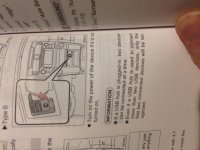
played with this again after work, system worked fine after work and I had removed the hub, tried 2 different hubs with varying success, would work intermittently and then stop working. Even found the page in the manual that states you can do it. Guess I need to find the perfect hub to make it work.Has anyone successfully used a USB hub? I ask because I hooked one up this morning and now the port does not work, even after removing the hub. Need to check fuses I guess.... If you did get it to work did you get two additional sources in the on screen menu for music etc or just one?