
You are using an out of date browser. It may not display this or other websites correctly.
You should upgrade or use an alternative browser.
You should upgrade or use an alternative browser.
Here's Some Help with Navigation Install
- Thread starter petegaz
- Start date

Oh Well
Sorry about that, but like you wrote, I tried. Anyway, I noticed in your signature block, "(Orange)" after Camry Navigation. Is that because your head unit has orange colored lights and matches the rest of the interior lights? If so, how did you change the lights to orange? Thanks.
Mark
j0mama said:Well I am using a external amplifier, and couldnt be happier.... but that was a REALLY old post... but I give him credit for trying!
j0.
Sorry about that, but like you wrote, I tried. Anyway, I noticed in your signature block, "(Orange)" after Camry Navigation. Is that because your head unit has orange colored lights and matches the rest of the interior lights? If so, how did you change the lights to orange? Thanks.
Mark

spyderdoc
New member
Re: Oh Well
Do a search. There is a very long thread about the exact procedure and which LED lights to purchase. Remember, it is a HUGE PITA to do......20 something tiny little surface LED's to remove and replace. You need a good steady hand so you don't do damage with the soldering iron....
Good luck
Mark
mhumm2 said:Sorry about that, but like you wrote, I tried. Anyway, I noticed in your signature block, "(Orange)" after Camry Navigation. Is that because your head unit has orange colored lights and matches the rest of the interior lights? If so, how did you change the lights to orange? Thanks.
Mark
Do a search. There is a very long thread about the exact procedure and which LED lights to purchase. Remember, it is a HUGE PITA to do......20 something tiny little surface LED's to remove and replace. You need a good steady hand so you don't do damage with the soldering iron....
Good luck
Mark
2005 Camry Nav System Received !!!
Well I just received my nav unit and plan to install it this weekend, but where is the map DVD? I hope OEMValue already loaded it in the unit, because it was not in the box.
For those of you that purchased systems from OEMValue, where was the DVD? Thanks
Mark Hummel
Well I just received my nav unit and plan to install it this weekend, but where is the map DVD? I hope OEMValue already loaded it in the unit, because it was not in the box.
For those of you that purchased systems from OEMValue, where was the DVD? Thanks
Mark Hummel
spyderdoc
New member
Re: 2005 Camry Nav System Received !!!
Prob already in the slot. Mine was when I got it...
Mark
mhumm2 said:Well I just received my nav unit and plan to install it this weekend, but where is the map DVD? I hope OEMValue already loaded it in the unit, because it was not in the box.
For those of you that purchased systems from OEMValue, where was the DVD? Thanks
Mark Hummel
Prob already in the slot. Mine was when I got it...
Mark
Thanks for the informatiom Spyderdoc, I appreciate it.
Petegaz, here's a quote from your nav install web site:
"Next you will need to tap into the Reverse Sensor. I found the best spot was on the passenger side of the vehicle in the kickpanel (just to the right of the pollen filter). You will need to remove the glove box"
My challenge is that I don't know where the pollen filter is nor do I know where to look once I remove the glove box. Would someone please describe exactly where the correct kickpanel is that's referred to in the quote above? I'd like to be able to go to the correct kickpanel on the first try if possible. Once I remove the panel, I'm sure I'll be able to confirm it's correct and find the right wire to tap into thanks to Petegaz's close-up photo.
As far as the GPS antenna location; I was thinking about mounting it flush with the dashboard, in the center immediately in front of the defrost vents. I'd even be willing to cut a small (custom fit) hole that matches the antenna itself then seal it with a little Silicon RTV. I've used a Garmin GPS on the boat and learned that keeping the antenna flat, meaning parallel with the ground, and not obstructing it's line of sight to as much of the sky as possible is the best way to lock in as many satelites as possible. That's why I don't like behind the rear-view mirror location very much; I think it's too limiting.
Another option I'm considering is an external mount next to the moon roof using RTV adhisive and a small piece of metal RTV'd in place to protect the antenna wire. Vandalism would be a small concern, but locking in every satelite possible would be easy as the antenna would be able to "see" at least twice as much sky as it would inside. I already have my XM radio satellite antenna on on side of the moon roof and a different GPS antenna on the other side. Of course that GPS system is going to be replaced with the Camry nav system, but it's able to routinely lock in 8 to 10 satelites without a problem and I get extrememly accurate tracking. It's even able to place my vehicle in my driveway and on the correct side!
Comments are invited, please and where is that kickpanel for the reverse wire? Thanks.
Mark Hummel
Petegaz, here's a quote from your nav install web site:
"Next you will need to tap into the Reverse Sensor. I found the best spot was on the passenger side of the vehicle in the kickpanel (just to the right of the pollen filter). You will need to remove the glove box"
My challenge is that I don't know where the pollen filter is nor do I know where to look once I remove the glove box. Would someone please describe exactly where the correct kickpanel is that's referred to in the quote above? I'd like to be able to go to the correct kickpanel on the first try if possible. Once I remove the panel, I'm sure I'll be able to confirm it's correct and find the right wire to tap into thanks to Petegaz's close-up photo.
As far as the GPS antenna location; I was thinking about mounting it flush with the dashboard, in the center immediately in front of the defrost vents. I'd even be willing to cut a small (custom fit) hole that matches the antenna itself then seal it with a little Silicon RTV. I've used a Garmin GPS on the boat and learned that keeping the antenna flat, meaning parallel with the ground, and not obstructing it's line of sight to as much of the sky as possible is the best way to lock in as many satelites as possible. That's why I don't like behind the rear-view mirror location very much; I think it's too limiting.
Another option I'm considering is an external mount next to the moon roof using RTV adhisive and a small piece of metal RTV'd in place to protect the antenna wire. Vandalism would be a small concern, but locking in every satelite possible would be easy as the antenna would be able to "see" at least twice as much sky as it would inside. I already have my XM radio satellite antenna on on side of the moon roof and a different GPS antenna on the other side. Of course that GPS system is going to be replaced with the Camry nav system, but it's able to routinely lock in 8 to 10 satelites without a problem and I get extrememly accurate tracking. It's even able to place my vehicle in my driveway and on the correct side!
Comments are invited, please and where is that kickpanel for the reverse wire? Thanks.
Mark Hummel
Need list of voice commands
Hello:
As many of you know, I received my 05 Camry Nav system from OEM Value. I also ordered the microphone system that plugs into it. As I understand it, there are several voice commands, I can use, to control the nav system (and I don't just mean changing modes [AM/FM/Nav etc]).
Does anyone have a complete list of commands that the system recognizes?
Please advise.
Mark Hummel
Hello:
As many of you know, I received my 05 Camry Nav system from OEM Value. I also ordered the microphone system that plugs into it. As I understand it, there are several voice commands, I can use, to control the nav system (and I don't just mean changing modes [AM/FM/Nav etc]).
Does anyone have a complete list of commands that the system recognizes?
Please advise.
Mark Hummel
spyderdoc
New member
mhumm2 said:Thanks for the informatiom Spyderdoc, I appreciate it.
Petegaz, here's a quote from your nav install web site:
"Next you will need to tap into the Reverse Sensor. I found the best spot was on the passenger side of the vehicle in the kickpanel (just to the right of the pollen filter). You will need to remove the glove box"
My challenge is that I don't know where the pollen filter is nor do I know where to look once I remove the glove box. Would someone please describe exactly where the correct kickpanel is that's referred to in the quote above? I'd like to be able to go to the correct kickpanel on the first try if possible. Once I remove the panel, I'm sure I'll be able to confirm it's correct and find the right wire to tap into thanks to Petegaz's close-up photo.
As far as the GPS antenna location; I was thinking about mounting it flush with the dashboard, in the center immediately in front of the defrost vents. I'd even be willing to cut a small (custom fit) hole that matches the antenna itself then seal it with a little Silicon RTV. I've used a Garmin GPS on the boat and learned that keeping the antenna flat, meaning parallel with the ground, and not obstructing it's line of sight to as much of the sky as possible is the best way to lock in as many satelites as possible. That's why I don't like behind the rear-view mirror location very much; I think it's too limiting.
Another option I'm considering is an external mount next to the moon roof using RTV adhisive and a small piece of metal RTV'd in place to protect the antenna wire. Vandalism would be a small concern, but locking in every satelite possible would be easy as the antenna would be able to "see" at least twice as much sky as it would inside. I already have my XM radio satellite antenna on on side of the moon roof and a different GPS antenna on the other side. Of course that GPS system is going to be replaced with the Camry nav system, but it's able to routinely lock in 8 to 10 satelites without a problem and I get extrememly accurate tracking. It's even able to place my vehicle in my driveway and on the correct side!
Comments are invited, please and where is that kickpanel for the reverse wire? Thanks.
Mark Hummel
OK, the pollen filter is just anterior to the glove box. If you remove the glove box, it is right there, from what I remember, it is a white plastic cover that has an accordian like appearance. The junction box that you will tap into is just to the right of this...The kick panel is the gray plastic piece on the door side of the foot well. If yo uwere sitting in the seat, your foot will hit it if you move it to the side....
Next, the antenna can be mounted beneath the dash. If you look on the "ceiling" of the dash when the stereo is removed, just to the left of where the stereo sits, there is a mounting area. You can bend the bracket that the antenna is on and just use a screw to mount it there. Make sure the antenna sits level...I really wouldn't cut a hole in your dash, since the antenna receives great signal without doing so....
Good luck!
Nav system installed !
Well it's in and it seems to work fine. The only challenge I have now is a weird motor humm. That's not unusual, but the humm is only in the front right speaker which is unusual.
Does anyone have any ideas or similar experience?
Spyderdoc, your description of the kickpanel for the reverse wire was perfect. Thanks.
MArk
Well it's in and it seems to work fine. The only challenge I have now is a weird motor humm. That's not unusual, but the humm is only in the front right speaker which is unusual.
Does anyone have any ideas or similar experience?
Spyderdoc, your description of the kickpanel for the reverse wire was perfect. Thanks.
MArk

gregtay
New member
Re: Need list of voice commands
mhumm2 said:Hello:
As many of you know, I received my 05 Camry Nav system from OEM Value. I also ordered the microphone system that plugs into it. As I understand it, there are several voice commands, I can use, to control the nav system (and I don't just mean changing modes [AM/FM/Nav etc]).
Does anyone have a complete list of commands that the system recognizes?
I believe there is a pdf of the commands posted at Siennaclub.org. Try doing a search over there.
Please advise.
Mark Hummel

yabedude
New member
petegaz said:To All:
I recently installed the Toyota Navigation system from oemvalue.com in my 2003 4Runner Sport. There were a few issues I had in getting the system to work 100% (speed & reverse sensor, antenna amplifier).
Pete,
I was wondering if I screwed up installing this after market HU. Your notes about the amplified antenna came in very handy. Thanks for the write up!
gregtay
New member
Re: Re: Oh Well
... and this weekend i FINALLY converted my Solara nav over to Orange Took most of my Saturday, but it was worth it. The LEDs are a perfect match to the rest of the dash lights.
spyderdoc said:Do a search. There is a very long thread about the exact procedure and which LED lights to purchase. Remember, it is a HUGE PITA to do......20 something tiny little surface LED's to remove and replace. You need a good steady hand so you don't do damage with the soldering iron....
Good luck
Mark
... and this weekend i FINALLY converted my Solara nav over to Orange
Took most of my Saturday, but it was worth it. The LEDs are a perfect match to the rest of the dash lights.
spyderdoc
New member
Re: Re: Re: Oh Well
What a difference, huh? A huge PITA and very risky, but was very much worth it!
Mark
gregtay said:... and this weekend i FINALLY converted my Solara nav over to Orange
What a difference, huh? A huge PITA and very risky, but was very much worth it!
Mark
gregtay
New member
Re: Re: Re: Re: Oh Well
Yeap... certainly worth it. Now that they are orange I realize how much i didn;t like the green... Now the NAV looks like it is part of the truck. There were a few scary moments in the process, but overall it wasn't too bad (but certainly qualifys as a PITA!!) I used 2 15W irons from Radio Shack... you don't need much heat to get the LEDs on or off. Plus, I used the orange LEDs that were the same size at the green ones.
Next weekend I am going to attack the reverse camera, XM and voice mic/switch. My NAV has been installed for 14 months... just finally getting around to this stuff.:bash:
spyderdoc said:What a difference, huh? A huge PITA and very risky, but was very much worth it!
Mark
Yeap... certainly worth it. Now that they are orange I realize how much i didn;t like the green... Now the NAV looks like it is part of the truck. There were a few scary moments in the process, but overall it wasn't too bad (but certainly qualifys as a PITA!!) I used 2 15W irons from Radio Shack... you don't need much heat to get the LEDs on or off. Plus, I used the orange LEDs that were the same size at the green ones.
Next weekend I am going to attack the reverse camera, XM and voice mic/switch. My NAV has been installed for 14 months... just finally getting around to this stuff.:bash:

lexusnut
New member
Looks as though this thread died
Looks like thie thread died in february of 05. Well too darn bad.
I have installed a New 2006 NAV unit into my 2003 T4R.
It was a drop in replacement. I got a camry unit with JBL AMP from 4Runner. I am not sure of hte year on the JBL amp.
Here is a thread
http://www.toyota-4runner.org/showthread.php?threadid=12755&goto=newpost
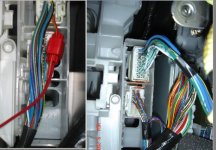
I do however have a problem. I cant seem to find the reverse sencor wire. The wire harness mentioned in the install guide (by the way great guide) does not match colors on my car. The one behind glove box.
Look at the pic provided my harness is on the right there are no red wires. I am stuck. The system seem to work ok, but i am sure i am missing something.
Looks like thie thread died in february of 05. Well too darn bad.
I have installed a New 2006 NAV unit into my 2003 T4R.
It was a drop in replacement. I got a camry unit with JBL AMP from 4Runner. I am not sure of hte year on the JBL amp.
Here is a thread
http://www.toyota-4runner.org/showthread.php?threadid=12755&goto=newpost
I do however have a problem. I cant seem to find the reverse sencor wire. The wire harness mentioned in the install guide (by the way great guide) does not match colors on my car. The one behind glove box.
Look at the pic provided my harness is on the right there are no red wires. I am stuck. The system seem to work ok, but i am sure i am missing something.
Attachments
I am drooling for the navigation system, but I'd probably start an electrical fire trying to install it. Do you think a Toyota dealer would do it? If not, what about a car stereo shop? For money, they probably would.
Also, what kind of warranty does oemvalue.com offer? Is this original fresh out of the box or refurbished equipment? Where could you get tech support?
Also, what kind of warranty does oemvalue.com offer? Is this original fresh out of the box or refurbished equipment? Where could you get tech support?
lexusnut
New member
mav75 said:I am drooling for the navigation system, but I'd probably start an electrical fire trying to install it. Do you think a Toyota dealer would do it? If not, what about a car stereo shop? For money, they probably would.
Also, what kind of warranty does oemvalue.com offer? Is this original fresh out of the box or refurbished equipment? Where could you get tech support?
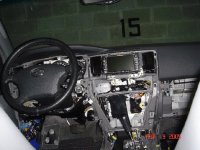
Drool drool. I liked OEMVALUE. unit was new, or a fresh pull, not in original toyota box, i don't remember warranty. This guy provided me all components and install was mostly a drop in. With exception of the speed sensor. I see you have limited. I think that limited is a difficult undetaking. There is a problem with the amplifier, voice navigation, and the front cover. I'd be very cautious.
Radio installation shop should be able to do it, i'd go to a small guy who is responsible, and who cares for his reputation.
Attachments
ATL Newbie
New member
I just completed an install on a 2006 Limited with the JBL 10 speaker system. Install was a piece of cake, as described within this thread, and I have NEVER attempted something like this before.
I have not yet installed the external speaker required of the JBL systems in order to hear the navigation voice, and I'm not sure whether I'm going to. The nav unit is easy to use without the voice, and from experience in a friend's Lexus, I actually find the voice a little annoying. I will probably hook up the voice just to have it, and then turn it off.
The only problem with the limited trim is that the opening for the radio head unit is slightly wider than the navigation unit. This is not a problem in the Sport and SR5 models. You have three basic solutions:
1. Order an SR5 dash piece from your dealer. Probably pretty expensive for a hunk of plastic.
2. Order these pieces from Scosche TA 1465b
I don't know yet how well they fit, they will arrive any day now.
3. Fashion your own plastic fill piece as described within this thread.
I am sure that a local radio sales place will do your install for a decent price if you're nervous. I went to a local place to look for those schosche pieces, and they quickly offered to do my entire installation. We never talked price because I wanted to do it myself, but I bet they would have done it for $100 or so.
The install is seriously easy. The hardest part was tapping into the speed and reverse sensors...but one reason that was so hard is that the instructions in this thread say that the wires are 24 guage. I don't think they are any smaller than 22 guage, and may even be 20 guage. Anyway, I could not tap them with a connector designed for 22-26 guage, and had not problem tapping them with an 18-22 guage connector.
I also installed an XM radio unit, and removed all the trim in the back to wedge it into place. I did manage to break a couple of plastic clips along the way, but everything seems to hold together well. The dashboard is more sturdy and does not break.
I have not yet installed the external speaker required of the JBL systems in order to hear the navigation voice, and I'm not sure whether I'm going to. The nav unit is easy to use without the voice, and from experience in a friend's Lexus, I actually find the voice a little annoying. I will probably hook up the voice just to have it, and then turn it off.
The only problem with the limited trim is that the opening for the radio head unit is slightly wider than the navigation unit. This is not a problem in the Sport and SR5 models. You have three basic solutions:
1. Order an SR5 dash piece from your dealer. Probably pretty expensive for a hunk of plastic.
2. Order these pieces from Scosche TA 1465b
I don't know yet how well they fit, they will arrive any day now.
3. Fashion your own plastic fill piece as described within this thread.
I am sure that a local radio sales place will do your install for a decent price if you're nervous. I went to a local place to look for those schosche pieces, and they quickly offered to do my entire installation. We never talked price because I wanted to do it myself, but I bet they would have done it for $100 or so.
The install is seriously easy. The hardest part was tapping into the speed and reverse sensors...but one reason that was so hard is that the instructions in this thread say that the wires are 24 guage. I don't think they are any smaller than 22 guage, and may even be 20 guage. Anyway, I could not tap them with a connector designed for 22-26 guage, and had not problem tapping them with an 18-22 guage connector.
I also installed an XM radio unit, and removed all the trim in the back to wedge it into place. I did manage to break a couple of plastic clips along the way, but everything seems to hold together well. The dashboard is more sturdy and does not break.
lexusnut
New member
The install is seriously easy. The hardest part was tapping into the speed and reverse sensors...but one reason that was so hard is that the instructions in this thread say that the wires are 24 guage. I don't think they are any smaller than 22 guage, and may even be 20 guage. Anyway, I could not tap them with a connector designed for 22-26 guage, and had not problem tapping them with an 18-22 guage connector.
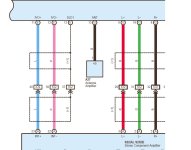
Question Question!!! I have not been able to find the reverse sensor. So i did not connect to it. Unit seem to work fine without it. Where is the reverse sensor? The color of wires on the diagram I found here is different. What do i do?
I also hear feedback through speakers is there a way to cut it?
I grounded the amp but maybe i need to ground it more?
Similar threads
- Replies
- 2
- Views
- 3K


