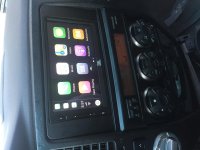
Radio Upgrades... Let see them.

Were you able to program the steering wheel controls to respond to short and long button presses, increasing the number of steerlng wheel functions?

I did not try that. If I remember correctly, you can customize those to do a number of functions through the PAC unit, but I just left them stock - volume/next/mode on the left, and then I added the BT buttons on the right. They all work as you'd expect.

If you have the PAC, towards the back of the instructions it has all kinds of ways to customize, you either have to do it while it's connected to a PC or while your dash is apart - I think you have to push SWC button then push a button on the PAC. I don't remember if short v. long pushes were an option, but if it is it'd be handled by the PAC, not the head unit.

EDIT: Here's the instructions - you can definitely do long v. short commands. https://assets.sonicelectronix.com/manuals/pac/rp42ty11_manual.pdf

Just a side note, I'm really happy with the 5200 AVIC-NEX but if i could do it over again i'd get a 6200, 7200, 8200, or another brand simply because the entry-level 5200 doesn't have HDMI input, and a few other things I forget about - maybe HD radio and something else. But all I really use it for is bluetooth, playing music/movies from USB flash drive, etc. Rarely use Apple Carplay and i'm about to get Note 8 so i'll test out the Android Play or whatever it's called. Carplay works fine, just doesn't have enough compatible apps. Not Pioneer's fault - it's an Apple thing.
 
Last edited:
I just replaced my head unit this past weekend with a Pioneer-AVH-X490BS. Sound quality improved tremendously even with the stock speakers (which I'll replace at some point).

vo6Dcc3l.jpg


Nice looks clean.. Great head unit.. I have that in my 1979 Towncar
 
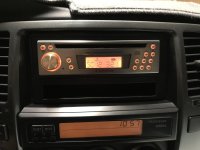
Went the cheaper route and I think it looks close to OEM in its style. Blaupunkt New Jersey. Has basic bluetooth and built in mic for hands free. That's enough for me.

a4e7b2f0a8083e9116158d3233e984fd.jpg

Can you direct me to the blue bulbs how to/where to buy them for the temp/mpg screen?
 
I did not try that. If I remember correctly, you can customize those to do a number of functions through the PAC unit, but I just left them stock - volume/next/mode on the left, and then I added the BT buttons on the right. They all work as you'd expect.

If you have the PAC, towards the back of the instructions it has all kinds of ways to customize, you either have to do it while it's connected to a PC or while your dash is apart - I think you have to push SWC button then push a button on the PAC. I don't remember if short v. long pushes were an option, but if it is it'd be handled by the PAC, not the head unit.

EDIT: Here's the instructions - you can definitely do long v. short commands. https://assets.sonicelectronix.com/manuals/pac/rp42ty11_manual.pdf

Just a side note, I'm really happy with the 5200 AVIC-NEX but if i could do it over again i'd get a 6200, 7200, 8200, or another brand simply because the entry-level 5200 doesn't have HDMI input, and a few other things I forget about - maybe HD radio and something else. But all I really use it for is bluetooth, playing music/movies from USB flash drive, etc. Rarely use Apple Carplay and i'm about to get Note 8 so i'll test out the Android Play or whatever it's called. Carplay works fine, just doesn't have enough compatible apps. Not Pioneer's fault - it's an Apple thing.

Thanks! I had chatted with Crutchfield last week and he didn't think it would work, so I wanted to see if anyone had done it like the instructions say. Crutchfield is normally on it, but I guess we'll see when I install my Pioneer 4200 (which does have HDMI, HD radio, onsale for $365 after rebate from Walmart) later this week.

I'm thinking to add preset +/- as a hold option to the up and down buttons.

Not sure yet if I want to do band, mute and phone menu or not, which are the other unmapped controls. Frankly I'm not sure how useful those buttons are as I've never used a Pioneer before.

I was thinking mute for volume down hold, but seemed to basically be the same thing.

I know on my stock unit, if I hold down the up/down button it seeks on the radio, does it not do anything when you hold it down with the Pioneer and the Pac?

Thanks for any input on this, it'd be great to not have to test all the button hold combos while trying to install this thing!
 
Last edited:
Im looking to do a stereo upgrade[....]
Edit:

I also wanted to add a few questions for people that have used Carplay. Is it something that you can live without after using or do you find yourself preferring Bluetooth most of the time? I heard once you connect your phone you have to unlock it to use carplay, after unlocking it can you hit the lock button or will that disconnect carplay? How well does navigation work in carplay?

I've got Carplay on my stereo (my install is just a few posts up). For me, it's handy, but it's not a dealbreaker. Some things about it are nice, some are a bit annoying. But, to specifically answer your questions:
1) You don't need to unlock your phone to use Carplay, except for the very first time you connect it (it'll ask you to connect and possibly prompt you to install some apps, depending on what your head unit supports). Just get in the car, plug in the cable, and away you go.
Note that when you plug it in, it will 'lock' your phone (just shows a 'Carplay' screen), but if you unlock it, you can use it normally, even while it's plugged in. You can lock/unlock your phone as much as you want - won't affect operation through Carplay.
2) How well navigation works - well, how much do you like Apple Maps? :) It's currently the only supported nav app you can use through Carplay.

HTH.
Dirk
 
i've got a dash kit for a 4th gen limited that I'd let go of for the cost of shipping if anyone is interested. i screwed up and bought it for my sr5.
 
I've got Carplay on my stereo (my install is just a few posts up). For me, it's handy, but it's not a dealbreaker. Some things about it are nice, some are a bit annoying. But, to specifically answer your questions:
1) You don't need to unlock your phone to use Carplay, except for the very first time you connect it (it'll ask you to connect and possibly prompt you to install some apps, depending on what your head unit supports). Just get in the car, plug in the cable, and away you go.
Note that when you plug it in, it will 'lock' your phone (just shows a 'Carplay' screen), but if you unlock it, you can use it normally, even while it's plugged in. You can lock/unlock your phone as much as you want - won't affect operation through Carplay.
2) How well navigation works - well, how much do you like Apple Maps? :) It's currently the only supported nav app you can use through Carplay.
HTH.
Dirk

Thnaks for the reply. I ended up going with a Kenwood DMX-7704s carplay/ android auto unit.
 
Can anyone point me in the right direction,, I just picked up an 07 sport, and will be wanting to install my Kenwood DNX6190HD, but Im going blind from reading so much lol I want to make sure what adapters etc to get so that I can use the steering wheel controls..
Any help would be appreciated.
 
Old School

Hi, I love my Denford with Pioneer stage 4 amps, component speakers and a Morel Ultimo sub!!!:rockon:
 

Attachments

  • 35DF68EB-BB06-4805-8390-76C9695E44AA.jpg
    35DF68EB-BB06-4805-8390-76C9695E44AA.jpg
    130.1 KB · Views: 2,084
Can anyone point me in the right direction,, I just picked up an 07 sport, and will be wanting to install my Kenwood DNX6190HD, but Im going blind from reading so much lol I want to make sure what adapters etc to get so that I can use the steering wheel controls..
Any help would be appreciated.

What you need depends on what you have installed, JBL vs non-JBL. I would recommend crutchfield. They will send you everything at a great discount if you buy the radio from them. At the very least they will list all the parts that are needed for a particular stereo when you add it to your cart. Mine was simple because I had the base radio. All I needed was the dash kit and the main harness. To get steering wheel controls they recommended a module along with another wiring harness. When I got it I just matched up all the wires per wireing diagrams that came with parts and then it was all plug and play.
 
What you need depends on what you have installed, JBL vs non-JBL. I would recommend crutchfield. They will send you everything at a great discount if you buy the radio from them. At the very least they will list all the parts that are needed for a particular stereo when you add it to your cart. Mine was simple because I had the base radio. All I needed was the dash kit and the main harness. To get steering wheel controls they recommended a module along with another wiring harness. When I got it I just matched up all the wires per wireing diagrams that came with parts and then it was all plug and play.

Thats where I have a little issue, the 4runner came with an Advent head unit, so I dont know what was stock, I do know, its not the JBL as the door speakers dont have that label that my 04 had.
When I went to Crutchfeild, they (website) said I need 2 of the same thing for the steering wheel lol. I may just call them or try a local stereo shop (scared) like Car Toys.
Appreciate the reply :thumb:
 
869e623d3946dd0b448728c5f8101759.jpg


061d1dba75e1b580a8086c8f6ab25885.jpg


266e85e697b5c33fb81583977523b46c.jpg


I got a Toyota 200mm wide Kenwood DDx917ws from Malaysia. Not available here but the shipping was super quick. Since it’s marketed for Toyota’s it plugs right in. Capacitive touch too. Looks clean but it gets finger printy and the volume is hard to change while driving. I have to use the remote until I can connect the steering controls.

Here’s the radio harness it comes with.
da087e987baa4e8f6cfcc481b1c90863.jpg

Just plugs right into the stock plugs then to the back of the unit. No need to connect any wires. I’m still working on figuring the steering wheel harness.


Sent from my iPhone using Tapatalk
 
869e623d3946dd0b448728c5f8101759.jpg


061d1dba75e1b580a8086c8f6ab25885.jpg


266e85e697b5c33fb81583977523b46c.jpg


I got a Toyota 200mm wide Kenwood DDx917ws from Malaysia. Not available here but the shipping was super quick. Since it’s marketed for Toyota’s it plugs right in. Capacitive touch too. Looks clean but it gets finger printy and the volume is hard to change while driving. I have to use the remote until I can connect the steering controls.

Here’s the radio harness it comes with.
da087e987baa4e8f6cfcc481b1c90863.jpg

Just plugs right into the stock plugs then to the back of the unit. No need to connect any wires. I’m still working on figuring the steering wheel harness.


Sent from my iPhone using Tapatalk


Would you mind posting more info on the steering wheel controls when you get them figured out?


Sent from my iPhone using Tapatalk
 

I got a Toyota 200mm wide Kenwood DDx917ws from Malaysia. Not available here but the shipping was super quick. Since it’s marketed for Toyota’s it plugs right in. Capacitive touch too. Looks clean but it gets finger printy and the volume is hard to change while driving. I have to use the remote until I can connect the steering controls.
Sent from my iPhone using Tapatalk[/QUOTE]
That looks like a nice unit and really like the fit! Good choice.
 
I know this probably shot in the dark but wondering if anyone might know across the board most Toy. fits or just specific with Scion ? Have a nice used Corolla pt86140-020250 maybe someone knows ? :thumb3::flypig:
 
I took one for the team and gambled on the JBL CP100 Legend. It's back in the box and on it's way back to Crutchfield. They are no longer ordering more from JBL. Steering controls didn't line up and would not take any software updates.

I am going to take a second gamble on an 8" Joying Android unit.

The sound quality felt sub par on my JBL speakers. I dont think the subwoofer was going. I had the JBL harness.

It handled CarPlay pretty well. It didn't like it if I plugged my Iphone in AFTER car had been started.

I liked the FM channel scan function.

Clock kept resetting to 24h mode.

The steering wheel controls didn't line up. Vol+ acted liked seek up. Seek- acted like Mute, etc etc. (you cannot re-program vol+/- on an Axxess module).
 

Attachments

  • IMG_7212.jpg
    IMG_7212.jpg
    127.5 KB · Views: 1,662
Last week I finished my head unit upgrade. I added a Joying 2GB unit with rearview camera and USB charge/audio port in console. I added the camera on the inside vs the outside. I got that idea from this thread but cannot remember who to give that credit to. Works great and never gets dirty, if the window is dirty give it a wipe or lower the window...genius.

I had the JBL system and used the adapter and steering wheel module. Sounds great! May consider amp and speaker upgrade some time in the future but for now its loud and clear besides there are a ton of great android equalizers to work the sound to your liking. Poweramp is a must!

I'm interested in how well this unit has handled itself since your install. A follow up review perhaps?
 

I got a Toyota 200mm wide Kenwood DDx917ws from Malaysia. Not available here but the shipping was super quick. Since it’s marketed for Toyota’s it plugs right in. Capacitive touch too. Looks clean but it gets finger printy and the volume is hard to change while driving. I have to use the remote until I can connect the steering controls.

Here’s the radio harness it comes with.

Just plugs right into the stock plugs then to the back of the unit. No need to connect any wires. I’m still working on figuring the steering wheel harness.


Sent from my iPhone using Tapatalk[/QUOTE]

More info on this? Did you have JBL system?

That looks quite good and has apple car play...
 
869e623d3946dd0b448728c5f8101759.jpg


061d1dba75e1b580a8086c8f6ab25885.jpg


266e85e697b5c33fb81583977523b46c.jpg


I got a Toyota 200mm wide Kenwood DDx917ws from Malaysia. Not available here but the shipping was super quick. Since it’s marketed for Toyota’s it plugs right in. Capacitive touch too. Looks clean but it gets finger printy and the volume is hard to change while driving. I have to use the remote until I can connect the steering controls.

Here’s the radio harness it comes with.
da087e987baa4e8f6cfcc481b1c90863.jpg

Just plugs right into the stock plugs then to the back of the unit. No need to connect any wires. I’m still working on figuring the steering wheel harness.


Sent from my iPhone using Tapatalk

Did this unit have a sirius/xm capability?
 
Kenwood DNX573S & Maestro RR to make it all work.
I was not planning to do this just yet but......I was in a Best Buy the other day and found this Kenwood so cheap that I could not resist!
Imagine that?

I have been installing A/V since the 70's and this is one that I do not want to do again although I have already yanked and reinstalled this one 3 times too.
The Maestro is a great niche product but the physical design leaves a lot to be desired and call me "Old School" but I prefer a paper manual to Web Manual EVERYTIME!

Anyway I really like the radio and other than the startup it is not as slow as I was afraid it would be.

672d0b847a7651811349a77b84bed986.jpg
ad3ae7fb74e47a7327c680051f8943a5.jpg
2b139223c8f1f62de169df0f4537ca17.jpg


Sent from my iPhone using Tapatalk
 
Last edited:

Members online

Forum statistics

Threads
278,309
Messages
3,554,075
Members
248,016
Latest member
Advally Service

Trending content

Back
Top