Scanner apps/tools for iPhones and Apple OS

OBD Fusion & Carista App Combined

I've recently purchased the ELM 327 wifi adapter and it is certainly easy to link with an iOS app...I used a free app to read and clear some codes that recently popped up on up on my 3rd gen; looks like I'll be spending some money on the EVAP system (Rhode Island mechanic recommendation appreciated).

I'm going to spend money on an iOS app and it looks like OBD Fusion would be the way to go...the custom PID feature looks quite useful. I also own a Golf TDLie and would like to customize some vehicle features using the Carista OBD app (I'm sure Klaus has a reason to keep trunk hatch locked when the doors are unlocked).

My question is:
Is anyone aware of an Apple iOS OBD app that combines both the features of the OBD Fusion and Carista app?

Thanks.
 
A little off topic but can you leave these wifi modules plugged in under the steering wheel all the time or do you have to unplug it every time? The reason I'm asking is because I've heard if you leave them plugged in it drains the battery. I'm hoping this issue has been fixed because it doesn't seem worth it to me if you have to plug it in every time you start driving.
 
I use the GOPOINT BT1/BT1A to plug into the port and the track app called Harry's Lap Timer on my mustang for the road course. I also use the DashCmd app.

The module and apps work great, but will have to see how well they work for my TE that should arrive on in a week.
 
I haven't had any issue leaving it plugged in all the time. I have heard they do draw a little power when the vehicle is off so I wouldn't recommend it for long term parking. I use my 4Runner just about everyday so it's not a problem. The issue I have come across though is the initial wifi OBD connection to your app can't be made while the vehicle ignition is on. Once the initial connection is made in the ACC position, you can then view and read all the available OBD data while the vehicle is running.

Note however that there is no password to make a wifi connection. As a matter of precaution, the security conscious may want to keep it unplugged when not in use.
 
Refreshing an older thread here. The actual Elm327 manufacturer site and link for the wifi (iPhone compatible) adapter appears to be here:
ELM327 WIFI 2.1 OBDII OBD2 Car Diagnostic Code Reader Scanner Tool

Concur? They caution strongly against imitators / knockoffs. Retails here for $37 plus $10 shipping. Any recent comments on imitators vs the 'original'.

And the "OBD Fusion" app appears to still be available in the App Store for $9.99.

Any updates or better solutions for the iPhone / iPad user?
 
Refreshing an older thread here. The actual Elm327 manufacturer site and link for the wifi (iPhone compatible) adapter appears to be here:
ELM327 WIFI 2.1 OBDII OBD2 Car Diagnostic Code Reader Scanner Tool

Concur? They caution strongly against imitators / knockoffs. Retails here for $37 plus $10 shipping. Any recent comments on imitators vs the 'original'.

And the "OBD Fusion" app appears to still be available in the App Store for $9.99.

Any updates or better solutions for the iPhone / iPad user?

The one thing that's stopped me is that I'd like to:
A) leave it connected all the time which is not a good idea from a cyber security standpoint on these wifi iOS devices. Anyone can connect to them.

B) your phone thinks it's connected to a wifi network so your apps aren't going to try to route data through your cell connection (i.e. Won't get Facebook messages, gmail, iMessages, etc). I could be totally wrong on this btw. I think that's how it works but there may be some more active checking the phone does - if it can't hit the internet on wifi, route everything through cell.
 
I bought the actual Carista. For three reasons, first and foremost it's Bluetooth, second the Carista app (to switch dingers on/off, control locks/lights/ect), third it works with OBDFusion, DashCommand, and others. Oh and fourth it was only 39.99 on Amazon (includes the BT elm327 compatible adapter and the app)

I have left it plugged in, I see no difference with or without, the truck off solo has more draw.
 
A little off topic but can you leave these wifi modules plugged in under the steering wheel all the time or do you have to unplug it every time? The reason I'm asking is because I've heard if you leave them plugged in it drains the battery. I'm hoping this issue has been fixed because it doesn't seem worth it to me if you have to plug it in every time you start driving.

I've had mine in there for a couple of years.

No I'll effects.
 
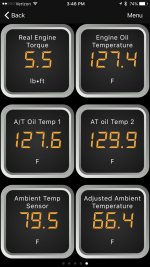
I've had the OBD Fusion app for some time along with a compatible ELM 327 imitation WIFI adapter for my iPhone. I've had the trans temps programmed in there through customer PIDs and have used it successfully for some time. They recently released an in app purchase that brings Toyota/Lexus/Scion specific scanning ability. I was just messing with it and it appears that it has the trans temp values as well as oil temp values straight in the app now. Screenshot below. All items did not require custom PIDs.

Also, it looks like the app supports TPMS and maybe KDSS but I haven't gotten that to work yet. Per my email with them, it looks like I need a genuine ELM327 adapter and not the imitation which most sell (genuine is more expensive).

There is A LOT more, most of it useless (like what your window is doing) but its there. I'm still going through it. What I did not see (maybe the car doesn't have it) is the gear the car is in or what the torque converter is doing. Additionally, I don't think this app does anything with customization (disable seat belt chime for instance).
 

Attachments

  • IMG_4524.jpg
    IMG_4524.jpg
    115.1 KB · Views: 1,832
I've had the OBD Fusion app for some time along with a compatible ELM 327 imitation WIFI adapter for my iPhone. I've had the trans temps programmed in there through customer PIDs and have used it successfully for some time. They recently released an in app purchase that brings Toyota/Lexus/Scion specific scanning ability. I was just messing with it and it appears that it has the trans temp values as well as oil temp values straight in the app now. Screenshot below. All items did not require custom PIDs.

Also, it looks like the app supports TPMS and maybe KDSS but I haven't gotten that to work yet. Per my email with them, it looks like I need a genuine ELM327 adapter and not the imitation which most sell (genuine is more expensive).

There is A LOT more, most of it useless (like what your window is doing) but its there. I'm still going through it. What I did not see (maybe the car doesn't have it) is the gear the car is in or what the torque converter is doing. Additionally, I don't think this app does anything with customization (disable seat belt chime for instance).

What PID's are you using? I used the ones posted above, but the values its giving me are off, as in they're showing about 100 deg higher.
 
What PID's are you using? I used the ones posted above, but the values its giving me are off, as in they're showing about 100 deg higher.


In my app (when I did it manually) I had the following for torque converter Temp:

((((C*256)+D )*(7/100)-400)/10)

I wonder if your values are in C vs F.
 
Resurrecting this thread to ask how you know the vehicle-specific parameters, for example for things like transmission temps? Does the app have this info?
 
Howdy everyone, I am a tech rep for Snap-On Tools. I specifically work with our diagnostic equipment (aka "scanners"). I'm curious... do these super cheap apps and OBDII plug in adapters actually tell you vehicle proprietary codes? Or are they just showing you generic codes?

The reason I ask is because I always hear guys saying "go to Advance Auto, they'll scan your car for free!". And the truth is, these scanners are only showing you generic codes. It's a sales tactic for them to up-sell their customers on parts. But that's besides the point.

Does anyone have more info on these super cheap scanner adapters and apps? If they are in fact showing you manufacturer specific proprietary codes, are they also providing you with factory PID parameters?

Thanks!
 
OBD Fusion is a good choice for ios and it offers enhanced diagnostics (on abs, airbag,etc) for toyota. I use veepeak obdcheck ble with it and so far I'm happy with it.
 
I upgraded to an OBDLink MX+ ( OBDLink(R) MX+ | OBDLink(R) | OBD Solutions | OBDLink(R) | OBD Solutions ) from an older Carista. The MX+ supports iOS over Bluetooth. I think I paid right around like $80 for it.

The app it uses is made by OBD Fusion. So looks and feels the same. You get unlimited access to extended parameters for makes/models/years. Most other apps (obdFusion, Dashcommand, ect.) are $10 each! So if you have three cars, that $30 bucks in extended, get a new car another $10, and so on. This all inclusive.

The adapter has an actual linking button on the device itself (they say more hacker-proof, sure I guess) The adapter scans quite a bit faster than my old Carista did, is BT3.0 and it supports ELM327 2.x. This gives you access TPMS and other systems not available with ELM327 1.4 adapters.

Overall glad I bought it for the TPMS monitoring alone. :)

YMMV
 
I upgraded to an OBDLink MX+ ( OBDLink(R) MX+ | OBDLink(R) | OBD Solutions | OBDLink(R) | OBD Solutions ) from an older Carista. The MX+ supports iOS over Bluetooth. I think I paid right around like $80 for it.

The app it uses is made by OBD Fusion. So looks and feels the same. You get unlimited access to extended parameters for makes/models/years. Most other apps (obdFusion, Dashcommand, ect.) are $10 each! So if you have three cars, that $30 bucks in extended, get a new car another $10, and so on. This all inclusive.

The adapter has an actual linking button on the device itself (they say more hacker-proof, sure I guess) The adapter scans quite a bit faster than my old Carista did, is BT3.0 and it supports ELM327 2.x. This gives you access TPMS and other systems not available with ELM327 1.4 adapters.


Overall glad I bought it for the TPMS monitoring alone. :)

YMMV

I have a new carista unit and a bluedriver, I guess maybe I need to see if I can access the info from either of those first. Thanks for the reply
 
I upgraded to an OBDLink MX+ ( OBDLink(R) MX+ | OBDLink(R) | OBD Solutions | OBDLink(R) | OBD Solutions ) from an older Carista. The MX+ supports iOS over Bluetooth. I think I paid right around like $80 for it.

The app it uses is made by OBD Fusion. So looks and feels the same. You get unlimited access to extended parameters for makes/models/years. Most other apps (obdFusion, Dashcommand, ect.) are $10 each! So if you have three cars, that $30 bucks in extended, get a new car another $10, and so on. This all inclusive.

The adapter has an actual linking button on the device itself (they say more hacker-proof, sure I guess) The adapter scans quite a bit faster than my old Carista did, is BT3.0 and it supports ELM327 2.x. This gives you access TPMS and other systems not available with ELM327 1.4 adapters.

Overall glad I bought it for the TPMS monitoring alone. :)

YMMV

Maybe a dumb question, but I know the Carista lets you go in and configure settings (like having all the windows go up with the lock button, seat belt reminder, etc.) Does this do the same thing?
 
Maybe a dumb question, but I know the Carista lets you go in and configure settings (like having all the windows go up with the lock button, seat belt reminder, etc.) Does this do the same thing?

Right, I have used Carista (and have since I bought the truck new) with the new OBDLinkMX+ adapter, it works without issue.

You can use the Carista app with any ELM327 1.4+ compatible OBD adapter. (which is most of them) You just have to get the 30-day trial or pay (I think it's) $1.99 for a week or $29 a year. Which either way is cheaper than a trip to the dealer in gas alone, let alone the time dealing with them.

Hope that helps.
 
Last edited:

Members online

Forum statistics

Threads
278,312
Messages
3,554,085
Members
248,016
Latest member
Advally Service

Trending content

Back
Top