
You are using an out of date browser. It may not display this or other websites correctly.
You should upgrade or use an alternative browser.
You should upgrade or use an alternative browser.
...got bass?
- Thread starter rigtec
- Start date

rigtec
New member
Hi tigger,
The two alignments that you've offered have their places, but where High Sound Quality and Low Frequency Extension are desired simultaneously, these are both poor choices. Folded Horns don't Go very Low unless they're BIG... Prohibitively 'LARGE'; which is why they're designed to be 'Stacked' in "Block Arrays" e.g., four, eight, twelve, even sixteen per block. They've been truncated for the purpose of moving them and setting them up night after night. But the real magic starts when the Horn Mouths and full aperture begin to couple on stage... NOW THEY CAN GO LOW! lol!
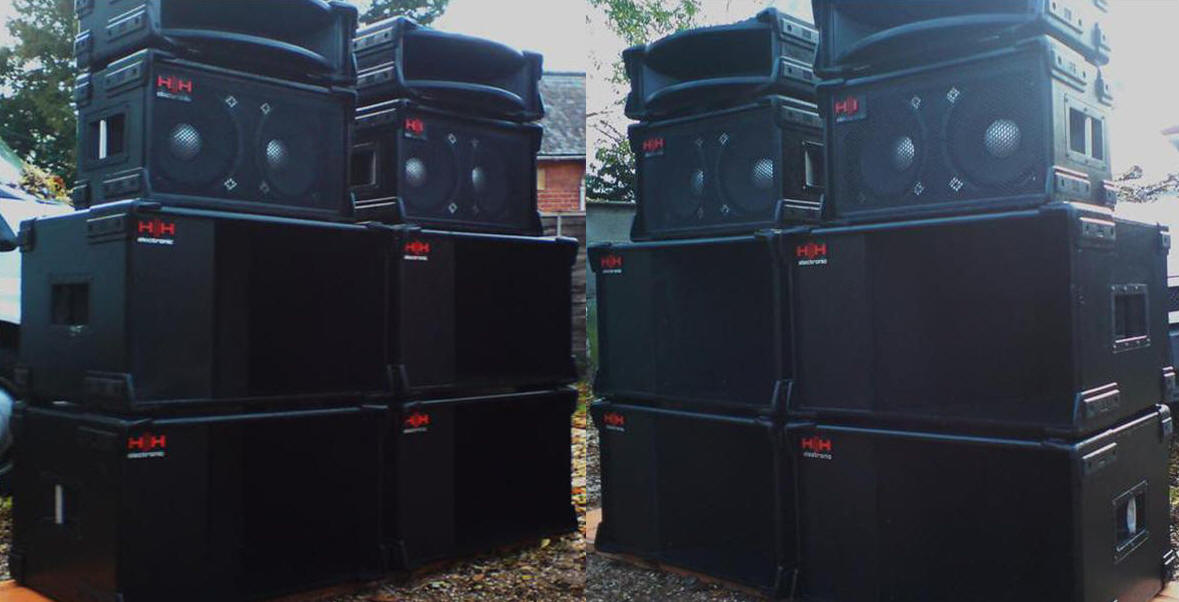
The problem with horns is, the length that they need to be to get down in 'Sub-bass' territory e.g., 30, 25, 15 HZ range. The formula for a predictable low-freq extension is: 1,125 (speed of sound ft/sec) divided by the desired freq e.g., 25HZ = 45ft (full wavelength), divided by 4 (quarter-wave length) 11.25ft horn-length needed to build a quarter-wave length resonator/horn. Now our Band-pass will go low (no question about that), but... the trade off for the extra extension is 'A VERY Narrow band-width' (0.5 to 1 octv); this alignment is widely known as 'THE ONE NOTE WONDER'! ...Not recommended for musical applications; just... BOOM BOOM BOOM! all the way home.
Every alignment comes with it's own pros and cons; 'tis in it's design'... but placed in the proper environment you'll realize just why it was designed the way it was, and still being used in some applications today!
Rgds!
The two alignments that you've offered have their places, but where High Sound Quality and Low Frequency Extension are desired simultaneously, these are both poor choices. Folded Horns don't Go very Low unless they're BIG... Prohibitively 'LARGE'; which is why they're designed to be 'Stacked' in "Block Arrays" e.g., four, eight, twelve, even sixteen per block. They've been truncated for the purpose of moving them and setting them up night after night. But the real magic starts when the Horn Mouths and full aperture begin to couple on stage... NOW THEY CAN GO LOW! lol!
The problem with horns is, the length that they need to be to get down in 'Sub-bass' territory e.g., 30, 25, 15 HZ range. The formula for a predictable low-freq extension is: 1,125 (speed of sound ft/sec) divided by the desired freq e.g., 25HZ = 45ft (full wavelength), divided by 4 (quarter-wave length) 11.25ft horn-length needed to build a quarter-wave length resonator/horn. Now our Band-pass will go low (no question about that), but... the trade off for the extra extension is 'A VERY Narrow band-width' (0.5 to 1 octv); this alignment is widely known as 'THE ONE NOTE WONDER'! ...Not recommended for musical applications; just... BOOM BOOM BOOM! all the way home.
Every alignment comes with it's own pros and cons; 'tis in it's design'... but placed in the proper environment you'll realize just why it was designed the way it was, and still being used in some applications today!
Rgds!
Last edited:
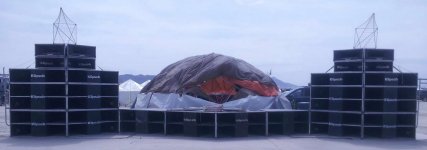
I know. I was just messing with you. I used to use some Klipsch stacks when I was DJ'ing many years ago. 6 stacks, 6 ft wide, 8 ft high. We called it the 36 ft wall of sound. Not very practical for use in a vehicle :doh: unless maybe you hauled a 40 ft. flat bed.
Our setup was similar to this but we used an array of 12 tweeters per stack. The setup came out of Rainbow Music Hall in Denver. They hosted a lot of rock bands in the 70's and 80's like Yes and Black Sabbath.
Our setup was similar to this but we used an array of 12 tweeters per stack. The setup came out of Rainbow Music Hall in Denver. They hosted a lot of rock bands in the 70's and 80's like Yes and Black Sabbath.
Attachments
Last edited:
rigtec
New member
I know. I was just messing with you...
Ooh... got me! Nice set-up... apparently you know the rules (Do's and Absolute Don'ts) regarding Pro Audio Low Freq sound system building and control! Not always an easy task; many variables, but when it's working... Nothing feels better!
Cheers
rigtec
New member
Hi folks,
I installed the new Alpine PDX M-12's yesterday (Fri 8/7/15). The install went great, took about 1-1/2 to 2 hours to get operational; took a few photos of the job. Remember that this was an 'Amplifier Swap-out' e.g., removed two existing JL Audio HD-750/1's, the wiring & processing equipment were already there, just needed to do tie-ins:
New Amp Prep


The only thing that was required to be set-up here was the mounting hardware. These amps come with all the hardware for One flat mount, and multiple amp Stacking; so no need to order stacking kits like I had to do with JL Audio. You just have to remove a top trim panel so the next amp can be mounted on top of the first; after the bottom amp is mounted:
Removal preparation

Used a 14mm socket to remove the driver's seat.
JL HD-750/1 stack moving out

Keeping the amps cool

Cool air from the A/C ducts (in the seat track-pit) help to keep the amps cool when working hard, quick warm up in winter. A lot of dirt accumulated here since I've worked under the seat. Problem is... I always seem to be in a big rush when I go under there... Vacuuming will be done at a later time (Pics optional) lol!
The Wiring

Fortunately for me, the 4ga wire pulled for the JL's is the same as what Alpine requires for the PDX M-12's; only the fuses need to be changed from 60A ea to 100A ea. The JL Audio 'main power plug' and speaker output plugs will have to be changed; a new one comes with the new amps. The wiring is very simple these days, with the diagrams being, somewhat, universal; EVERYONE here can do this yourself. The subwoofer install kits online are reasonably cheap ($19.95 and up; depending on the gauge wire and the length of the run needed) and include everything you need to do the job... there are many people here that will help you to get the job done!
THE POWER UPSTART


The thing that I did wrong: "I assumed that I could use the 'Remote level control' that I got for the JL amps... really no way to know the Resistance range value on those rheostats unless you have them both. I've ordered the Alpine RUX remote bass control from crutchfield; they may charge as much as the manufacturers', but their Shipping speed is good; something like overnite or next day air! I'll be sure to post the final evaluation, review, and Pro's and cons"
Oh one more:

Hahaha, Rgds!
I installed the new Alpine PDX M-12's yesterday (Fri 8/7/15). The install went great, took about 1-1/2 to 2 hours to get operational; took a few photos of the job. Remember that this was an 'Amplifier Swap-out' e.g., removed two existing JL Audio HD-750/1's, the wiring & processing equipment were already there, just needed to do tie-ins:
New Amp Prep


The only thing that was required to be set-up here was the mounting hardware. These amps come with all the hardware for One flat mount, and multiple amp Stacking; so no need to order stacking kits like I had to do with JL Audio. You just have to remove a top trim panel so the next amp can be mounted on top of the first; after the bottom amp is mounted:
Removal preparation

Used a 14mm socket to remove the driver's seat.
JL HD-750/1 stack moving out

Keeping the amps cool

Cool air from the A/C ducts (in the seat track-pit) help to keep the amps cool when working hard, quick warm up in winter. A lot of dirt accumulated here since I've worked under the seat. Problem is... I always seem to be in a big rush when I go under there... Vacuuming will be done at a later time (Pics optional) lol!
The Wiring

Fortunately for me, the 4ga wire pulled for the JL's is the same as what Alpine requires for the PDX M-12's; only the fuses need to be changed from 60A ea to 100A ea. The JL Audio 'main power plug' and speaker output plugs will have to be changed; a new one comes with the new amps. The wiring is very simple these days, with the diagrams being, somewhat, universal; EVERYONE here can do this yourself. The subwoofer install kits online are reasonably cheap ($19.95 and up; depending on the gauge wire and the length of the run needed) and include everything you need to do the job... there are many people here that will help you to get the job done!
THE POWER UPSTART


The thing that I did wrong: "I assumed that I could use the 'Remote level control' that I got for the JL amps... really no way to know the Resistance range value on those rheostats unless you have them both. I've ordered the Alpine RUX remote bass control from crutchfield; they may charge as much as the manufacturers', but their Shipping speed is good; something like overnite or next day air! I'll be sure to post the final evaluation, review, and Pro's and cons"
Oh one more:

Hahaha, Rgds!
Last edited:
rigtec
New member
Two New 'Alpine PDX M-12' Mono-blocks started up
Hey gang,
I've had to wait for a few agonizing days while the 'Remote Level Control' to run the new amps was in transit, Uggh! Well, I installed it today; along with performing the 'Input Gain' set-up and PEQ/X-Over adjustments. I gotta tell ya... having a couple mono-block sub-woofer amps with an EXTRA 1,000-1,100 watts available (that won't actually be used for driving motors, but headroom), make the experience that much more... UNBELIEVABLE! Those Four Tens definitely create an 'EARTH-QUAKE' like environment when driven hard! They're quicker than fifteens; which translates to 'high impact' transients and solid punch! The boxes are sealed, which generally afford the drivers a higher mechanical limit (X-lim) by controlling the cone's fwd and backwards travel... this also translates to a higher power rating.
I'm usually not satisfied the first time I tune the EQ and Cross-overs; this could take weeks to get just right so I'll be talking about this new system's progress for a little while longer,
Cheers!
Hey gang,
I've had to wait for a few agonizing days while the 'Remote Level Control' to run the new amps was in transit, Uggh! Well, I installed it today; along with performing the 'Input Gain' set-up and PEQ/X-Over adjustments. I gotta tell ya... having a couple mono-block sub-woofer amps with an EXTRA 1,000-1,100 watts available (that won't actually be used for driving motors, but headroom), make the experience that much more... UNBELIEVABLE! Those Four Tens definitely create an 'EARTH-QUAKE' like environment when driven hard! They're quicker than fifteens; which translates to 'high impact' transients and solid punch! The boxes are sealed, which generally afford the drivers a higher mechanical limit (X-lim) by controlling the cone's fwd and backwards travel... this also translates to a higher power rating.
I'm usually not satisfied the first time I tune the EQ and Cross-overs; this could take weeks to get just right so I'll be talking about this new system's progress for a little while longer,
Cheers!
rigtec
New member
Sealed, Ported, or Band-pass: Which is best?
Hi folks,
In my last "Understanding your Amplifier's power ratings" post, I talked a little about why I 'Strongly' recommend mating a Sub-woofer with an amplifier that has at least Twice the sub-woofer's 'Continuous or RMS' power rating... hope you read and understood that post; #74 above! In this segment I wanted to touch on the variety of enclosure (Box) alignment types, how they differ, and what to expect from them... however, when I was preparing my notes and referencing some material to present, I ran across a very good 'essay/tutorial'; which I've seen many times before, but had forgotten about, and so decided to just post it in it's entirety! I think if you're learning about 'Car Audio Systems' e.g., System Installs, Sub-woofer drivers, Enclosure types, Class-A, B, A/B, H, and Class-D Amplifiers...etc, Crutchfield is a very good source of sound system info to learn Sound System Building/Operation/ and Theory from! ..."See link below":
Subwoofers FAQ-By Crutchfield Writing Team: Subwoofers FAQ
"Hope you enjoy the shared pages" Rgds!
Hi folks,
In my last "Understanding your Amplifier's power ratings" post, I talked a little about why I 'Strongly' recommend mating a Sub-woofer with an amplifier that has at least Twice the sub-woofer's 'Continuous or RMS' power rating... hope you read and understood that post; #74 above! In this segment I wanted to touch on the variety of enclosure (Box) alignment types, how they differ, and what to expect from them... however, when I was preparing my notes and referencing some material to present, I ran across a very good 'essay/tutorial'; which I've seen many times before, but had forgotten about, and so decided to just post it in it's entirety! I think if you're learning about 'Car Audio Systems' e.g., System Installs, Sub-woofer drivers, Enclosure types, Class-A, B, A/B, H, and Class-D Amplifiers...etc, Crutchfield is a very good source of sound system info to learn Sound System Building/Operation/ and Theory from! ..."See link below":
Subwoofers FAQ-By Crutchfield Writing Team: Subwoofers FAQ
"Hope you enjoy the shared pages" Rgds!

riceandpho
Elite Member
have you tried playing them with the port open yet? should be louder:eyebrows:
rigtec
New member
have you tried playing them with the port open yet? should be louder:eyebrows:
Hi riceandpho,
The four ten that I'm using now started out as a 2 X 10 'Ported' enclosure. It was deafening loud but annoyingly 'un-musical', and so there was nothing left to do but close the ports; which caused a noticeable drop in apparent volume (on the order of 10 dBs 'or half the sound output'). To compensate I added two additional drivers to the top, and doubled the power; which gave back the dBs that was lost. With 1500W true rms and 12 to 15dBs of Free cabin gain, I've got more than enough raw volume and extension. My only goal now is Clean, musical output; which I've met!
Are you running subs in your truck?
riceandpho
Elite Member
yea just 2 15s ported on a rockford t1000 bdcp. should of spent the extra 100 on the 1500bdcp, but the 1000 is fine.
rigtec
New member
yea just 2 15s ported on a rockford t1000 bdcp. should of spent the extra 100 on the 1500bdcp, but the 1000 is fine.
You say that you've JUST got two 15s driven by 1,000W; as if that's somehow below the bare minimum for adequate subwoofer function... are they meeting the need for low frequency extension 'and' respectable high output?
riceandpho
Elite Member
i had these for a while, its not really 1000 on the amp, its close to 1554w on 2 ohm load, its fine for right now. it matches the punch 3 just fine.
Hey Rigtec,
What kind of vibrations are you experiencing? I sound proofed the crap out of mine (somewhere near 175lbs worth) and I still get vibrations at certain frequencies. I even covered the complete back of my license plate with 100mil dampner and it still vibrates. And I am only running a single 10" Alpine Type R DVC in a small sealed box.
Just wondering how you are dealing with it with the level of bass you are pumping.
What kind of vibrations are you experiencing? I sound proofed the crap out of mine (somewhere near 175lbs worth) and I still get vibrations at certain frequencies. I even covered the complete back of my license plate with 100mil dampner and it still vibrates. And I am only running a single 10" Alpine Type R DVC in a small sealed box.
Just wondering how you are dealing with it with the level of bass you are pumping.
rigtec
New member
i had these for a while, its not really 1000 on the amp, its close to 1554w on 2 ohm load, its fine for right now. it matches the punch 3 just fine.
Going by your last few posts (referring to the vents... "would be louder if open"...) , I'm getting the impression that Loudness (Apparent volume) may be one of your goals, or issues that you are working out? That was one of my issues when I first bought my truck. I started off with one ten but it wasn't loud enough (to me) after only a month of having it. So I added a second one:

After that I wanted (needed) to go a little more extreme so I started building the system I have now... "where does it end"...
Cheers!
rigtec
New member
Hey Rigtec,
What kind of vibrations are you experiencing? I sound proofed the crap out of mine (somewhere near 175lbs worth) and I still get vibrations at certain frequencies. I even covered the complete back of my license plate with 100mil dampner and it still vibrates. And I am only running a single 10" Alpine Type R DVC in a small sealed box.
Just wondering how you are dealing with it with the level of bass you are pumping.
Well one thing that I did was to Force the low-end downward, just below the resonant frequency of the panels in the truck. What you are experiencing is a phenomenon where the truck's metal panels are Sympathizing with a certain frequency group (and energy) within the bass; ever see an opera singer shatter a delicate champagne glass using only her voice... the glass breaks because it was resonating (sympathizing) at the same frequency as her voice; causing it's thin, delicate glass body to shake in more than one direction (counter phasing) simultaneously and so, comes 'violently' apart. The only thing that vibrates loud enough to hear is my rear license plate; which gets drowned out 'on short order' once the subs start working hard! You just need to move your 'Sub-Bass' range down a bit; the resonant frequency of those panels is relatively high in comparison to the subwoofer's operating range; and so below that, they become 'Dormant' (= silent)!
Best
Last edited:
rigtec
New member
Remote Level Controls
Hi folks,
And Happy Holidays to those who will be observing Rosh HaShanah... "Peace to you!"
About a month ago I decided that I needed to 'Upgrade' the amp stack that drives the subs in my 2012 Limited. There was nothing wrong with the two JL Audio HD-750/1 mono-blocks that I was using, I just got "THE ITCH" that some of us get when we need to continue the 'Never-ending' build that you've started some time ago! I decided to replace the JL's with a pair of 'Alpine' PDX M-12 mono-blocks. I know that I'm not the only one here that's running a 'Stand alone' Subwoofer System e.g., a system that is not dependent on, or akin to the truck's oem audio system. It has it's own power source, EQ, X-overs and needs only an audio signal from the HU to operate.
Anyway, I was having a problem with the 'Remote Subwoofer level Control'. It's mounted in the near proximity of the driver-seat and controls the remotely located power amps via a R-11 phone cable. The RLC that I had on the JL amps worked just fine, and I had hoped that I could use that control knob on the two M-12's. Unfortunately the rheostats (potentiaometers) aren't with-in the same resistance range to run the OP-amps. So after finding that out, I removed the JL RLC, found a new location for the new Alpine RLC (RUX Knob) and installed it, only to find that it didn't work right either! The bass would go from zero to FULL GAIN within the first quarter (1/4) turn of the knob and then begin decreasing volume as the half turn mark approached... I'm telling you this because some of this stuff, you won't find in any books or online, nor will most professional audio system installers be able to help you when you run into this trouble... "Ask me how I know!"
After scratching my head for a while and cussin' a little, I put on my tech hat and started approaching this from another prospective! Because I'm running twin mono-blocks, I can't just use a single phone cord between the control knob and the amps. I need to split the signal using a combination of short (pig-tail) phone lines, a 'Y' adapter and the 15' phone wire that came with the RLC. I had never tested the 15 footer by itself, just ran it into the spliter that I had used on the JL's. So next I did run the 15' line directly from the control into one amp, and it worked fine. Now this is where you have to look very closely at all those phone cords.
I noticed that looking down from the top (latch, reading left to right), the 15 footer uses it's pin-out as YELLOW, GREEN, RED, BLACK... BUT... the other end gets reversed going into the amp because NEITHER port is inverted (upside-down). So the amp's port corrects the pins so that the pin-out will still read YELLOW, GREEN, RED, BLACK. If the port wasn't correcting, the amp would see BLACK, RED, GREEN, YELLOW. But by me adding the spliter and those two RJ-11 pigtails (which were designed to reverse the pins), the amps were seeing the pin-out order backwards! So here's what to watch out for:
"NON-REVERSED" RJ-11"

Above is the one I'm calling a "NON REVERSED" RJ-11 (or straight) because inverting one latch on the cord will make the pin-out order read "Y, G, R, B" from left to right on Both ends.
"REVERSED RJ-11"

Above is the one I'm calling a "REVERSED RJ-11" because NOT inverting One latch will cause the pin-out order (scanning from L to R) to read "Y, G, R, B" on one end, and "B, R, G, Y" on the other.
So if you ever have trouble with a remote level control and everything seems to be wired correctly but it's not working as it should, check all of your phone cords; RJ-11's come reversed (Standard) and in non-reversed (straight) orders. 'Happy Woofering'! :lookout:
Cheers!
Hi folks,
And Happy Holidays to those who will be observing Rosh HaShanah... "Peace to you!"
About a month ago I decided that I needed to 'Upgrade' the amp stack that drives the subs in my 2012 Limited. There was nothing wrong with the two JL Audio HD-750/1 mono-blocks that I was using, I just got "THE ITCH" that some of us get when we need to continue the 'Never-ending' build that you've started some time ago! I decided to replace the JL's with a pair of 'Alpine' PDX M-12 mono-blocks. I know that I'm not the only one here that's running a 'Stand alone' Subwoofer System e.g., a system that is not dependent on, or akin to the truck's oem audio system. It has it's own power source, EQ, X-overs and needs only an audio signal from the HU to operate.
Anyway, I was having a problem with the 'Remote Subwoofer level Control'. It's mounted in the near proximity of the driver-seat and controls the remotely located power amps via a R-11 phone cable. The RLC that I had on the JL amps worked just fine, and I had hoped that I could use that control knob on the two M-12's. Unfortunately the rheostats (potentiaometers) aren't with-in the same resistance range to run the OP-amps. So after finding that out, I removed the JL RLC, found a new location for the new Alpine RLC (RUX Knob) and installed it, only to find that it didn't work right either! The bass would go from zero to FULL GAIN within the first quarter (1/4) turn of the knob and then begin decreasing volume as the half turn mark approached... I'm telling you this because some of this stuff, you won't find in any books or online, nor will most professional audio system installers be able to help you when you run into this trouble... "Ask me how I know!"
After scratching my head for a while and cussin' a little, I put on my tech hat and started approaching this from another prospective! Because I'm running twin mono-blocks, I can't just use a single phone cord between the control knob and the amps. I need to split the signal using a combination of short (pig-tail) phone lines, a 'Y' adapter and the 15' phone wire that came with the RLC. I had never tested the 15 footer by itself, just ran it into the spliter that I had used on the JL's. So next I did run the 15' line directly from the control into one amp, and it worked fine. Now this is where you have to look very closely at all those phone cords.
I noticed that looking down from the top (latch, reading left to right), the 15 footer uses it's pin-out as YELLOW, GREEN, RED, BLACK... BUT... the other end gets reversed going into the amp because NEITHER port is inverted (upside-down). So the amp's port corrects the pins so that the pin-out will still read YELLOW, GREEN, RED, BLACK. If the port wasn't correcting, the amp would see BLACK, RED, GREEN, YELLOW. But by me adding the spliter and those two RJ-11 pigtails (which were designed to reverse the pins), the amps were seeing the pin-out order backwards! So here's what to watch out for:
"NON-REVERSED" RJ-11"

Above is the one I'm calling a "NON REVERSED" RJ-11 (or straight) because inverting one latch on the cord will make the pin-out order read "Y, G, R, B" from left to right on Both ends.
"REVERSED RJ-11"

Above is the one I'm calling a "REVERSED RJ-11" because NOT inverting One latch will cause the pin-out order (scanning from L to R) to read "Y, G, R, B" on one end, and "B, R, G, Y" on the other.
So if you ever have trouble with a remote level control and everything seems to be wired correctly but it's not working as it should, check all of your phone cords; RJ-11's come reversed (Standard) and in non-reversed (straight) orders. 'Happy Woofering'! :lookout:
Cheers!
Last edited:
rigtec
New member
Setting the 'Input Gain' w/o using a volt meter or test cd
Hi folks,
One of Thee most important steps in installing a subwoofer and amplifier is 'Setting the input gain' (sensitivity) level. If you neglect to set this up properly, you'll experience very poor sound quality, improper bass to music program ratios, high THD (total harmonic distortion) level, and/or a subwoofer that just cannot keep up with the head unit! There are a lot of ways to set-up the gain level e.g., using a multimeter to adjust the voltage at the amps input stage or run a reference Test CD for proper low frequency band-width adjustment and dBu input level set-up... In this addition of got bass?, I'll share a way to adjust the subwoofer gain level with-out any special tools but only a small screwdriver and flashlight.
You need to start by choosing a reference piece of music program that may represent the type of music that you'd normally listen to. Now play the music that you've chosen for this set-up, turn the bass 'ALL THE WAY DOWN' on the headunit; this is to keep the audio signal ultra clean through the dash and door speakers... your new sub's going to handle all of the bass from this point fwd anyway! Now turn the mids and treble down to the middle of the screen (flat). Turn the Sensitivity control on the amp all the way down (to the left). If you're using a remote bass control, you'll need to disconnect it now. We want to drive the HU's volume control up about 3/4 (three quarters) of the way up; my headunit goes up to #62, so the 3/4 mark is #47.
The reason for this step is to drive the signal up to the point just before it begins to distort... we don't want any distortion to contaminate our subwoofer's input signal or it will become AMPLIFIED and very audible! Okay, now with the music playing, begin to slowly advance the amplifier's sensitivity control upward (clockwise), bring the bass up to the point where it begins to become a little too predominant or slightly uncomfortable; this is to compensate for those songs where there's just not quite enough bass in a particular tune. PS: I strongly suggest that you use a Remote bass control; this way you won't have to destroy the properly adjusted gain for each and every song that needs the bass adjusted!
Just be sure to use a control that your amp manufacturer sells or recommends because the R-11 phone cord pinouts are usually all different! Okay, now reconnect your remote level control (if you're using one). Now you can readjust your treble and midrange controls; just try to adjust the bass from the subwoofer's amp... that should be plenty of bass and you shouldn't need to add any from the hu. You should also notice that there's much more clarity from the dash and door speakers because they can now concentrate on reproducing only the mids and treble. And for those of you that still need to get a remote bass control, here are a few pix of what they may look like; prices usually run from $12 to $30 bucks on 'amazon' and 'ebay'!


From left to right: ALPINE >>>> JL AUDIO>>>> and >>>>NVX-UNIVERSAL
I hope that this will be helpful if you're having trouble getting your sub to behave itself! :yo:
Rgds
Hi folks,
One of Thee most important steps in installing a subwoofer and amplifier is 'Setting the input gain' (sensitivity) level. If you neglect to set this up properly, you'll experience very poor sound quality, improper bass to music program ratios, high THD (total harmonic distortion) level, and/or a subwoofer that just cannot keep up with the head unit! There are a lot of ways to set-up the gain level e.g., using a multimeter to adjust the voltage at the amps input stage or run a reference Test CD for proper low frequency band-width adjustment and dBu input level set-up... In this addition of got bass?, I'll share a way to adjust the subwoofer gain level with-out any special tools but only a small screwdriver and flashlight.
You need to start by choosing a reference piece of music program that may represent the type of music that you'd normally listen to. Now play the music that you've chosen for this set-up, turn the bass 'ALL THE WAY DOWN' on the headunit; this is to keep the audio signal ultra clean through the dash and door speakers... your new sub's going to handle all of the bass from this point fwd anyway! Now turn the mids and treble down to the middle of the screen (flat). Turn the Sensitivity control on the amp all the way down (to the left). If you're using a remote bass control, you'll need to disconnect it now. We want to drive the HU's volume control up about 3/4 (three quarters) of the way up; my headunit goes up to #62, so the 3/4 mark is #47.
The reason for this step is to drive the signal up to the point just before it begins to distort... we don't want any distortion to contaminate our subwoofer's input signal or it will become AMPLIFIED and very audible! Okay, now with the music playing, begin to slowly advance the amplifier's sensitivity control upward (clockwise), bring the bass up to the point where it begins to become a little too predominant or slightly uncomfortable; this is to compensate for those songs where there's just not quite enough bass in a particular tune. PS: I strongly suggest that you use a Remote bass control; this way you won't have to destroy the properly adjusted gain for each and every song that needs the bass adjusted!
Just be sure to use a control that your amp manufacturer sells or recommends because the R-11 phone cord pinouts are usually all different! Okay, now reconnect your remote level control (if you're using one). Now you can readjust your treble and midrange controls; just try to adjust the bass from the subwoofer's amp... that should be plenty of bass and you shouldn't need to add any from the hu. You should also notice that there's much more clarity from the dash and door speakers because they can now concentrate on reproducing only the mids and treble. And for those of you that still need to get a remote bass control, here are a few pix of what they may look like; prices usually run from $12 to $30 bucks on 'amazon' and 'ebay'!
From left to right: ALPINE >>>> JL AUDIO>>>> and >>>>NVX-UNIVERSAL
I hope that this will be helpful if you're having trouble getting your sub to behave itself! :yo:
Rgds
rigtec
New member
Oh, almost forgot to mention...
If you're using a 'DSP' (digital signal processor) of some sort like I am, when setting up your gain... leave the processor Turned on! A while back, I made the mistake of setting-up the 'Input-gain' with the DSP turned off because I thought it was the right thing to do. After doing that though, when the gain was set, I implemented the processed EQ/X-Over and the input signal was far too strong for the input stage of the amps; sounded like $#%^ (totally distorted)! So be careful not to make that mistake!
Rgds
If you're using a 'DSP' (digital signal processor) of some sort like I am, when setting up your gain... leave the processor Turned on! A while back, I made the mistake of setting-up the 'Input-gain' with the DSP turned off because I thought it was the right thing to do. After doing that though, when the gain was set, I implemented the processed EQ/X-Over and the input signal was far too strong for the input stage of the amps; sounded like $#%^ (totally distorted)! So be careful not to make that mistake!
Rgds
Last edited:
Similar threads

- Replies
- 4
- Views
- 7K


