
You are using an out of date browser. It may not display this or other websites correctly.
You should upgrade or use an alternative browser.
You should upgrade or use an alternative browser.
Here's Some Help with Navigation Install
- Thread starter petegaz
- Start date

can you please post pictures for JBL amp installed in glove box?
Hey Pete,
Could you please tell us where in the glove box you installed JBL amp? is it at the
upper section (tray) inside the glove box? is that JBL amp get shown when you open the
glove box? is it possibel that you can post pictures for JBL amp installed in glove box?
because according to oemvalue: "the external amplifier may be the hardest part of the
install as you'll need to find a place to mount it."
we really appreciate it, Thanks and good job man.
-cafebabe
Hey Pete,
Could you please tell us where in the glove box you installed JBL amp? is it at the
upper section (tray) inside the glove box? is that JBL amp get shown when you open the
glove box? is it possibel that you can post pictures for JBL amp installed in glove box?
because according to oemvalue: "the external amplifier may be the hardest part of the
install as you'll need to find a place to mount it."
we really appreciate it, Thanks and good job man.
-cafebabe
Glovebox Amp Install
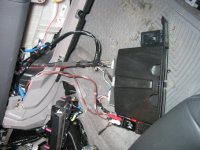
I installed the JBL amp in the upper glovebox. I think it was supposed to be for a CD Changer. I cut the tabs off the amp, wrapped it in some self-stick foam so it wouldn't rattle over bumps and cut the back of the upper glovebox out to fit (see picture). It is definitely a tight fit (a few four-letter words were heard), but I think it was the best place. The good point is that with the little upper glovebox door closed you don't see it at all. Good luck.
I installed the JBL amp in the upper glovebox. I think it was supposed to be for a CD Changer. I cut the tabs off the amp, wrapped it in some self-stick foam so it wouldn't rattle over bumps and cut the back of the upper glovebox out to fit (see picture). It is definitely a tight fit (a few four-letter words were heard), but I think it was the best place. The good point is that with the little upper glovebox door closed you don't see it at all. Good luck.

Hitman
New member
Re: can you please post pictures for JBL amp installed in glove box?
cafebabe,
OEMvalue is supplying a new, much smaller amp with the navigation system package. I was the first to get one and install it, according to Troy. It is small enough to fit under the dash, just to the right and slightly below the head unit. In fact, because this new amp is smaller, Troy doesn't even supply a wiring harness for it, because it just plugs directly in with the 12" harness already built-in.
cafebabe said:Hey Pete,
Could you please tell us where in the glove box you installed JBL amp? is it at the
upper section (tray) inside the glove box? is that JBL amp get shown when you open the
glove box? is it possibel that you can post pictures for JBL amp installed in glove box?
because according to oemvalue: "the external amplifier may be the hardest part of the
install as you'll need to find a place to mount it."
we really appreciate it, Thanks and good job man.
-cafebabe
cafebabe,
OEMvalue is supplying a new, much smaller amp with the navigation system package. I was the first to get one and install it, according to Troy. It is small enough to fit under the dash, just to the right and slightly below the head unit. In fact, because this new amp is smaller, Troy doesn't even supply a wiring harness for it, because it just plugs directly in with the 12" harness already built-in.
GoneToCarolina
New member
New NAV unit for 2005 4Runner???
According to the wiring diagrams for the 2005 4Runner, there are two different setups for the navigation system: one for 1GR–FE (the V6) and another for 2UZ–FE (the V8).
The navigation system for the V8 appears to be pretty much identical to the navigation system for the 2003 and 2004 4Runners (i.e. supports all 10 speakers; the ECU is separate from the display head unit).
The navigation system for the V6 shows only 8 speakers, but the navigation ECU is combined with the display into one unit. This unit seems to be at least very similar to the Solara navigation unit. Could this possibly be a true "plug and play" solution for adding a navigation unit to the JBL 10-speaker system on a 2003/2004 4Runner?!?!?
Apparently, only a 2005 Limited V6 4Runner would have this new navigation unit...
So...
1) Can anybody out there confirm if this new unit is actually available as an option?
2) Is the voice navigation supported without the need for the "extra speaker" mod?
3) What is the backlight color for the buttons?
4) Can it support all 10 speakers in the JBL system (or just eight)?
According to the wiring diagrams for the 2005 4Runner, there are two different setups for the navigation system: one for 1GR–FE (the V6) and another for 2UZ–FE (the V8).
The navigation system for the V8 appears to be pretty much identical to the navigation system for the 2003 and 2004 4Runners (i.e. supports all 10 speakers; the ECU is separate from the display head unit).
The navigation system for the V6 shows only 8 speakers, but the navigation ECU is combined with the display into one unit. This unit seems to be at least very similar to the Solara navigation unit. Could this possibly be a true "plug and play" solution for adding a navigation unit to the JBL 10-speaker system on a 2003/2004 4Runner?!?!?
Apparently, only a 2005 Limited V6 4Runner would have this new navigation unit...
So...
1) Can anybody out there confirm if this new unit is actually available as an option?
2) Is the voice navigation supported without the need for the "extra speaker" mod?
3) What is the backlight color for the buttons?
4) Can it support all 10 speakers in the JBL system (or just eight)?

dareames
New member
XM with NAV
I just got my Camry NAV installed in my 05 4Runner SR5. Has anybody installed the optional XM Radio tuner kit to one of these? Does it have to be the "Toyota" XM Kit or can you use any XM tuner. Which port on the back of the NAV unit does it plug into?
Thanks!!
Doug
I just got my Camry NAV installed in my 05 4Runner SR5. Has anybody installed the optional XM Radio tuner kit to one of these? Does it have to be the "Toyota" XM Kit or can you use any XM tuner. Which port on the back of the NAV unit does it plug into?
Thanks!!
Doug
Petegaz:
Great job on the nav system, I'll be taking on a similar job in a couple of weeks. I'm buying all the equipment this week, and laying out my action plan for an 18 march weekend install.
2005 Solara Nav unit (pkg 3); External Microphone for voice control; 2005 Solara XM Receiver, and and an amplified speaker for voice guidance output. I've downloaded your pdfs which I'm sure will help a lot.
Questions:
My stock JBL 6 spkr system sounds great to me and although OEM Value tells me I'll be able to use the existing digital amplifier, the audio signal will be created in the Nav unit. How does the sound quality compare with the stock JBL system I'm going to replace?
As for the FM Diversity antenna amplifier power, doesn't the Nav unit output a switched 12vdc signal like the stock head unit does? I'd like to use shunt-splices like you did and go directly into the same voltage source from the nave unit. Did you look for one before going directly to switched vehicle power or not? If not, I'm going to see if I can find one using a needle probe attached to my multimeter.
How do I get into the dash and remove all the panels? Would a Toyota maintenance manual tell/show me? Are there any special tools required?
My only concern is finding a location to install the XM Receiver. I really enjoy having a self-modified T4R look completely stock from the casual observer and I really don't want to use the glove box. It's too convenient of a storage box to fill up with a receiver. Where is the JBL Amplifier located? Then again the receiver may not be that big and I can mount it behind one of the rear cargo compartment cubby holes.
What is the purpose of the reverse signal and what exactly is that signal (dc voltage, ground in reverse, etc.)? I realize the unit will not operate without it, but I'd like to know what it uses that signal for. Same question for the speed sensor signal.
That's about it for now. I appreciate you pioneering the way for those of us who wish to follow! Take care.
Mark
Great job on the nav system, I'll be taking on a similar job in a couple of weeks. I'm buying all the equipment this week, and laying out my action plan for an 18 march weekend install.
2005 Solara Nav unit (pkg 3); External Microphone for voice control; 2005 Solara XM Receiver, and and an amplified speaker for voice guidance output. I've downloaded your pdfs which I'm sure will help a lot.
Questions:
My stock JBL 6 spkr system sounds great to me and although OEM Value tells me I'll be able to use the existing digital amplifier, the audio signal will be created in the Nav unit. How does the sound quality compare with the stock JBL system I'm going to replace?
As for the FM Diversity antenna amplifier power, doesn't the Nav unit output a switched 12vdc signal like the stock head unit does? I'd like to use shunt-splices like you did and go directly into the same voltage source from the nave unit. Did you look for one before going directly to switched vehicle power or not? If not, I'm going to see if I can find one using a needle probe attached to my multimeter.
How do I get into the dash and remove all the panels? Would a Toyota maintenance manual tell/show me? Are there any special tools required?
My only concern is finding a location to install the XM Receiver. I really enjoy having a self-modified T4R look completely stock from the casual observer and I really don't want to use the glove box. It's too convenient of a storage box to fill up with a receiver. Where is the JBL Amplifier located? Then again the receiver may not be that big and I can mount it behind one of the rear cargo compartment cubby holes.
What is the purpose of the reverse signal and what exactly is that signal (dc voltage, ground in reverse, etc.)? I realize the unit will not operate without it, but I'd like to know what it uses that signal for. Same question for the speed sensor signal.
That's about it for now. I appreciate you pioneering the way for those of us who wish to follow! Take care.
Mark
Hitman
New member
mhumm2 said:Petegaz:
Great job on the nav system, I'll be taking on a similar job in a couple of weeks. I'm buying all the equipment this week, and laying out my action plan for an 18 march weekend install.
2005 Solara Nav unit (pkg 3); External Microphone for voice control; 2005 Solara XM Receiver, and and an amplified speaker for voice guidance output. I've downloaded your pdfs which I'm sure will help a lot.
Questions:
My stock JBL 6 spkr system sounds great to me and although OEM Value tells me I'll be able to use the existing digital amplifier, the audio signal will be created in the Nav unit. How does the sound quality compare with the stock JBL system I'm going to replace?
As for the FM Diversity antenna amplifier power, doesn't the Nav unit output a switched 12vdc signal like the stock head unit does? I'd like to use shunt-splices like you did and go directly into the same voltage source from the nave unit. Did you look for one before going directly to switched vehicle power or not? If not, I'm going to see if I can find one using a needle probe attached to my multimeter.
How do I get into the dash and remove all the panels? Would a Toyota maintenance manual tell/show me? Are there any special tools required?
My only concern is finding a location to install the XM Receiver. I really enjoy having a self-modified T4R look completely stock from the casual observer and I really don't want to use the glove box. It's too convenient of a storage box to fill up with a receiver. Where is the JBL Amplifier located? Then again the receiver may not be that big and I can mount it behind one of the rear cargo compartment cubby holes.
What is the purpose of the reverse signal and what exactly is that signal (dc voltage, ground in reverse, etc.)? I realize the unit will not operate without it, but I'd like to know what it uses that signal for. Same question for the speed sensor signal.
That's about it for now. I appreciate you pioneering the way for those of us who wish to follow! Take care.
Mark
I can't give you my opinion on the JBL system because I never had it in the first place, but I'll try to answer some of your other questions...
Yes, you must supply 12v to the antenna lead because the navigation system doesn't supply it for you. If I remember correctly, I just extended the original source wire and connected it to the antenna's power lead.
There are excellent step-by-step instructions to disassemble the dash/console with pictures on this forum posted by another member. Just do a search and I'm sure you'll find them.
The reverse sensor wire is used for the orientation of the vehicle icon on the navigation screen. If you don't have the reverse sensor wire hooked up, the icon on the screen will 'flip' positions whenever you back up. In other words, the navigation system will display your vehicle as facing the opposite direction whenever you are simply in reverse and backing up.
The speed sensor wire is used for proper tracking of your vehicle. The satellite signal is only really used to confirm/correct your position, and only updates periodically. The speed sensor wire is really what is used most of the time. If you were to drive through a long tunnel (like the Licoln tunnel in NYC), your speed sensor will track your true position, without any satellite signal.
Also, without the speed sensor hooked up, you won't get any turn-by-turn voice guidance.
Which Toyota Nav System Do I Need?
I'm really confused. I have a 2003 2-WD, SR5 Sport with stock stereo (AM/FM/Single CD, 6 spkrs). OEMValue sent me a Solara Nav System (Pkg-3) because it was assumed I had a digital JBL system. Apparently I do not! There is no JBL logo on the front of my stereo and according to the local dealership, I have a stock Toyota Fujitsu (sp?) receiver. Apparently there is no descrete amplifier -- like all receivers, it's integrated in the head unit.
Does this sound correct? I've checked for an amp under all seats -- no luck. If it is true, which Nav pkg do I need from OEM Value? It looks to me that I need pkg-1.
How do I gain access to the dashboard and access panels to replace the old stereo ?
Thanks in advance -- you guys have been a great source of information.
Mark
I'm really confused. I have a 2003 2-WD, SR5 Sport with stock stereo (AM/FM/Single CD, 6 spkrs). OEMValue sent me a Solara Nav System (Pkg-3) because it was assumed I had a digital JBL system. Apparently I do not! There is no JBL logo on the front of my stereo and according to the local dealership, I have a stock Toyota Fujitsu (sp?) receiver. Apparently there is no descrete amplifier -- like all receivers, it's integrated in the head unit.
Does this sound correct? I've checked for an amp under all seats -- no luck. If it is true, which Nav pkg do I need from OEM Value? It looks to me that I need pkg-1.
How do I gain access to the dashboard and access panels to replace the old stereo ?
Thanks in advance -- you guys have been a great source of information.
Mark
Hitman
New member
If you have the standard (non-JBL) stereo, then you need the Camry navigation system (package #1)
BTW, this is the best set up to add the navigation system because it will work perfectly without having to add an amplified speaker for the voice commands.
But it's YOUR responsibility to order the right system from OEMvalue....
BTW, this is the best set up to add the navigation system because it will work perfectly without having to add an amplified speaker for the voice commands.
But it's YOUR responsibility to order the right system from OEMvalue....
Hitman said:If you have the standard (non-JBL) stereo, then you need the Camry navigation system (package #1)
BTW, this is the best set up to add the navigation system because it will work perfectly without having to add an amplified speaker for the voice commands.
Hitman: That's great news. Please elaborate. I have a mess of questions:
- Are my stock speakers compatible with the amp?
- What are the specs of the analog JBL amp (power, THD, etc.).
- I'd also like to know the dimensions of the amp so I can figure out a place to mount it.
- About the nav voice guidance output, will the audio be sent to all 6 speakers?
- Will music automatically mute for voice guidance?
- Is the Toyota nav voice control microphone compatible with this configuration; in other words just plug it in to the nav unit, right?
- Is the Camry XM receiver also a simple plug in to the back of the nav unit?
- How do I remove the center console and dashboard so I can start planning this install?
- Do I need any special tools for this?
Wow, I shotgunned questions all over the place. Sorry about that, I hope I didn't get any on you! Reply when you can and thanks a lot. I really do appreciate the help.
Mark Hummel
Hitman
New member
mhumm2 said:Hitman: That's great news. Please elaborate. I have a mess of questions:
- Are my stock speakers compatible with the amp?
Yes, the navigation system will come with an amplifier that you must use. This is because your stock stereo has a built-in amp, but the navigation system does not have a built-in amp. There's just no room to have a built-in amp with all the other stuff in the navigation system head unit.
- What are the specs of the analog JBL amp (power, THD, etc.).
I don't know... and I asked Troy (at OEMvalue) and he didn't know either. I suspect it is very close to the stock amp that's built into the head unit. Troy claims it is more powerful though. It sounds pretty decent to me, especially for stock, paper speakers.
- I'd also like to know the dimensions of the amp so I can figure out a place to mount it.
There are two different amps that OEMvalue ships. I don't have the dimensions, but I can tell you that if you end up with the larger amp, you'll probably have to mount it in the upper section of the glove box. There's just not enough room under the dash anywhere for the larger amp. The smaller amp will fit to the right of the head unit, in a small cavity in the dash. When you start to take everything apart, you'll see that the entire area is pretty much filled up.... not much room to add anything. But you can fit the small amp without cutting anything. That's what I did with mine. If you can, ask for the smaller amp. According to Troy, it's just as powerful as the larger amp anyway.
- About the nav voice guidance output, will the audio be sent to all 6 speakers?
No, the voice guidance comes thru the driver's side front door speaker only. The volume is adjustable, however. And you can set it so the voice volume automatically becomes louder when driving at highway speeds
- Will music automatically mute for voice guidance?
Yes, it mutes slightly, then returns to normal volume.
- Is the Toyota nav voice control microphone compatible with this configuration; in other words just plug it in to the nav unit, right?
I'm not sure about that.... other people have hooked up the microphone, but I'm not sure if it's a plug and play. You might want to do a search on the forum.
- Is the Camry XM receiver also a simple plug in to the back of the nav unit?
I'm not sure about this either... but I do know that there are other, less expensive options for adding satellite radio to your Toyota navigation system.
- How do I remove the center console and dashboard so I can start planning this install?
There are excellent instructions (with pictures) on this forum. I don't have a link to them at the moment, but they should be easy to find. Basically, you start by disassembling the center console. Then you work your way to the silver trim around the radio/climate control/vents Most of the stuff pops right out... you won't need many tools at all.
- Do I need any special tools for this?
Nope.... just a 10mm wrench or socket and rachet should be about all you need to disassemble everything. You will need to tap into some wires though to wire it up.
Wow, I shotgunned questions all over the place. Sorry about that, I hope I didn't get any on you! Reply when you can and thanks a lot. I really do appreciate the help.
Mark Hummel
No problem... if you have any problems, just let us know. Plenty of people have already been through this install, and any of them will probably be able to help you out. I can guarantee you that you'll love the Toyota system. It's one of the best system available.
Last edited:
dareames
New member
Mark,
I have recently installed the Camry NAV system and XM Radio in my 4 Runner. I know Hitman has already answered most of your questions, I thought I would add just a few things...
Troy told me that the Camry amp is not that good for the 4 Runner. It was designed for the Camry and provides more power to the back speakers than it does to the front speakers. I bought an aftermarket amp instead of using the Camry amp.
Yes, the Camry XM tuner is a simple plug and play. It plugs into the rear-seat audio plug on the back of the NAV. I'm assuming you can't have both rear-seat audio and XM at the same time (I'm sure somebody will correct me if I"m wrong). I don't have the rear-seat audio setup so it was no problem for me. The only other thing you need to plug in are the 2 antenna cables to the back of the XM tuner. You will also need to figure out a spot to mount the XM tuner. I mounted mine in the cubby hole in the glove box.
I hope this helps!!!
Doug
I have recently installed the Camry NAV system and XM Radio in my 4 Runner. I know Hitman has already answered most of your questions, I thought I would add just a few things...
mhumm2 said:
- What are the specs of the analog JBL amp (power, THD, etc.).
Troy told me that the Camry amp is not that good for the 4 Runner. It was designed for the Camry and provides more power to the back speakers than it does to the front speakers. I bought an aftermarket amp instead of using the Camry amp.
-- Is the Camry XM receiver also a simple plug in to the back of the nav unit?
Yes, the Camry XM tuner is a simple plug and play. It plugs into the rear-seat audio plug on the back of the NAV. I'm assuming you can't have both rear-seat audio and XM at the same time (I'm sure somebody will correct me if I"m wrong). I don't have the rear-seat audio setup so it was no problem for me. The only other thing you need to plug in are the 2 antenna cables to the back of the XM tuner. You will also need to figure out a spot to mount the XM tuner. I mounted mine in the cubby hole in the glove box.
I hope this helps!!!
Doug
Last edited:
XM RX Huh?
dareames,
I appreciate that.
I was under the impression that the low power issue was corrected for Pkg-1 with a different analog amp that's smaller, but more powerful and drives all 6 spkrs while still being a plug and play solution for the nav head unit. So I'm hoping this issue is an old one that's already been corrected.
Huh? I understand one antenna connector from the external XM antenna, but why would there be two? If you're referring to the diversity FM antennas, I was under the impression they are a completely different input to the nav head unit and amplified by an inline FM signal amplifier that I have to ensure recieves 12vdc switched power.
Again, this is confusing. I've seen screen shots of the nav unit controlling a Toyota XM Rx directly from the display. That's what the hardware AM/SAT button is for. Once activated, there are also several software buttons on the screen itself. Why would I need a separate display for XM Radio?
I currently have the XM Commander Rx that uses a modulator and I plan on reinstalling it between the diversity antenna and antenna amplifier so I will continue to use the XM Commander control head/display until I buy and install the Camry XM RX. So what am I missing here?
dareames, I really do appreciate the information and I'll probably quote a lot of this in an email to Troy because a couple points conflict with information I already have. I really don't need more issues, that's for sure. Take care and send some pics of your install if you get the chance. I'd love to see them.
Mark
dareames,
I have recently installed the Camry NAV system and XM Radio in my 4 Runner. I know Hitman has already answered most of your questions, I thought I would add just a few things...
I appreciate that.
Troy told me that the Camry amp is not that good for the 4 Runner. It was designed for the Camry and provides more power to the back speakers than it does to the front speakers. I bought an aftermarket amp instead of using the Camry amp.
I was under the impression that the low power issue was corrected for Pkg-1 with a different analog amp that's smaller, but more powerful and drives all 6 spkrs while still being a plug and play solution for the nav head unit. So I'm hoping this issue is an old one that's already been corrected.
Yes, the Camry XM tuner is a simple plug and play. It plugs into the rear-seat audio plug on the back of the NAV. I'm assuming you can't have both rear-seat audio and XM at the same time (I'm sure somebody will correct me if I"m wrong). I don't have the rear-seat audio setup so it was no problem for me. The only other thing you need to plug in are the 2 antenna cables to the back of the XM tuner.
Huh? I understand one antenna connector from the external XM antenna, but why would there be two? If you're referring to the diversity FM antennas, I was under the impression they are a completely different input to the nav head unit and amplified by an inline FM signal amplifier that I have to ensure recieves 12vdc switched power.
You will also need to figure out a spot to mount the XM tuner. I mounted mine in the cubby hole in the glove box.
Again, this is confusing. I've seen screen shots of the nav unit controlling a Toyota XM Rx directly from the display. That's what the hardware AM/SAT button is for. Once activated, there are also several software buttons on the screen itself. Why would I need a separate display for XM Radio?
I currently have the XM Commander Rx that uses a modulator and I plan on reinstalling it between the diversity antenna and antenna amplifier so I will continue to use the XM Commander control head/display until I buy and install the Camry XM RX. So what am I missing here?
dareames, I really do appreciate the information and I'll probably quote a lot of this in an email to Troy because a couple points conflict with information I already have. I really don't need more issues, that's for sure. Take care and send some pics of your install if you get the chance. I'd love to see them.
Mark
dareames
New member
Re: XM RX Huh?
If your 4 Runner does not have the JBL sound system then you do indeed need the Camry Navigation system. I would also highly recommend using an after market amplifier, we have installation instructions on how to install one with the Navigation system. The JBL amplifier that is made for the 2005 Camry (the one we include in package #1) does not work well with the 4Runner. The amplifier is setup (cannot be adjusted) to supply more power to the front speakers than the rear speakers. This is because the 2005 Camry has more speakers in the front than the rear. Your 4Runner has more speakers in the rear than the front, hence your rear speakers will be very quiet.
So I bought Package #2 (the one without the amp) and bought an amp from my brother-in-law (who owns a car audio store) and got him to install everything for me. BTW...looks like I got the speakers backwards in a previous post....the Camry amp favors the front speakers instead of the back.
I am not referring to the FM antennas. There are 2 plugs on the end of the XM antenna. One antenna.....two plugs. I don't know why, that's just what it had. Sorry for the confusion!!!
You wouldn't need a separate display....that's why I got the Toyota XM tuner, so I could use my NAV head unit to control it. It works great!
Again....I'm sorry if I caused any confusion!!
Doug
Here's what Troy told me in an email dated 2/21/2005:mhumm2 said:
I was under the impression that the low power issue was corrected for Pkg-1 with a different analog amp that's smaller, but more powerful and drives all 6 spkrs while still being a plug and play solution for the nav head unit. So I'm hoping this issue is an old one that's already been corrected.
If your 4 Runner does not have the JBL sound system then you do indeed need the Camry Navigation system. I would also highly recommend using an after market amplifier, we have installation instructions on how to install one with the Navigation system. The JBL amplifier that is made for the 2005 Camry (the one we include in package #1) does not work well with the 4Runner. The amplifier is setup (cannot be adjusted) to supply more power to the front speakers than the rear speakers. This is because the 2005 Camry has more speakers in the front than the rear. Your 4Runner has more speakers in the rear than the front, hence your rear speakers will be very quiet.
So I bought Package #2 (the one without the amp) and bought an amp from my brother-in-law (who owns a car audio store) and got him to install everything for me. BTW...looks like I got the speakers backwards in a previous post....the Camry amp favors the front speakers instead of the back.
Huh? I understand one antenna connector from the external XM antenna, but why would there be two?
I am not referring to the FM antennas. There are 2 plugs on the end of the XM antenna. One antenna.....two plugs. I don't know why, that's just what it had. Sorry for the confusion!!!
Again, this is confusing. I've seen screen shots of the nav unit controlling a Toyota XM Rx directly from the display. That's what the hardware AM/SAT button is for. Once activated, there are also several software buttons on the screen itself. Why would I need a separate display for XM Radio?
You wouldn't need a separate display....that's why I got the Toyota XM tuner, so I could use my NAV head unit to control it. It works great!
Doesn't sound like you're missing anything to me. Looks like you nailed it right on the head.I currently have the XM Commander Rx that uses a modulator and I plan on reinstalling it between the diversity antenna and antenna amplifier so I will continue to use the XM Commander control head/display until I buy and install the Camry XM RX. So what am I missing here?
Again....I'm sorry if I caused any confusion!!
Doug
Re: Re: XM RX Huh?
Hey, Doug, no problem I think I misread some of your post anyway. Here's an email excerpt I received from Troy 2-Mar-05:
The 2003 4Runner is a very popular application for the Navigation system install. It has been done before, you're definitely not the first.
You will need package #1. The amplifier you need is different from the one in the picture as the amplifier in the picture does not work well with your vehicle (causes low volume levels in the rear speakers). We'll include a different amplifier that will have your system working at 100%.
No problem, I remember now that some XM Receivers do have a double connection antenna lead. Now I know what you're referring to. It's just so many guys are having problems with the diversity FM antenna and amplifier that I assumed those were the antenna leads. My mistake.
Okay, ,my mistake, when you wrote "tuner" I thought you meant another display unit in addition to the head unit, but you were referring to the XM receiver instead since the head unit is the tuner for the XM receiver too. I got it now and this matches the information I have exactly. I appreciate the confirmation. Also the glove box cubby sounds like the perfect place for the XM receiver. Are the cables long enough to reach the Nav head unit?
No problem. I appreciate the post very much. Did you install the microphone to control the nav system by voice command?
Mark
dareames said:Here's what Troy told me in an email dated 2/21/2005:
If your 4 Runner does not have the JBL sound system then you do indeed need the Camry Navigation system. I would also highly recommend using an after market amplifier, we have installation instructions on how to install one with the Navigation system. The JBL amplifier that is made for the 2005 Camry (the one we include in package #1) does not work well with the 4Runner. The amplifier is setup (cannot be adjusted) to supply more power to the front speakers than the rear speakers. This is because the 2005 Camry has more speakers in the front than the rear. Your 4Runner has more speakers in the rear than the front, hence your rear speakers will be very quiet.
So I bought Package #2 (the one without the amp) and bought an amp from my brother-in-law (who owns a car audio store) and got him to install everything for me. BTW...looks like I got the speakers backwards in a previous post....the Camry amp favors the front speakers instead of the back.
Hey, Doug, no problem I think I misread some of your post anyway. Here's an email excerpt I received from Troy 2-Mar-05:
The 2003 4Runner is a very popular application for the Navigation system install. It has been done before, you're definitely not the first.
You will need package #1. The amplifier you need is different from the one in the picture as the amplifier in the picture does not work well with your vehicle (causes low volume levels in the rear speakers). We'll include a different amplifier that will have your system working at 100%.
I am not referring to the FM antennas. There are 2 plugs on the end of the XM antenna. One antenna.....two plugs. I don't know why, that's just what it had. Sorry for the confusion!!!
No problem, I remember now that some XM Receivers do have a double connection antenna lead. Now I know what you're referring to. It's just so many guys are having problems with the diversity FM antenna and amplifier that I assumed those were the antenna leads. My mistake.
You wouldn't need a separate display....that's why I got the Toyota XM tuner, so I could use my NAV head unit to control it. It works great!
Okay, ,my mistake, when you wrote "tuner" I thought you meant another display unit in addition to the head unit, but you were referring to the XM receiver instead since the head unit is the tuner for the XM receiver too. I got it now and this matches the information I have exactly. I appreciate the confirmation. Also the glove box cubby sounds like the perfect place for the XM receiver. Are the cables long enough to reach the Nav head unit?
Doesn't sound like you're missing anything to me. Looks like you nailed it right on the head.
Again....I'm sorry if I caused any confusion!!
No problem. I appreciate the post very much. Did you install the microphone to control the nav system by voice command?
Mark
dareames
New member
Re: Re: Re: XM RX Huh?
Of course, I got the Camry XM kit. The Solara XM kit's antenna may be longer, but I wasn't sure if it would work with the Camry NAV, so I didn't want to risk it. I had another post wanting to know if the Solara XM kit would work with the Camry NAV, but nobody responded to the post. The Camry XM only displays 10 characters for the song title and the artist, so it chops off the names if they are longer than 10 characters. I was wondering if the Solara XM kit had the 2nd generation receiver that had longer titles. That's the ONLY thing that I don't like about my setup, but I can live with it. If you find a different XM kit that has 2nd gen receiver, let me know.
Sorry for the confusion on the tuner/receiver thing. I guess in my mind they are the same thing. The receiver is the brains of the radio and the head unit is just the display. All of the tuning goes on in the receiver. When you purchase these, they are calling them XM Radio Tuner Kits. That's the way I understand it, but I could be wrong. Heaven knows I've been wrong millions of times before!! BTW, the Camry XM Radio Kit is PT546-33050 and the Solara is PT546-06040.
Doug
Yes, the cable from the receiver to the head unit is extremely long, about 12-15 feet I'd guess. I only needed about 2 feet. The antenna cable is much shorter because it was designed for the Camry with the XM Receiver in the back of the car and the antenna going on top of the car in the back. I put my antenna on my dash, all the way to the right side next to the pillar. The antenna cable may be 5-6 feet max. I've heard some people have mounted the antenna on the windshield, just behind the rear view mirror. I've also seen other people mount it on the rear of the vehicle on top. To do that, you would have to put the XM receiver in the back and run the other wire all the way to the head unit up front.mhumm2 said:Are the cables long enough to reach the Nav head unit?
Of course, I got the Camry XM kit. The Solara XM kit's antenna may be longer, but I wasn't sure if it would work with the Camry NAV, so I didn't want to risk it. I had another post wanting to know if the Solara XM kit would work with the Camry NAV, but nobody responded to the post. The Camry XM only displays 10 characters for the song title and the artist, so it chops off the names if they are longer than 10 characters. I was wondering if the Solara XM kit had the 2nd generation receiver that had longer titles. That's the ONLY thing that I don't like about my setup, but I can live with it. If you find a different XM kit that has 2nd gen receiver, let me know.
No, I didn't get the microphone. I didn't figure I'd use it that much. I think it's just to change from SAT1, SAT2, SAT3, FM1, FM2, AM, CD. I'm not sure if it controls anything else. I figured I'd just use the steering wheel controls for all that. I can always add it later. I am thinking about adding the back-up camera next year.No problem. I appreciate the post very much. Did you install the microphone to control the nav system by voice command?
Sorry for the confusion on the tuner/receiver thing. I guess in my mind they are the same thing. The receiver is the brains of the radio and the head unit is just the display. All of the tuning goes on in the receiver. When you purchase these, they are calling them XM Radio Tuner Kits. That's the way I understand it, but I could be wrong. Heaven knows I've been wrong millions of times before!! BTW, the Camry XM Radio Kit is PT546-33050 and the Solara is PT546-06040.
Doug
j0mama said:I just tried installing a 2004 Camry navigation unit into my 2004 4Runner equiped with the 10speaker JBL stereo...
After playing with that... Im still undecided if I am going to keep this unit, since I would have to use a seperate external amplifer, and lose the 10 speaker system.
Anyone, have any other ideas?
j0.
I hope I can help j0. It sounds to me like you should have purchased package number 3, the Solara Nav System. As I understand it, this system was designed for the JBL digital amplifier and I remember seeing a software button on one of the screen shots for "surround." Send Troy an email and see what he thinks.
Mark Hummel
Hitman
New member
mhumm2 said:I hope I can help j0. It sounds to me like you should have purchased package number 3, the Solara Nav System. As I understand it, this system was designed for the JBL digital amplifier and I remember seeing a software button on one of the screen shots for "surround." Send Troy an email and see what he thinks.
Mark Hummel
Do you realize that you're responding to a post that is more than one year old?
Similar threads
- Replies
- 2
- Views
- 3K


