Scion FRS Radio

For anyone else that has done this upgrade I have a question, before installing the 2014 FRS Pioneer Bespoke I had the 2013 Bespoke installed. With the 2013 unit when I would be using Google Maps app on my phone the navigation voice commands would automatically come through the head unit regardless of what source I was using (i.e. iPod, USB, CD, Radio, etc.) and then return back to the source once the command was complete. For example, if I was listening to music on my iPod via the iPod source the song would stop while google maps told me to 'turn left' and then the iPod song would come back on. With the 2014 unit, the google maps navigation commands will only come through the head unit if I leave the source on Bluetooth. Is anyone else have this same issue? Or is there a way to change a setting so that navigation commands automatically come through the unit and then return to the orginal source?

Thanks in advance for any input.
 
For anyone else that has done this upgrade I have a question, before installing the 2014 FRS Pioneer Bespoke I had the 2013 Bespoke installed. With the 2013 unit when I would be using Google Maps app on my phone the navigation voice commands would automatically come through the head unit regardless of what source I was using (i.e. iPod, USB, CD, Radio, etc.) and then return back to the source once the command was complete. For example, if I was listening to music on my iPod via the iPod source the song would stop while google maps told me to 'turn left' and then the iPod song would come back on. With the 2014 unit, the google maps navigation commands will only come through the head unit if I leave the source on Bluetooth. Is anyone else have this same issue? Or is there a way to change a setting so that navigation commands automatically come through the unit and then return to the orginal source?

Thanks in advance for any input.
Great question. I've wondered the same thing...
 
It's a known complaint that while you're listening to the Scion radio, the sound sort of drifts from the front to the back than to the front. Some part of a song sounds louder than other for no apparent reason.

According to the METRA tech guy, the PAC TATO is having a hard time putting out a constant signal when the radio is putting out varying voltage signals. A LOC usually fixes this by the user manually adjusting the output from each of the four audio channel to the same voltage. Most LOC black box has the means of adjusting their output using a screwdriver or similar. Once I installed the LOC, adjusted the output to be the same out of all four channels, the weird automatic fading issue disappeared.

He also told me that most aftermarket stereos have a 4 vac (volts a/c) out of their pre-amp channels vs the Scion which only puts out 2 vac. Most aftermarket gizmos like to work with 4 vac pre-amp output I guess. Just a FYI.

Do you have any more info on which LOC you used and how you installed it? Has this solution held up over time?

I'm collecting parts for my Scion radio job and would like to preemptively solve the sound fading issue while I have the dash apart. :cheers:
 
I have one extra antenna wire that does not hook up. Am I missing something? What controls the backlighting for the buttons? I don't have any that illuminate. The screen dims like it should when headlights are on.
c5f562943625e1102ec49b06cc15afcd.jpg

Hi, anyone know how to connect the front panel of the radio light.

Thank you very much for your help.
 
Scion Nav Install in 08 with JBL...Advice needed

Hi Fellow 4runners,

Love this forum and all the help and resources people have taken the time to post. Well, I have a huge questions and I’m hoping that someone can point me in the right direction for a head unit swap.

A couple of days ago, my JBL navigation unit in my 2008 Limited went out. The Nav disc got jammed when I accidently hit the eject button for that instead of the CD. I restarted the vehicle and the Nav DVD popped out. Tried to put it in, but it would cycle and then pop out.

So, first, just the navigation didn’t work. The radio, Bluetooth, CD changer, aux input, backup camera, all still worked. So, I searched the forum here and the possible remedy to get the unit to reset was to disconnect the battery for five minutes. Did that. I went from no navigation to no nothing. All I got was “NO DVD INSTALLED. PLEASE INSTALL DVD.” The Nav DVD would go in, but it kept kicking it out. So I bought an update DVD. Same thing. So I got nothing working right now and that annoying message on the screen just taunting me like that little ******* from grade school. I’m hoping that you guys can help me give this annoying little brat an ass kicking and help me remedy this situation.

I bought a Scion PT546-00140 with the Bespoke module attached. My hope is to get this working, if possible. The bonus is hopefully Bluetooth iPhone connectivity instead of the aux input. However, bottom line; I need a working head unit. Will this work and what do I need to make it happen?

From my research, it looks like I might need some combo of the following parts:
• 28 pin harness- PT546-00120-CH
• Antenna Adapter- PT546-00120-AD
• and if you want Bluetooth PT546-74120-MC
• and USB- PT546-00120-US

Is that it, or do I need additional parts because I have the amp. I would like to use the existing GPS antennae, retain the steering wheel controls, use the existing backup camera and microphone, and have Bluetooth connectivity. The aux input would be cool as a back up to the Bluetooth.

I saw a post where the person used a couple of additional items.
- Metra TYTO-01- Converts the analog output of the head unit to the digital signals the Synthesis amp is looking for.
- 71-1761- Reverse Wiring Harness- Allows you to plug the converter into the Scion head unit without hacking up any vehicle wiring.
- Line Output Converter (LOC) from Metra

Sorry for the long post, but I wanted to provide as much detail as possible.

Thanks in advance for your help

Squ1dward

 
Last edited:
Also, this may be a dumb question (forgive my ignorance), but if I had the bluetooth phone option with my stock headunit NAV, why do I need to get a new Bluetooth mic. Is there anyway to reuse the existing mic

Squ1d
 
I just did this too. Camera isn't run yet, but whatever.

Anyways, you need to connect the vss wire to the harness. It's a pink wire on the split harness adapter from scion, and a purple with a red stripe that's in the bundle behind the hvac controls. That'll stop that stupid delay. My antenna is under the dash too, works fine.

Not sure what to tell you about the USB, mine works fine. I bought a USB cable from eBay for cheap.


Can someone tell which harness and pin number the VSS wire is located? I see in the Scion Manual on the 24 pin harness there is wire called VSYN located at pin 6. Is this the same as VSS?
 
The VSS is als called "speed sense" on the pin diagram floating around here. It is the middle wire #3 on the 6-pin R-9 harness where the reverse is also located. That goes into pin #17 on the 28-pin harness on the FRS radio. If the "reverse" wire is on the top row, second in from right, the VSS or (SPD) is one the row below, 3rd pin in from the right.

You will need a wire with the proper connector to push into the existing harness. You can try a local stereo shop. I ordered one from autoharnesshouse.com. Brian is very helpful and responds to emails. Ultimately, you need two separate wires , one with the male connector ends and one with the female to get the reverse and the VSS to work. Brian will sell you both. Get those and you are done. Also, if you don't want to cut the factory wires, he will sell you the connector that hooks into the R-9 connector with the two wires out for the reverse and VSS. Then you just push the other ends into the corresponding pin holes and you are done.

Hope that helps,
Squ1d
 
The VSS is als called "speed sense" on the pin diagram floating around here. It is the middle wire #3 on the 6-pin R-9 harness where the reverse is also located. That goes into pin #17 on the 28-pin harness on the FRS radio. If the "reverse" wire is on the top row, second in from right, the VSS or (SPD) is one the row below, 3rd pin in from the right.

You will need a wire with the proper connector to push into the existing harness. You can try a local stereo shop. I ordered one from autoharnesshouse.com. Brian is very helpful and responds to emails. Ultimately, you need two separate wires , one with the male connector ends and one with the female to get the reverse and the VSS to work. Brian will sell you both. Get those and you are done. Also, if you don't want to cut the factory wires, he will sell you the connector that hooks into the R-9 connector with the two wires out for the reverse and VSS. Then you just push the other ends into the corresponding pin holes and you are done.

Hope that helps,
Squ1d

Thank you [MENTION=141989]Squ1dward[/MENTION] this info should be really helpful. I ordered my backup camera harness from autoharnesshouse back when I did that install. So as far as the back up camera tapping into the reverse wire, I've already done that.

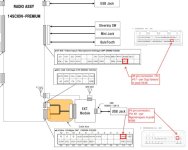
I still have a few questions with the navigation. The issue I am having since installing the navigation extension module is that the navigation is super slow and laggy. From what I understand from your posts and others is that I need to connect the VSS wire on vehicle side to the Scion Bespoke head unit so that the navigation can determine the speed of the vehicle. My question is based on your response above it looks like using the wire connector for autoharnesshouse I tap/connect into the 28 pin connector at pin #17 labeled as "SPD" on the diagram below. From there I connect the other end of the autoharnesshouse wire to the VSS wire on the vehicle side. According to your response above that would be the R-9 connector. This is where I am confused. I am not sure where the R-9 connector is. When I tapped the reverse wire for the back up camera it was located on the drivers side low left kick panel near the parking brake. Is this where I would find the VSS wire??? What I am also confused about is that [MENTION=135208]Ngonerogwu[/MENTION] in post #289 says that the VSS wire can be found behind the HVAC controls. Ngonerowu also sounds like he tapped into the 24pin connector ("pink wire on the split harness adapter from scion") pin#2 (SPD0) on the diagram below, I am assuming? So I guess my questions are:

1. Which harness/connector on the Scion Radio side do I tap into? the 28 pin connector at pin #17 (SPD) or 24 pin connector at pin #2 (SPD0)?
2. Where is the R-9 connector that has the VSS wire on the vehicle side? Or where is the best place to tap into the VSS wire?
3. In order to remove the lagginess from the navigation do I need to tap the VSS and the Reverse signal or just the VSS?

Thanks for the help, sorry for long post I just want to make sure I understand before tapping into wires.
 

Attachments

  • Screen Shot 2016-12-22 at 7.55.04 PM.jpg
    Screen Shot 2016-12-22 at 7.55.04 PM.jpg
    68.1 KB · Views: 10,809
1. Which harness/connector on the Scion Radio side do I tap into? the 28 pin connector at pin #17 (SPD) or 24 pin connector at pin #2 (SPD0)?
28 pin connector

2. Where is the R-9 connector that has the VSS wire on the vehicle side? Or where is the best place to tap into the VSS wire?
R-9 Connector is a small gray connector with three wires coming out of the back. It only has one row of pins. The red is the reverse wire and the (middle) purple wire with the grey horizontal stripes is the speed sense. The remaining wire (green with grey stripes) is the parking break sensor (not needed).

3. In order to remove the lagginess from the navigation do I need to tap the VSS and the Reverse signal or just the VSS?
The VSS (speed) should take care of the lagginess. The reverse is only used to activate the reverse camera

Here are a couple of pics that may help:

You can see where I cut the red wire and spliced it with a green wire for the reverse option. Its the green wire you see in the picture below.Later, I cut the purple wire and spliced that for the VSS (SPD).
D2_DB6_ADA_6_B50_429_F_81_F4_B210_BB2_DB9_BE.jpg


The green wire is spliced from the red wire for the reverse. The pink wire below the red/white stripe wire is where the speed is spliced into. I actually connected into the factory connector with an extra molex pin in the dash to match where the pink wire is located to make it cleaner. The pin hole on the factory harness was empty. If you dont have that, just splice into the pink wire. either way will work
32_F0_D10_C_BEDC_4_D9_F_83_B6_891434_BE3_D08.jpg


Here is a quick diagram to hopefully make it clear.
speed_cam.png


IF you run into any other issues, PM me with your phone number, Whattsapp or Skype and I can hopefully answer your questions.

Squ1d
 
Last edited:
Thank you [MENTION=141989]Squ1dward[/MENTION] for the clarification. The only thing I'm wondering now is if my 4runner has the R9 connector. I've never seen it when I'v been doing previous installs. I suppose it could be hidden away somewhere behind the HVAC controls taped to another harness or something. I have a 2004 Sport with JBL that did not have the navigation option. This thread suggests that the R9 connector does not exist in pre-2006 4runners. I am not sure if anyone here can confirm?

I did order the jumper cable from autoharnesshouse so if cannot find the R9 connector I will just splice into VSS wire located in the wire bundle behind the HVAC like Ngonerogwu suggested. As you said, autoharnesshouse does make a female version of the R9 harness with the three wires (Rev, VSS, Parking Brake) which would make for a cleaner install. After the holidays I will pull the headunit out and see if I can find the R9 connector.

Again thanks for the help, your info will be very helpful.
 
Glad I could help. Hit me up if you run into any other issues. I might mention you need to ground the (ill-) to get the backlighting for the buttons to work. Ground it to any ground and it should work.

Just another issue that came up after I thought I was finished

Squ1d
 
The head unit has been installed for awhile so no issues with the illumination. I just installed the nav extension and that's when I ran into the lagginess.


Sent from my iPhone using Tapatalk
 
So I Installed my t0015 last night. with JBL. First time soldering. My sound is really low on the left channels. When I throw in the stock HU sound is g2g. Is this just a wiring issue or can it be a TYTO issue?.

BTW Breaking tire beads suck:mad2:
 
So I Installed my t0015 last night. with JBL. First time soldering. My sound is really low on the left channels. When I throw in the stock HU sound is g2g. Is this just a wiring issue or can it be a TYTO issue?.

BTW Breaking tire beads suck:mad2:
Did you max out the volume before swapping radios? If so, you might need a LOC.

Sent from my SM-G920V using Tapatalk
 
Glad I could help. Hit me up if you run into any other issues. I might mention you need to ground the (ill-) to get the backlighting for the buttons to work. Ground it to any ground and it should work.

Just another issue that came up after I thought I was finished

Squ1d

So I just tapped into the VSS wire purple/red stripe behind the HVAC controls and connected to the SPD pin on the 28 pin harness but I am still experiencing the lagginess. Is there away to get to a diagnostic screen to see if the radio is sensing the VSS wire? Or does the nav screen show your speed if it is successfully connected to the VSS wire? Just spent several hours and am stumped :frusty:

UPDATE: I was able to access the diagnostic screen and it did give me a speed reading so I successfully connected the headunit to the VSS wire. For whatever reason it seemed like once I exited the diagnostic screen the nav seem to working accurately with no lag for a 15 minute test drive. However, today when I was heading home from work the GPS seem to get a confused at one point and just got stuck in one spot if that makes sense. Initially this morning and the first 10 minutes on my way home it was working fine before getting "lost". So I guess, the verdict is still out whether I fixed the laginess issue.

Also, yesterday while hooking up the VSS wire to the headunit I decided to relocate the GPS antenna from underneath the dash behind the radio to underneath the map light/sunroof controls in hopes that the signal would be stronger.

I will report back with how the nav works out once I drive the runner a little more. Thanks everyone for the help.
 
Last edited:
Just a note - if any of you are looking to add navigation, search for part # 86100-YY050 on ebay. Seems to be some sort of ID for nav itself - I've seen it cover all PT296-471x0 parts.

I've seen plenty of these units pop up at ~$100; I got mine (PT296-47120) about a week ago for well under that.

Also, contrary to one of the posts in this thread (I think CookieRoe's?), 47120 does support Entune.
 
I need to add a scion radio with a backup cam. Are people still have volume issues?

The volume issues are not coming from the radio itself, but the METRA TOYO interface. My first one lasted about a month and half and started to work intermittently.

Called the company, they denied any problems. When I said it was all over the forums that others had problems, they were speechless. They said it was probably a loose connection on the harness. Wasn't...

Only advice they gave was to return it to Amazon. Good thing I bought it from amazon, cause the return was easy. New one installed about three weeks ago. Used same wires, but new module. Worked right away and seems solid.

As for Entune, grab that over AHA. I have AHA and it is pretty worthless. Apps suck. Never use it.

BTW, if anyone needs a stock unit to max the volume levels, I have a Prius unit that I used. $45 shipped
 
Last edited:

Members online

Forum statistics

Threads
278,316
Messages
3,554,120
Members
248,016
Latest member
Advally Service

Trending content

Back
Top