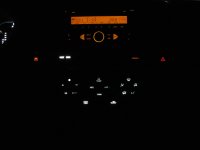
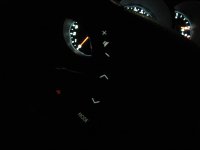
DIY: Interior LED swap (cluster, HVAC, switches, window, *steering wheel)

photo1.jpg~original


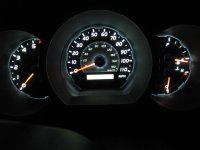
not the best pic, but half of my gauge wont light up (more apparent at night - cant read the clock at all).

i tore it apart and it seems that all the removable bulbs' filament arent blown. can anyone confirm this for me please? i suspect it may be a bulb that's soldered onto the board.
 
photo1.jpg~original


not the best pic, but half of my gauge wont light up (more apparent at night - cant read the clock at all).

i tore it apart and it seems that all the removable bulbs' filament arent blown. can anyone confirm this for me please? i suspect it may be a bulb that's soldered onto the board.

You'll only have to replace the removeable bulbs. No soldering needed.
 
no i was refering to yours actually. what kind of bulbs do you use? same kind for the whole dash? where can i find them at.?

Ahh...mine are all white leds. I used PLCC-2 surface mounted LED's from Oznium.com for the cluster and steering wheel controls. for the rest i used some 3mm flat top LED's i got from ebay. for the switches and HVAC, you'll need 1/8W 1.2K ohm resistors for each light.
 
Ahh...mine are all white leds. I used PLCC-2 surface mounted LED's from Oznium.com for the cluster and steering wheel controls. for the rest i used some 3mm flat top LED's i got from ebay. for the switches and HVAC, you'll need 1/8W 1.2K ohm resistors for each light.

thanks this really helps, hope to be done with mine soon. just hoping i dont come into any problems. thanks for the info, and nice ride, i really like everything you've done with it. it looks clean and simple, but i bet it took a lot of effort to get it where you are now. well thanks again, and keep on riding!!!:lookout:
 
thanks this really helps, hope to be done with mine soon. just hoping i dont come into any problems. thanks for the info, and nice ride, i really like everything you've done with it. it looks clean and simple, but i bet it took a lot of effort to get it where you are now. well thanks again, and keep on riding!!!:lookout:

Thanks!! Just take your time and make sure the connections are clean. Also, remember to test the LEDs are all lighting up before you put the needles back on. It'll save alot of time. Good luck!!
 
propman07 - I know its probably mentioned somewhere in these 18 pages (haven't gone through all of them), but how did you get the LCD display to come out white? Just putting in white LEDs doesn't make it white.
Also, it looks like it could be a little brighter but maybe thats just the pic.

where did you find you profile pic, omg man i wish i had a girl that looked like that.
 
Great thread!

One question though...

What kind of lights are used for the 4x4 switch, diff lock, DAC, rear window?

Or I guess the better question to ask is what is the base connection like on these?

Do they have the same bulb holders as the HVAC ones where NEO4-W 10mm or NEO3-W 8mm will work?

Or are they a #74 wedge style like the cup holder and gear shifter?

Or are they PLCC-2 surface mounted LED's?

Or something different....

Thanks!
 
Great thread!

One question though...

What kind of lights are used for the 4x4 switch, diff lock, DAC, rear window?

Or I guess the better question to ask is what is the base connection like on these?

Do they have the same bulb holders as the HVAC ones where NEO4-W 10mm or NEO3-W 8mm will work?

Or are they a #74 wedge style like the cup holder and gear shifter?

Or are they PLCC-2 surface mounted LED's?

Or something different....

Thanks!

The 4x4 switch, diff lock, DAC and rear window switches all use the twist style NEO bases. I believe that the rear window is the only NEO4 while the rest are NEO3.

You'll have to pop them out to confirm since I chose the longer route of making my own LEDs using the stock bulb bases and aiming them towards the front of the switch.
 
Thanks Darkie.

Can anyone confirm the sizing? Would prefer to only have to take apart the dash once to change them.

Is the 4x4 switch just the one light? Appears in some of the pictures posted that only the "H4" lights up well while "H2", "L4" and the selector are quite dim. Is that just a product of the location of the bulb and the beam pattern?
 
Last edited:
Is the 4x4 switch just the one light? Appears in some of the pictures posted that only the "H4" lights up well while "H2", "L4" and the selector are quite dim. Is that just a product of the location of the bulb and the beam pattern?

It is one light. It uses a reflector to spread the light from one bulb and directs it to each indicator. Since the LED's i used is a 135 degree directional LED, it creates a hotspot. You could use one with a SMD led that may spread the light enough to eliminate the hotspot - not confirmed.
 
photo1.jpg~original


not the best pic, but half of my gauge wont light up (more apparent at night - cant read the clock at all).

i tore it apart and it seems that all the removable bulbs' filament arent blown. can anyone confirm this for me please? i suspect it may be a bulb that's soldered onto the board.
I had this same issue so I decided to do the whole LED swap, but now my problem is the entire display wont light up. I know the bulbs are fine as i tested them to an outside source and got them to light up and i flipped the bulbs around several times thinking i was not getting the polarity right. i feel the issue is coming from the circuit board or wiring because i am not getting a full 12 volts from the board connector. i could not find my multi-meter so i dont have an exact number but when i use my test light it is very dim while the other HVAC controls light up the test light like normal.

anyone have suggestions i could try? i have checked the hood and steering column fuses, although since the HVAC controls are lighting up i doubt they would be blown.
 

Attachments

  • IMG_0178.jpg
    IMG_0178.jpg
    137.9 KB · Views: 1,286
  • IMG_0179.jpg
    IMG_0179.jpg
    174.9 KB · Views: 1,246
  • IMG_0180.jpg
    IMG_0180.jpg
    181.1 KB · Views: 1,261
Riddle me this Tony, I was putting in a new LED while the car was on and everything was plugged in. The pliers accidentally touched the + and - and now my shifter LEDs won't turn on, my dials on the HVAC won't turn on (but the arrows will) and the screen on the HVAC turns on...Where's the problem :'(
 
I had this same issue so I decided to do the whole LED swap, but now my problem is the entire display wont light up. I know the bulbs are fine as i tested them to an outside source and got them to light up and i flipped the bulbs around several times thinking i was not getting the polarity right. i feel the issue is coming from the circuit board or wiring because i am not getting a full 12 volts from the board connector. i could not find my multi-meter so i dont have an exact number but when i use my test light it is very dim while the other HVAC controls light up the test light like normal.

anyone have suggestions i could try? i have checked the hood and steering column fuses, although since the HVAC controls are lighting up i doubt they would be blown.

Sorry for the late response. Have had a chance to test it with your multi-meter? what's the voltage difference between your display and other bulbs that are working?

I know that the HVAC backlight is connected to the ACC fuse under the dash but since you checked those not sure what's going on. You say the light is dim so that means that there is some power being supplied to the board.
 
Sorry for the late response. Have had a chance to test it with your multi-meter? what's the voltage difference between your display and other bulbs that are working?

I know that the HVAC backlight is connected to the ACC fuse under the dash but since you checked those not sure what's going on. You say the light is dim so that means that there is some power being supplied to the board.

The other lights were getting 12 volts while the display was only at 7 volts.
 
Riddle me this Tony, I was putting in a new LED while the car was on and everything was plugged in. The pliers accidentally touched the + and - and now my shifter LEDs won't turn on, my dials on the HVAC won't turn on (but the arrows will) and the screen on the HVAC turns on...Where's the problem :'(

Have you checked your fuses as well? I am starting to think maybe there is some sort of separate controller for the screen if that is the only thing working for you and also the only thing not working for me. I tried to jiggle the plug and wires in the back but did not seem to do anything, was hoping for a flicker at the least. I did meter the wires and one of them was putting out only 6 volts, maybe if someone could test theirs and see if its the same or 12 volts on theirs. Is the the blue wire with a black stripe right at the end. The other wires throwing out power were showing 12 volts so it seemed odd that one was different. I was thinking about hot wiring it but wanted to see what reading anyone else got to compare so i dont fry anything if its supposed to be 6 volts.
 
So here's a thought... Ford does a multi-color choice backlighting thing for their cars, so why not for our 4Runners?

Anyone know of any LED's small enough to be soldered to the circuit boards and how you could set-up the drivers?
 
Why would you use Flat-top LEDs and not round ones if the factory ones are round? This is for the center counsel and switches.
 
The size needed for both switches and HVAC (3MM) , the flat top LEDs typically provide a wider angle of light in the range of 135-180 degrees vs the round top LEDs which is 15-45 degrees. Last time I checked, they offer 360 degree LEDs but only in 5MM and above that wouldn't fit inside the switches.
 

Members online

No members online now.

Forum statistics

Threads
278,316
Messages
3,554,121
Members
248,016
Latest member
Advally Service

Trending content

Back
Top