It's a scion logo. I've looked high and low on how to change it. I'm not thinking it's possible.
I wonder if the Subaru BRZ HU would install the same as the FRS. I could pay homage to my old Subaru I sold to buy the 4Runner.

It's a scion logo. I've looked high and low on how to change it. I'm not thinking it's possible.

Based on the feedbacks so far, here is a consolidated item list for the FR-S radio install:
T10015 FR-S Touch screen head unit
Metra TYTO-01 JBL Amplifier Interface Harness
Metra 71-1761 Harness
PT546-00120-CH Conversion Harness
PT546-00120-AD Antenna Adapter
PT546-74120-MC Bluetooth microphone
Scosche Mda-B Micro/Delco Antenna Adapter Tip
Metra 40-UV43 Male to Female Motorola Antenna Cable
That is everything I bought.

Now if I could only figure out this wiring for the Illumination of the back lighting on the buttons. I called Metra and asked what they thought. They had no clue. Said its wire to wire matching. I started a thread about what wires I need to use. I need to find out what pins are used for it on the back of the FRS radio. Looks like green and green/white are what is used in the factory harness.
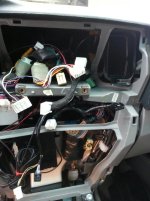
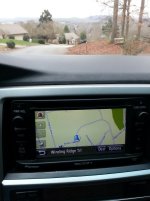
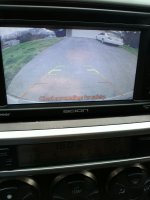
Just finished installing the T10015 head unit with the Entune NAV. I also connected the USB ports and rear camera.
First off, installation was straight forward with all the help from this thread. I purchased the head unit and NAV off ebay. Got the cables from assorted vendors and the camera from backupcameraco.com. I wanted a plug and play Toyota camera which is 6v, instead of a 12v camera that would require another relay.
Everything is working except the USB. It doesn't seem to recognize when anything is plugged into it.
Also, the NAV is off about a 1/4 mile which makes it useless. It can't figure out which end is up either. I can make a 90 degree turn and the map will turn 180. Very strange. I originally mounted the GPS antenna under the dash, then moved it to the windshield which didn't change anything.
Just finished installing the T10015 head unit with the Entune NAV. I also connected the USB ports and rear camera.
First off, installation was straight forward with all the help from this thread. I purchased the head unit and NAV off ebay. Got the cables from assorted vendors and the camera from backupcameraco.com. I wanted a plug and play Toyota camera which is 6v, instead of a 12v camera that would require another relay.
Everything is working except the USB. It doesn't seem to recognize when anything is plugged into it.
Also, the NAV is off about a 1/4 mile which makes it useless. It can't figure out which end is up either. I can make a 90 degree turn and the map will turn 180. Very strange. I originally mounted the GPS antenna under the dash, then moved it to the windshield which didn't change anything.
Will that fix the accuracy of the NAV too? If so, that will be sweet!
I bought my USB off ebay too, the cheap one. It's called Axxess AX-TOYUSB.
I puchased this camera:
Toyota Display Audio/Entune Backup Camera Kit - Camry, Corolla, Prius, | Backup Camera System Truck Backup Cameras LCD Mirror LCD Monitor Gentex
It has grids but they can be turned off by connecting two little green wires together on the camera harness. The image can also be flipped 180 degrees meaning you can mount the camera two ways. I mounted mine in the factory location for the 4runners.
I just did this too. Camera isn't run yet, but whatever.
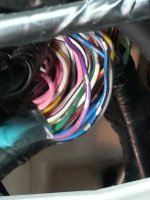
Anyways, you need to connect the vss wire to the harness. It's a pink wire on the split harness adapter from scion, and a purple with a red stripe that's in the bundle behind the hvac controls. That'll stop that stupid delay. My antenna is under the dash too, works fine.
Not sure what to tell you about the USB, mine works fine. I bought a USB cable from eBay for cheap.
Just finished installing the T10015 head unit with the Entune NAV. I also connected the USB ports and rear camera.
First off, installation was straight forward with all the help from this thread. I purchased the head unit and NAV off ebay. Got the cables from assorted vendors and the camera from backupcameraco.com. I wanted a plug and play Toyota camera which is 6v, instead of a 12v camera that would require another relay.
Everything is working except the USB. It doesn't seem to recognize when anything is plugged into it.
Also, the NAV is off about a 1/4 mile which makes it useless. It can't figure out which end is up either. I can make a 90 degree turn and the map will turn 180. Very strange. I originally mounted the GPS antenna under the dash, then moved it to the windshield which didn't change anything.
Yes, just keep watching ebay and amazon. I paid 220.00 for mine including the shipping and it was new with the plastic still on it.
Yes, just keep watching ebay and amazon. I paid 220.00 for mine including the shipping and it was new with the plastic still on it.