Scion FRS Radio

I didn't get any pictures, but the dimensions are different. The good news is you should have a knock-out inside the console that will fit the correct AUX socket. And there's probably a plug taped to the harness waiting for the socket.

No knock-out inside my console. I looked up part numbers on Partznet, and there are different P/N's for consoles w/ power and consoles w/o power. But I think you're right about it being included in the wiring harness. I found a plug that looks like it fits to this:


I only want the AUX to play something quick - it's easier to jump in and out than queuing up a full iPod. Here's the harness I bought. It's from Thailand and may not be quite what I need after seeing your posts this and last week. But I think I can make it work after a few changes. I didn't want to spend $125 for this...

If nothing is plugged into the AUX input, it will not show up on the touchscreen as an option, as soon as I plug something into it, the option appears on the selection screen.

With my iphone plugged into the USB port, and a cable plugged into the AUX port, the AUX input is an option on the touchscreen.
Good! Right now, I only see 5 options (AM, FM, CD, BT, & USB) so I was a little concerned. (Maybe AM is Phone, can't remember since I don't have the BT kit yet.)

Nope, no album artwork, and I tried about 20 different bands tonight.
I was messing through the settings on the HU and saw an option to "Display Captured Image" "On/Off". Is that the issue on your end? Here's the owner's manual. Look at page 83 to see what I'm talking about.
 
Good! Right now, I only see 5 options (AM, FM, CD, BT, & USB) so I was a little concerned. (Maybe AM is Phone, can't remember since I don't have the BT kit yet.)


I was messing through the settings on the HU and saw an option to "Display Captured Image" "On/Off". Is that the issue on your end? Here's the owner's manual. Look at page 83 to see what I'm talking about.

You don't have the microphone installed, but you see BT as an option? Can you select it? Going to have to take a photo of as many options as I can get on the screen and see if you see something different, since I have every option working (except CD, since, I rarely ever use those)

I'm pretty sure that option is set to off, I will check it and see if I can see artwork after changing it.
 
Changing the Show Captured Image to ON allows album artwork to show when connected via USB, but not through BT, which would be nice. So that's fixed.

I'm also getting the same Charging/Not Charging cycling going on that [MENTION=100938]acronin2[/MENTION] was/is getting. But if I hold my lightning cable firmly in place, it stops and stays connected. Not sure what that is all about yet. I have an off-brand USB A-male to A-female cable to extend the length of the eBay USB cable I bought. I've now learned that you can get longer SCION->USB cables than the 6"-8" cable I bought, so if this keeps up, I will change it out for a longer cable, and ditch my extension cable.
 
To confirm, I believe I've read everything in this thread and no one has made the JBL amplifier work with any of the Scion units, correct (without bypassing the amp).
 
You are correct, but...

To confirm, I believe I've read everything in this thread and no one has made the JBL amplifier work with any of the Scion units, correct (without bypassing the amp).

As far as I know the answer to your question is 'Correct', however it would be possible to use the Scion Pioneer Bespoke 2014 touchscreen (no RCA outputs) with a Line Output Converter along with one of the JBL Amp interface adapters such as Pac TATO, Metra TYTO-01, Schosche adapter.

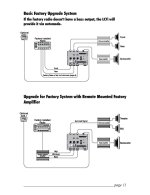
I am getting ready to install the AudioControl LC7i (LOC) along with 2014 Bespoke (top diagram below) but I have eliminated the JBL amp and replaced it with a 5ch aftermarket amp. It appears that you could also use the LC7i with factory amp but based on the bottom diagram below it would require you to still add aftermarket amps. The only reason that the bottom diagram configuration would make sense to me is if you still wanted to keep the 10 speaker JBL setup. By eliminating the JBL amp like I did, you lose the center channel dash speaker and the two rear cargo speakers.

So to answer your question 'No one on here (that I know of) has used the 2014 Bespoke while keeping JBL amp'. It should be possible but it's just a question of how much time/money you want to put into it. The 2013 Bespoke (the one I am using now) does have RCA outputs and will work with the JBL amp along with one of the JBL Amp interface adapters (TYTO-01 etc). This was the set up I was using for a little while before getting rid of the JBL amp.

Hope this helps, sorry for such a long answer.
 

Attachments

  • LC7i Manual_Page_11.jpg
    LC7i Manual_Page_11.jpg
    110.6 KB · Views: 3,580
You don't have the microphone installed, but you see BT as an option? Can you select it? Going to have to take a photo of as many options as I can get on the screen and see if you see something different, since I have every option working (except CD, since, I rarely ever use those)

I'm pretty sure that option is set to off, I will check it and see if I can see artwork after changing it.

I don't have a BT mic installed either, but th Bluetooth Audio is selectable and works. Just the phone part won't work without the mic, but it is also selectable and you still get notifications of calls.
 
That's good to know! As I understood it, the bluetooth wasn't enabled without it.

Either way, I wanted both phone and music :)
 
crazy question and I haven't read all 14 pages of the thread but if I bought the radio( minus the radio) how much would it cost me all in to have navigation Bluetooth and everything maybe even a backup cam?
 
crazy question and I haven't read all 14 pages of the thread but if I bought the radio( minus the radio) how much would it cost me all in to have navigation Bluetooth and everything maybe even a backup cam?

Bluetooth works with the radio, but for phone/voice, you'll need that mic cable. ($70~)

From what I can find, it's about $500 for the Nav/Entune add-on system.
 
Going to have to take a photo of as many options as I can get on the screen and see if you see something different, since I have every option working (except CD, since, I rarely ever use those)
[MENTION=67786]4RunAmok[/MENTION]
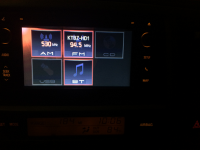
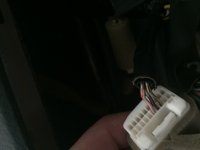
I've attached pictures of my source screen and 20-Pin connector. Would you mind replying with your source options displayed? The cable I ordered from Thailand would have required too much work to make it work so I'm going to get the same type of cord you have.

As for the AUX, I found out the Scion AUX pins on the stereo are in the 28-pin connector. So for my 4Runner's factory 20-pin connector, only three wires are on it for the steering wheel controls (radio and phone).

Bonus: what wires are coming out of the back of your 20-Pin connector?
 

Attachments

  • Stereo.png
    Stereo.png
    132.7 KB · Views: 2,382
  • IMG_2575.JPG
    IMG_2575.JPG
    23.7 KB · Views: 2,263
[MENTION=14422]K_Labs[/MENTION] - I remember reading this a few pages back. I don't have a camera so I can't help you any further.

Beatsonic makes a back up camera harness for this unit that is plug an play. As for the camera I dunno what cameras are used on the FRS from the factyor but I think most back up cameras would work. This is on my to do list so keep me update if you do add one.
 
[MENTION=67786]4RunAmok[/MENTION]
I've attached pictures of my source screen and 20-Pin connector. Would you mind replying with your source options displayed? The cable I ordered from Thailand would have required too much work to make it work so I'm going to get the same type of cord you have.

As for the AUX, I found out the Scion AUX pins on the stereo are in the 28-pin connector. So for my 4Runner's factory 20-pin connector, only three wires are on it for the steering wheel controls (radio and phone).

Bonus: what wires are coming out of the back of your 20-Pin connector?

Oh this would require me taking apart my dash to look! LOL! Which probably won't happen until/if I add the backup camera wiring.

You were saying your console does not have the aux plug, so it very well may not be in your wiring. I don't recall any of the larger plugs having that few wires going into them, so there could be a big difference between our harnesses.

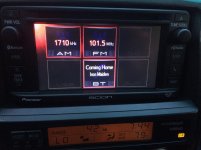
Here is the screen I show...
Photo Jul 01, 7 44 20 PM.jpg
 

Attachments

  • Photo Jul 01, 7 44 20 PM.jpg
    Photo Jul 01, 7 44 20 PM.jpg
    66.5 KB · Views: 2,395
Last edited:
9691c985e165498f3d5ff6052ba49999.jpg


This is what I show and I have the aux port in my center console.

I would love to have a back up camera. Someone please do this install and let us know how it goes.
 
Okay, maybe I lost track of what was incompatible with the JBL units along the 15 pages of thread or maybe it's just too late too keep track of it all...

But what exactly prevents the Scion T10015 (PN: PT546-00140) head unit from integrating with the JBL system?

I know 2nd gen for sure. I purchased an Entune nav unit out of a 2014 Tacoma and it would not fit the dash in my 4runner. Wiring is the same, but its too big for the opening, you would have to trim a decent amount of the dash to make it fit.

Buckles you didn't by any chance happen to snap pictures of the Tacoma head unit mocked-up or next to the old head unit did you? I was wondering how much bigger the Tacoma unit was...
 
Last edited:
Okay, maybe I lost track of what was incompatible with the JBL units along the 15 pages of thread or maybe it's just too late too keep track of it all...

But what exactly prevents the Scion T10015 (PN: PT546-00140) head unit from integrating with the JBL system?


Buckles you didn't by any chance happen to snap pictures of the Tacoma head unit mocked-up or next to the old head unit did you? I was wondering how much bigger the Tacoma unit was...

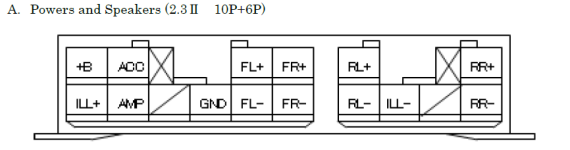
As far as I know, the issue is because the JBL equipped 4runners use a single 20 pin (male) harness from the vehicle side (as pictured below) to provide power, ground and speaker signals to the JBL amp and the Scion PT546-00140 requires the 10P+6P. I am assuming that non-JBL 4runners are equipped with this 10P+6P harness from the vehicle side. It is my understanding that the non-JBL headunit (similar to the PT546-00140) that comes stock in some 4runners have an internal amp that feeds the speaker signals directly from the head unit to the corresponding speaker.
 

Attachments

  • IMG_1207.jpg
    IMG_1207.jpg
    128.8 KB · Views: 4,438
  • 10p+6p.png
    10p+6p.png
    20.9 KB · Views: 2,323
Last edited:
Okay, maybe I lost track of what was incompatible with the JBL units along the 15 pages of thread or maybe it's just too late too keep track of it all...

But what exactly prevents the Scion T10015 (PN: PT546-00140) head unit from integrating with the JBL system?


Buckles you didn't by any chance happen to snap pictures of the Tacoma head unit mocked-up or next to the old head unit did you? I was wondering how much bigger the Tacoma unit was...

I'll have to dig through my photobucket and see if I have a pic. It was about .25" big all around. It would have fit with some trimming of the dash opening.
 
But what exactly prevents the Scion T10015 (PN: PT546-00140) head unit from integrating with the JBL system?

the speaker outputs of the scion will not correctly cross over to the JBL amp from my understanding. There is a digitial signal that is send from the JBL HU to the amp and from my research there is no way (that anyone has posted at least) to get this to work.

one way i was thinking of going about it was to run the scion, hooked up to one of those TATO deals and then to the JBL amp. one would have to convert the speaker outputs of the scion to the RCAs of the TATO unit though.

im sure some smart electrical guy could figure it out for us, but no one had done this yet!

if it is possible to run the scion unit while maintaining the OEM JBL amp, I am all about it, as this is what i wanted to do in the first place before i picked up my e7009.
 
one way i was thinking of going about it was to run the scion, hooked up to one of those TATO deals and then to the JBL amp. one would have to convert the speaker outputs of the scion to the RCAs of the TATO unit though.

i

This is where the line output converter could work in theory..

Scion headunit speaker siginals> LOC > Pac TATO > JBL Amp
 

Members online

No members online now.

Forum statistics

Threads
278,316
Messages
3,554,120
Members
248,016
Latest member
Advally Service

Trending content

Back
Top